 Sabrent Thunderbolt 4 KVM SB-TB4KBest overall
- Thunderbolt
- Thunderbolt 4, 40Gbps
- Display
- Up to 8K@60Hz or 4K@144Hz
- Laptop charging
- USB-C PD up to 60W
- USB-A ports
- 4 x 10Gbps
Most recommended by reviewers
Check price at Amazon
 Sabrent Thunderbolt 4 KVM SB-TB4KBest overallRunner-up2
 Cable Matters 40Gbps USB C KVMBest budget
We earn a commission when you buy through our links, at no extra cost to you. How this works.
If you run a Thunderbolt laptop or Mac and want one keyboard and mouse across two computers, check first that the switch actually carries Thunderbolt 4 and can drive your monitor at the resolution and refresh rate you want. Those two points separate a switch that works from one that disappoints.
The Sabrent SB-TB4K is our top pick because it is the one switch an expert reviewer found working flawlessly with Thunderbolt laptops. The Cable Matters and ANGEET models are cheaper or more monitor-flexible, with their own trade-offs.
1 Sabrent Thunderbolt 4 KVM SB-TB4K | 2 Cable Matters 40Gbps USB C KVM | 3 ANGEET Thunderbolt 4 KVM Switch | |
|---|---|---|---|
| Best for | Best overall | Best budget | Best for three monitors |
| Display | Up to 8K@60Hz or 4K@144Hz | Up to 8K@60Hz or 4K@240Hz | Not listed |
| Charging | Not listed | Up to 140W pass-through to active laptop | 50W PD per laptop |
| Check price at Amazon | Check price at Amazon | Check price at Amazon |
Sabrent Thunderbolt 4 KVM SB-TB4KBest overallMost recommended by reviewers
Check price at Amazon Cable Matters 40Gbps USB C KVMBest budget
 ANGEET Thunderbolt 4 KVM SwitchBest for three monitors


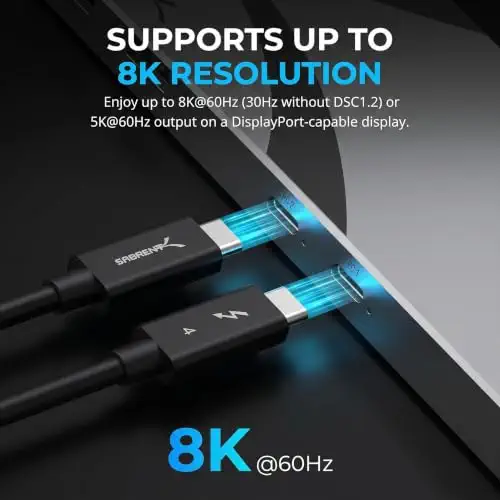

A Thunderbolt 4 KVM with 40Gbps ports and 4K@144Hz or 8K@60Hz display output for two computers.
Most recommended by reviewers
Check price at AmazonPrices and availability on Amazon change often.
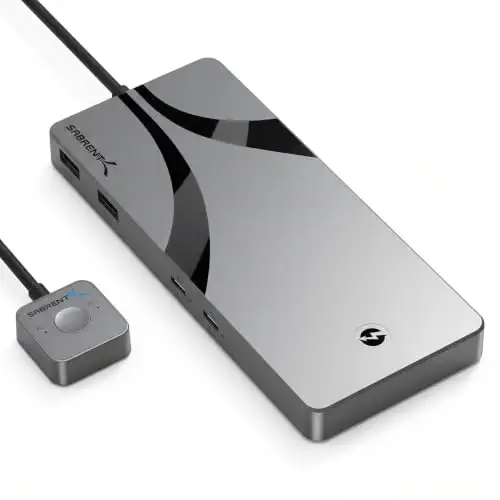
The Sabrent Thunderbolt 4 KVM Switch SB-TB4K is our top pick for anyone who wants a dependable Thunderbolt switch that handles high-resolution displays between two computers.
Reviewers found that switching between Thunderbolt laptops worked flawlessly, which is the core job here. The switch supports up to 8K at 60Hz or 4K at 144Hz, and its aluminum body is built to dissipate heat and feel solid on the desk. Clear LED indicators show source and power status at a glance. It is also the only Thunderbolt 4 certified KVM solution one expert review identified on the market.
Only one laptop charges at a time, and the charging limit is 60W, which reviewers flagged as a real limitation. Several features common at this price are also absent, including audio, an SD card reader, Ethernet and 100W laptop charging.
If it's not for you, the Cable Matters 40Gbps switch suits buyers on a budget who need 140W pass-through charging, while the ANGEET model suits anyone running three monitors across two laptops.
A reviewer found this to be the only broadly available Thunderbolt 4 certified KVM, and reported that switching between Thunderbolt laptops worked flawlessly. It drives demanding displays and carries your USB devices across both machines.
The catch is power: laptop charging tops out at 60W and only one laptop charges at a time, and the price is high. Check that your mainboard is on the Thunderbolt-certified list before buying.


A lower-cost 40Gbps switch with built-in cables, Thunderbolt dock sharing and an RF remote.
Prices and availability on Amazon change often.
This switch gives you 40Gbps bandwidth and high display output for two laptops at a fraction of the Sabrent's price. The built-in input and output cables keep setup tidy, and the RF remote switches without line of sight.
Read the compatibility notes first: docks with non-detachable host cables will not work, and the built-in cable path already reaches the maximum length.


A DisplayLink docking KVM that switches three monitors and 50W charging between two laptops, including Apple M-series Macs.
Prices and availability on Amazon change often.
If you need three screens rather than two, this is the only pick here built for it. It uses DisplayLink to extend displays on M-series Macs, which conventional KVMs do not do, and it charges both laptops at 50W each.
Plan for the driver install and the stated CPU and RAM recommendation, and note that monitor A and B are HDMI-only.
Confirm your computers and monitors have Thunderbolt 4 or USB-C with display output. Check the resolution and refresh rate the switch supports, and whether your laptop charges at the wattage you need.
Work backward from your computers, monitors and the resolution you need. Check the switch's display limits and charging watts before you buy.
The Sabrent SB-TB4K is our top pick, the only broadly available Thunderbolt 4 certified KVM an expert reviewer found working flawlessly with Thunderbolt laptops.
It lets one keyboard, mouse and monitor control two computers and passes Thunderbolt or USB-C data and video between them.
A KVM switch also moves the display between computers; a USB switch moves only the peripherals.
The Sabrent Thunderbolt 4 KVM Switch SB-TB4K, Cable Matters 40Gbps USB C KVM Switch for 2 Laptops, and ANGEET Thunderbolt 4 KVM Switch 3 Monitors 2 Laptops are the Thunderbolt and USB-C KVM options shown on this page. Check each product's listing to confirm it supports your Mac and Apple Studio Display.
Yes, if the dock has a detachable host cable and the switch supports your monitor setup. The ANGEET Thunderbolt 4 KVM Switch 3 Monitors 2 Laptops is listed on this page for multi-monitor setups with two laptops.
Why trust CheckedBest
This shortlist is built from 3 Amazon listings checked for stock today, weighed against 3 expert reviews and 3 owner discussions. Each pick is judged on Thunderbolt support, display output and what the maker says it can do.
Our expert team tests products when it is needed and researches online and in interviews. Every guide is fact-checked and edited by a real person.
The CheckedBest editorial team · Updated Nov 10, 2026
How we pickEditorial standardsAffiliate disclosureReport a mistake
We earn a commission when you buy through our links, at no extra cost to you. It never decides the winner.
