 HP OfficeJet Pro 8125Best overall
- Print speed
- 20 ppm black, 10 ppm color
- Paper input
- 225-sheet tray
- Display
- 2.7-inch color touchscreen
- Connectivity
- Dual-band Wi-Fi, HP app
Most recommended by reviewers
Check price at Amazon
We earn a commission when you buy through our links, at no extra cost to you. How this works.
If you need a printer for a home office or a small team, the OfficeJet Pro line is one of the most common places to start. The No. 1 pick is the HP OfficeJet Pro 8125, the best all-round choice for most home offices, with fast color printing, a 225-sheet tray and automatic two-sided printing at a reasonable price.
The runner-up, the 9135, is built for busier offices that print more pages, with faster output and two paper trays. The 8135 adds fax for businesses that still use it, and the 9730 is the one to choose if you need to print up to 11 x 17 inches.
1 Pro 8125 | 2 Pro 9135 | 3 Pro 8135 | 4 Pro 9730 | |
|---|---|---|---|---|
| Best for | Best overall | Best for busy offices | Best for faxing at home | Best for wide-format printing |
| Print speed | 20 ppm black, 10 ppm color | 25 ppm black, 20 ppm color | 20 ppm black, 10 ppm color | 22 ppm black, 18 ppm color |
| Paper input | 225-sheet tray | Two 250-sheet trays | 225-sheet tray | Two 250-sheet trays |
| Display | 2.7-inch color touchscreen | 4.3-inch color touchscreen | 2.7-inch color touchscreen | 4.3-inch color touchscreen |
| Connectivity | Dual-band Wi-Fi, HP app | Dual-band Wi-Fi, HP app, fax | Dual-band Wi-Fi, HP app, fax | Not listed |
| Ink plan | 3 months Instant Ink trial included | 3 months Instant Ink trial included | 3 months Instant Ink trial included | 3 months Instant Ink trial included |
| Check price at Amazon | Check price at Amazon | Check price at Amazon | Check price at Amazon |
HP OfficeJet Pro 8125Best overallMost recommended by reviewers
Check price at Amazon HP OfficeJet Pro 9135Best for busy offices
 HP OfficeJet Pro 8135Best for faxing at home
 HP OfficeJet Pro 9730Best for wide-format printing


A well-rounded home office printer with fast color output and automatic two-sided printing.
Most recommended by reviewers
Check price at AmazonPrices and availability on Amazon change often.
The HP OfficeJet Pro 8125 is our pick for most home offices, because it combines fast color printing with a 225-sheet tray and automatic two-sided printing in a compact package.
The 8125 prints up to 20 pages per minute in black and 10 in color, which is quick enough for reports, presentations and flyers at a home desk. Its 225-sheet input tray means fewer trips to refill paper, and automatic two-sided printing helps save paper on longer documents. A 2.7-inch color touchscreen and dual-band Wi-Fi with the HP app make it easy to print, scan and copy from a phone.
The three-month Instant Ink trial is included, but a monthly fee applies after that unless you cancel, so factor the ongoing ink cost into your budget. If you need faxing, the OfficeJet Pro 8135 is the same printer with fax built in. If you run a busier office, the OfficeJet Pro 9135 is the fastest of this group at 25 pages per minute in black and 20 in color, though it costs more and takes up more desk space.
If it's not for you, the HP OfficeJet Pro 8135 suits people who need built-in fax, and the HP OfficeJet Pro 9135 suits busy offices that want the fastest color output and a larger screen.
HP recommends the 8120 and 8130 series for most home offices, and the 8125 fits that same use: print, scan and copy with a large paper tray and a touchscreen that is easy to read. It prints at 20 pages per minute in black and 10 in color, which is quick enough for everyday documents and flyers.
The 225-sheet input tray is a practical advantage, since it means fewer refills than smaller home printers. Two-sided printing comes built in. The trade-off is that the color speed is half the black speed, so heavy color work takes longer.


The faster, higher-volume choice for small offices with two paper trays and single-pass double-sided scanning.
Prices and availability on Amazon change often.
HP positions the 9130 series as the fastest in the OfficeJet Pro family, and the 9135 is its fax-enabled version for offices. At 25 pages per minute in black and 20 in color, it keeps up with a team that prints all day.
Two 250-sheet trays mean it runs for much longer before anyone needs to refill paper. The 4.3-inch screen is easier to use than the smaller displays on the home models. It is a bigger, more expensive machine, so it suits a shared office rather than a single desk.


The 8120 family's fax-enabled version, for home offices that still send or receive faxes.
Prices and availability on Amazon change often.
HP notes that the 8130 adds fax and a side USB port over the 8120, which makes it the better fit for businesses that still send or receive faxed documents. The 8135 is the matching model in this range.
Apart from fax, it shares the 8125's speeds, tray and touchscreen. If you never use fax, the 8125 is the cheaper choice for the same printing.


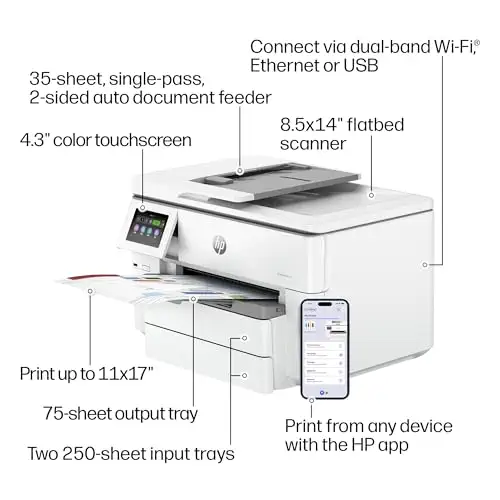
A wide-format model for printing and scanning up to 11 x 17 inches, such as plans and spreadsheets.
Prices and availability on Amazon change often.
HP's own guide says the wide-format models, the 9720 and 9730, are the choice if you need to print and scan up to 11 x 17 inches. That is the main reason to pick this model over the others on this page. The 9730 adds that capability to the same fast color output as the 9720, along with two paper trays and a 4.3-inch screen.
If your work does not involve large sheets, the 9135 gives faster print speeds for less money.
For most home offices, the 8125 is the best choice. Choose the 8135 if you still need fax, the 9135 if you print a lot each day, and the 9730 if you regularly print up to 11 x 17 inches.
If you only print plain black-and-white pages in volume, a monochrome laser printer will cost less per page. The OfficeJet Pro models are inkjets, so they suit mixed color work and photos better than heavy text printing.
For most home offices, the 8125 is the best overall choice, with fast color printing and a 225-sheet tray. For busier offices, the 9135 is faster and has two trays.
Reviewers praise HP's print quality and wireless connectivity, though a few note that photos can look flat. The OfficeJet Pro line is built for steady office use rather than fine photo printing.
HP does not publish a fixed lifespan for these models. Keeping the printer covered by a regular cleaning routine and using genuine cartridges helps it last longer.
Connection problems and paper feed issues are the most reported complaints. The dual-band Wi-Fi on these models helps with the first, and keeping the paper tray loaded correctly helps with the second.
OfficeJet Pro models are built for office workloads with bigger paper trays and faster speeds. DeskJet models are cheaper and suit occasional home printing.
An OfficeJet is an inkjet, which handles color and photos better. A laser printer is faster and cheaper per page for plain text documents.
Why trust CheckedBest
This shortlist is built from four Amazon listings that are in stock now, checked against HP's own model guide and expert reviews. Each pick is weighed on speed, paper capacity, running cost and the features each model adds.
Our expert team tests products when it is needed and researches online and in interviews. Every guide is fact-checked and edited by a real person.
The CheckedBest editorial team · Updated Nov 10, 2026
How we pickEditorial standardsAffiliate disclosureReport a mistake
We earn a commission when you buy through our links, at no extra cost to you. It never decides the winner.
