 Dell B2360dnBest for text-heavy offices
- Print type
- Monochrome laser
- Speed
- Up to 40 ppm mono
- Duplex
- Automatic
- Input tray
- 300 sheets
Most recommended by reviewers
Check price at Amazon
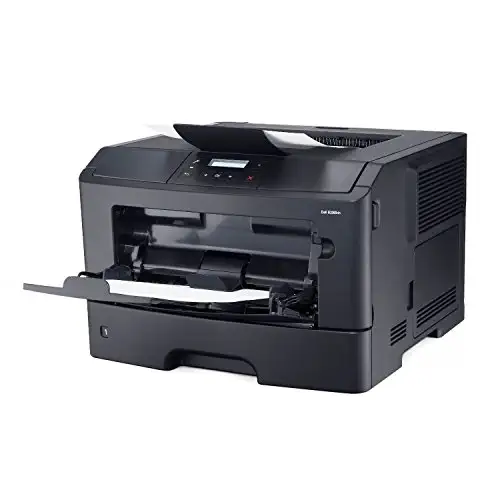 Dell B2360dnBest for text-heavy officesRunner-up2
 Dell E514dwBest all-in-one for home or small office
We earn a commission when you buy through our links, at no extra cost to you. How this works.
Before you buy a Dell printer, check whether you mostly print text or need color and photos, and how many pages a month you print. Laser models usually cost less per page for text. For that everyday job, the Dell B2360dn is our top pick: it prints fast, prints on both sides automatically and handles steady office use.
The other two picks cover different needs: the Dell E514dw if you want wireless scanning and copying in one box, and the Dell E525W if you need color.
1 Dell B2360dn | 2 Dell E514dw | 3 Dell E525W | |
|---|---|---|---|
| Best for | Best for text-heavy offices | Best all-in-one for home or small office | Best for color |
| Print type | Monochrome laser | Monochrome laser, multifunction | Color laser, all-in-one |
| Speed | Up to 40 ppm mono | Up to 27 ppm simplex | Not listed |
| Duplex | Automatic | Automatic | Not listed |
| Connectivity | Gigabit Ethernet | Built-in Wi-Fi | Wireless and cloud ready |
| Check price at Amazon | Check price at Amazon | Check price at Amazon |
Dell B2360dnBest for text-heavy officesMost recommended by reviewers
Check price at Amazon Dell E514dwBest all-in-one for home or small office
 Dell E525WBest for color


A fast, duplex mono laser for printing lots of black-and-white documents.
Most recommended by reviewers
Check price at AmazonPrices and availability on Amazon change often.
For a text-heavy office that prints a lot and wants speed without fuss, the Dell B2360dn Laser Printer (Renewed) is our pick.
Its up to 40 pages per minute in mono is the fastest rated speed among these picks, which makes it well suited to everyday documents. Automatic two-sided printing helps cut paper use, and Gigabit Ethernet lets the whole office share one machine over the network. The listing notes it is professionally inspected and comes with toner and drum cartridges plus a power cable, backed by the Amazon Renewed Guarantee.
It is a refurbished unit with a 90-day warranty, so it carries less coverage than a new printer would. It also prints only in black and white, so it is not the right choice if you need color. If you need copying or scanning, the all-in-one models are a better fit.
If it's not for you, the Dell E514dw suits a home or small office that wants printing, copying and scanning in one wireless box, and the Dell E525W is the choice if color printing matters more than mono speed.
Expert guides agree that laser printers are the right choice when the job is mostly text. This Dell B2360dn prints up to 40 pages a minute in black and white, which keeps a busy desk moving. Automatic duplex printing cuts paper use, and gigabit Ethernet lets a whole team share it.
Because it is a renewed unit, the price is lower than a new equivalent, and it comes with toner and drum cartridges in the box.
Prints, copies and scans in one wireless mono laser.
Prices and availability on Amazon change often.
Reviewers note that a multifunction printer suits anyone who needs scanning and copying without buying several devices. The E514dw covers all of that, with a document feeder for multi-page jobs and Wi-Fi so it can sit anywhere in the home.
Its print speed is lower than the B2360dn's, so it suits lighter, mixed use rather than heavy printing.


A wireless color laser all-in-one for mixed documents and color pages.
Prices and availability on Amazon change often.
If your work needs color pages, this is the only color laser in the Dell lineup on this list. It is wireless and cloud ready, so it fits a shared office setup.
Check the price against your budget first, because it sits well above the mono options.
Choose the B2360dn for mostly black-and-white text. Choose the E514dw if you also need scanning and copying. Choose the E525W if color pages are part of your work.
Yes. Dell sells both new and renewed printers, including the mono lasers and all-in-ones listed here.
They are solid office printers. The mono lasers are the strongest choice for text, and reviewers favour laser models for high-volume work.
Laser is usually better for text and high volume, and costs less per page. Inkjet is better for occasional color and photo printing.
Start with what you print most. Mono laser for text, all-in-one if you scan or copy, color laser if color matters.
Why trust CheckedBest
This shortlist starts from Dell printers that are on Amazon right now and in stock. We weighed what expert reviews say about laser and inkjet printers, ink and toner running costs, and what each model is built for.
Our expert team tests products when it is needed and researches online and in interviews. Every guide is fact-checked and edited by a real person.
The CheckedBest editorial team · Updated Nov 11, 2026
How we pickEditorial standardsAffiliate disclosureReport a mistake
We earn a commission when you buy through our links, at no extra cost to you. It never decides the winner.
