 Epson SureColor F170Best overall
- Format
- 8.5 x 11 in
- Printhead
- PrecisionCore
- Paper tray
- 150 sheets, dust-resistant
- Connectivity
- Wi-Fi, USB; not for mobile direct printing
Most recommended by reviewers
Check price at Amazon
We earn a commission when you buy through our links, at no extra cost to you. How this works.
The Epson SureColor F170 is our top pick: a compact, dedicated dye-sublimation printer that prints in under a minute, uses sublimation ink out of the box and suits beginners and hobbyists making Cricut projects.
If you want a cheaper all-in-one that also scans and copies, or need a larger sublimation specialist, the other two picks below cover those needs.
1 Epson SureColor F170 | 2 Sawgrass SG500 | 3 Brother SP-1 | |
|---|---|---|---|
| Best for | Best overall | Best for bigger, business use | Best starter bundle |
| Format | 8.5 x 11 in | Up to 8.5 x 14 in, bypass tray up to 8.5 x 51 in | Not listed |
| Paper tray | 150 sheets, dust-resistant | Not listed | 160 sheets transfer paper + 10 extra |
| Connectivity | Wi-Fi, USB; not for mobile direct printing | Wi-Fi | Wi-Fi, Ethernet |
| Ink | Genuine Epson sublimation ink included | SubliJet UHD, 4 x 31 mL included | 4 x 47 mL CMYK included |
| Check price at Amazon | Check price at Amazon | Check price at Amazon |
Epson SureColor F170Best overallMost recommended by reviewers
Check price at Amazon Sawgrass SG500Best for bigger, business use
 Brother SP-1Best starter bundle

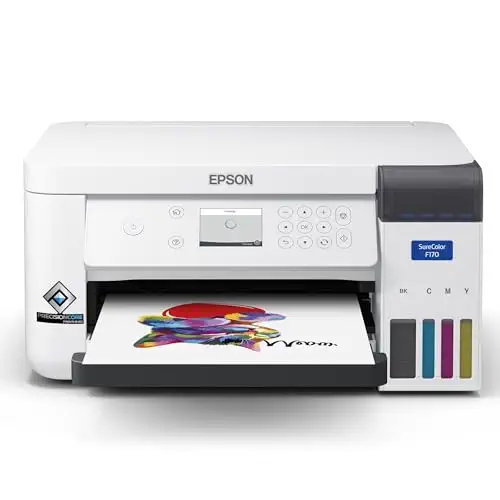


A compact dedicated sublimation printer that is easy to start with and is the most recommended option in this list.
Most recommended by reviewers
Check price at AmazonPrices and availability on Amazon change often.
The Epson SureColor F170 is our pick for most Cricut crafters, since it is a dedicated sublimation printer with genuine Epson sublimation ink already in the box.
Reviewers describe the F170 as a printer made specifically for sublimation, and that focus shows in its PrecisionCore printhead, which reviewers note can reach up to 1200 x 600 dpi. Prints are often finished in under a minute, and the 150-sheet tray is dust resistant, so paper stays cleaner between jobs. Its compact footprint, about 14.8 inches wide, fits comfortably on a desk, and it connects over Wi-Fi or USB on Windows and Mac. Reviewers call it a good fit for beginners and budget-conscious crafters.
Using sublimation ink in this printer can void the Epson warranty, and setup can be fiddly for newcomers. Reviewers also point out that the four-color ink system limits overall vibrancy compared with some rivals. It does not support mobile direct printing, so you will need a computer nearby.
If it's not for you, the Sawgrass SG500 suits larger, business-focused runs with a 3-year warranty and easier setup, while the Brother SP-1 Starter Bundle suits anyone who wants paper, blanks and ink included from day one.
Reviewers consistently name the SureColor F170 as the entry point to dye-sublimation. It is made for sublimation rather than adapted for it, so it needs less tinkering than a converted inkjet, and the 150-sheet dust-resistant tray keeps paper clean.
The catch is that the warranty can be voided once sublimation ink is in use, and beginners may find the first setup slow. Once running, it is a dependable small-format machine for mugs, tees and coasters.


A purpose-built sublimation printer with included ink and a warranty, a strong pick for beginners who want a plug-in-and-print setup.
Prices and availability on Amazon change often.
The Sawgrass SG500 is designed only for sublimation, which reviewers say makes it the easiest to set up of the group. Its 3-year warranty and included ink are real advantages for a first machine.
The higher price and the 8.5 x 14 in size limit make it less suited to people who want large prints, but for mugs, tees and Cricut transfers it works well.


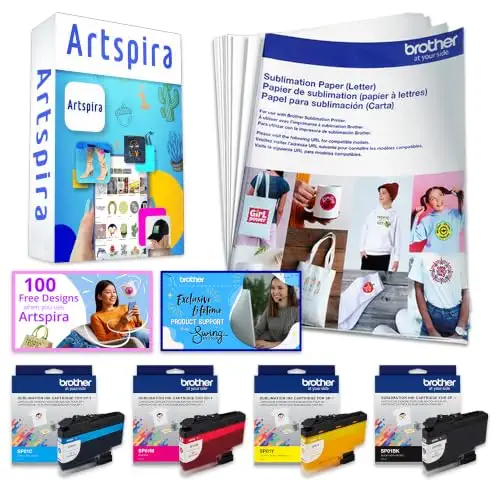
A ready-to-go starter kit with ink, sheets, blanks and software, for people who want everything in one box.
Prices and availability on Amazon change often.
The Brother SP-1 bundle is the most complete kit on this list. Reviewers highlight the ink, transfer sheets and Artspira app as a convenient package for a first sublimation project.
Resolution reports vary between the sources, so check the stated dpi against your own designs. For buyers who want to skip buying supplies separately, the bundle is a sensible choice.
Beginners on a budget: the Epson SureColor F170 is the usual starting point. Buyers who want supplies in one box: the Brother SP-1 bundle. People who want a purpose-built machine with a warranty: the Sawgrass SG500.
The Epson SureColor F170, Sawgrass SG500 and Brother SP-1 bundle are the three picks here. The F170 is the most recommended, the SG500 is purpose-built with a warranty, and the Brother bundle includes supplies.
No. A Cricut can cut sublimation designs, but it cannot print them. You need a separate sublimation printer and sublimation paper, which is why printers are listed here.
A sublimation printer uses special ink that turns to gas under heat and pressure, moving the design from paper onto fabric or coated items like mugs.
The Epson SureColor F170 is the usual first choice because it is made for sublimation, prints quickly and comes with ink, though setup takes some patience.
Why trust CheckedBest
We built this list from the sublimation printers that are in stock on Amazon right now, weighed against what expert reviewers and owners say about print quality, running costs and setup. Every pick is checked for live availability before it is shown.
Our expert team tests products when it is needed and researches online and in interviews. Every guide is fact-checked and edited by a real person.
The CheckedBest editorial team · Updated Nov 10, 2026
How we pickEditorial standardsAffiliate disclosureReport a mistake
We earn a commission when you buy through our links, at no extra cost to you. It never decides the winner.
