 Lenovo Legion Tower 5i Gaming PCBest overall
- Processor
- Intel Core Ultra 7 265F
- Graphics
- NVIDIA GeForce RTX 5060 Ti
- Memory
- 16 GB DDR5, expandable to 128 GB
- Storage
- 1 TB SSD
Most recommended by reviewers
Check price at Amazon
 Lenovo Legion Tower 5i Gaming PCBest overallRunner-up2
 Lenovo ThinkStation P620 WorkstationBest workstation

Reviewed by
Fact checker and editor
An experienced e-commerce editor and fact-checker specialising in product information, pricing, specifications and online retail content.
We earn a commission when you buy through our links, at no extra cost to you. How this works.
Lenovo makes desktops for almost every need, from a simple all-in-one for the family kitchen to a powerful tower for gaming or heavy workloads. Choosing well mostly comes down to what you will do with it and how much you want to spend.
The Lenovo Legion Tower 5i is the best overall choice for most buyers, offering the strongest balance of performance and price, and it earned the most support from reviewers. Business, all-in-one, workstation and budget users will find options built for their needs below.
1 Legion Tower 5i Gaming PC | 2 ThinkStation P620 Workstation | 3 IdeaCentre 27 All-in-One | 4 IdeaCentre 24 All-in-One Desktop | 5 IdeaCentre Business Tower Desktop | |
|---|---|---|---|---|---|
| Best for | Best overall | Best workstation | Best all-in-one for power | Best budget all-in-one | Best for business |
| Processor | Intel Core Ultra 7 265F | AMD Ryzen Threadripper PRO 3945WX (12 core) | Intel Core i7-13620H, 10 cores | Intel N100, 4 cores, up to 3.4 GHz | Intel Core i3-13100, 4 cores, 4.4 GHz turbo |
| Memory | 16 GB DDR5, expandable to 128 GB | 32 GB DDR4 | 16 GB DDR5 | 16 GB DDR5 | 16 GB DDR5 |
| Storage | 1 TB SSD | 1 TB SSD | 512 GB SSD | 512 GB PCIe SSD | 256 GB SSD and 500 GB HDD |
| Connectivity | Not listed | Not listed | Wi-Fi 6, USB-C, HDMI in and out | Wi-Fi 6, Bluetooth 5.2, Gigabit Ethernet | Wi-Fi 6E, Bluetooth 5.2, HDMI 2.1, RJ-45 |
| Check price at Amazon | Check price at Amazon | Check price at Amazon | Check price at Amazon | Check price at Amazon |
Lenovo Legion Tower 5i Gaming PCBest overallMost recommended by reviewers
Check price at Amazon Lenovo ThinkStation P620 WorkstationBest workstation
 Lenovo IdeaCentre 27 All-in-OneBest all-in-one for power
 Lenovo IdeaCentre 24 All-in-One DesktopBest budget all-in-one
 Lenovo IdeaCentre Business Tower DesktopBest for business


A capable gaming tower with an RTX 5060 Ti and a transparent side panel for easy upgrades.
Most recommended by reviewers
Check price at AmazonPrices and availability on Amazon change often.
One catchOnly 16 GB of memory comes standard, so budget for an upgrade if you multitask heavily.
One expert review named the Legion Tower 5i the best budget gaming PC in its roundup, and for good reason. The RTX 5060 Ti gives it the graphics muscle to run current AAA games smoothly, while the Core Ultra 7 processor handles streaming and everyday multitasking without strain. It is the strongest all-round balance of performance and price in this list.
The tool-less side panel and expandable memory mean you can grow the machine as your needs change, which matters more than most specs over a few years.


A professional workstation with a 12-core Threadripper PRO for demanding work.
Prices and availability on Amazon change often.
One expert review described the ThinkStation P620 as a powerful workstation that can handle the most demanding tasks. Its Threadripper PRO processor and 32 GB of memory suit 3D work, video editing and large data sets, and it is built to run for long sessions.
It is a serious tool rather than a gaming machine, so choose it only if your work truly needs a workstation.


A 27-inch all-in-one with a 10-core Core i7 and 512 GB SSD for home and office.
Prices and availability on Amazon change often.
If you want a large screen and a capable processor in one unit, the IdeaCentre 27 delivers. The 10-core Core i7 handles office work, streaming and browsing comfortably, and the 100Hz panel is smoother than most budget all-in-ones.
Its Full HD resolution is the main compromise on a 27-inch display, so it suits general use better than detailed photo or video work.


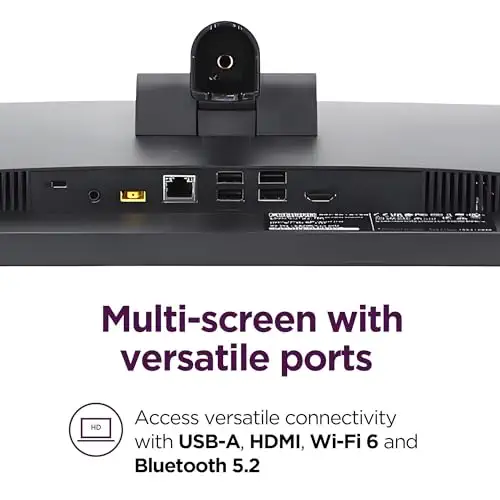
A slim, low-cost all-in-one for everyday home and office tasks.
Prices and availability on Amazon change often.
For browsing, email, documents and video calls, this all-in-one does the job without asking you to spend much. The 16 GB of memory is generous for the price, and the anti-glare IPS panel is pleasant to look at all day.
Choose it for light everyday use; if you run many programs at once, the 10-core model above is the better fit.


A compact business tower with Wi-Fi 6E and a mix of SSD and HDD storage.
Prices and availability on Amazon change often.
A tower with Windows 11 Pro, Wi-Fi 6E and plenty of ports suits an office where the machine will sit under a desk and be used all day. The 16 GB of memory and the combined SSD and HDD storage cover documents, spreadsheets and video meetings well.
It is a dependable workhorse rather than a fast machine, which is exactly what most office work needs.
Gamers who want strong graphics should look at the Legion Tower. Office workers and families will do well with an all-in-one. Anyone running heavy rendering or engineering software should consider the workstation.
Check the processor, memory and storage before you buy, since base configurations can be weaker. Reviewers also recommend looking for multi-year warranties and desktops that allow future upgrades.
Lenovo desktops are widely recommended for everyday and business use, with reviewers pointing to solid build quality and good support options. Check the configuration and warranty before you buy.
The IdeaCentre Business Tower suits office use, with Windows 11 Pro, Wi-Fi 6E and plenty of ports.
For most home buyers the IdeaCentre 24 all-in-one covers everyday tasks at a low price, while the IdeaCentre 27 suits those who want a larger screen.
The IdeaCentre 27 with a 10-core Core i7 gives the most power in an all-in-one, while the 24-inch model is the budget choice.
Both Lenovo and HP offer capable desktops at similar prices, so compare the specific configuration rather than the brand alone. Dell is also competitive, so check price and warranty for the model you want.
With regular care, a well-configured Lenovo desktop can last several years. Upgradable memory and storage help extend its useful life.
Meet the reviewer
Fact checker and editor
An experienced e-commerce editor and fact-checker specialising in product information, pricing, specifications and online retail content. Focused on ensuring accuracy, credibility and consumer confidence through clear, reliable and informative content.
Why trust CheckedBest
We compared five Lenovo desktops that are in stock on Amazon right now, weighing the configurations, processors, memory and storage against what editorial reviewers and buyers said about each model. Picks are grouped by the job they are best suited to, from home and office machines to gaming and workstation builds.
Our expert team tests products when it is needed and researches online and in interviews. Every guide is fact-checked and edited by a real person.
The CheckedBest editorial team · Updated Nov 8, 2026
How we pickEditorial standardsAffiliate disclosureReport a mistake
We earn a commission when you buy through our links, at no extra cost to you. It never decides the winner.
