 HP OfficeJet Pro 8125 Wireless All-in-OneBest for home office printing
- Print speed
- Up to 20 ppm black, 10 ppm color
- Input tray
- 225 sheets
- Display
- 2.7-inch color touchscreen
- Wireless
- Dual-band Wi-Fi
Most recommended by reviewers
Check price at Amazon
 HP OfficeJet Pro 8125 Wireless All-in-OneBest for home office printingRunner-up2
 HP Envy Photo 7975 Wireless Color Inkjet PhotoBest for photos and family printing

Reviewed by
Fact checker and editor
An experienced e-commerce editor and fact-checker specialising in product information, pricing, specifications and online retail content.
We earn a commission when you buy through our links, at no extra cost to you. How this works.
If you need one machine to print homework, scan paperwork and copy documents, an all-in-one saves space and money. The best HP for you depends on how much you print, whether you want photos, and whether ink costs matter to you.
Start with the HP OfficeJet Pro 8125, a wireless color inkjet with a 2.7-inch touchscreen, auto duplex printing and a 225-sheet tray that suits most home offices. It is the strongest all-round choice in this guide. Budget and photo-focused models are covered below for buyers with different needs.
1 OfficeJet Pro 8125 Wireless All-in-One | 2 Envy Photo 7975 Wireless Color Inkjet Photo | 3 DeskJet 2955 Color Inkjet All-in-One | |
|---|---|---|---|
| Best for | Best for home office printing | Best for photos and family printing | Best budget pick |
| Print speed | Up to 20 ppm black, 10 ppm color | Up to 10 ppm color, 15 ppm black | Up to 7.5 ppm black, 5.5 ppm color |
| Input tray | 225 sheets | Not listed | 60 sheets |
| Display | 2.7-inch color touchscreen | Large color touchscreen | ICON LCD |
| Wireless | Dual-band Wi-Fi | Not listed | Dual-band Wi-Fi with auto reconnect |
| Ink | 3 months Instant Ink trial included | 3 months Instant Ink included | Not listed |
| Check price at Amazon | Check price at Amazon | Check price at Amazon |
HP OfficeJet Pro 8125 Wireless All-in-OneBest for home office printingMost recommended by reviewers
Check price at Amazon HP Envy Photo 7975 Wireless Color Inkjet PhotoBest for photos and family printing
 HP DeskJet 2955 Color Inkjet All-in-OneBest budget pick


A wireless color inkjet for home office documents, with duplex printing and a 225-sheet tray.
Most recommended by reviewers
Check price at AmazonPrices and availability on Amazon change often.
One catchInstant Ink fees apply after the 3-month trial unless cancelled.
The OfficeJet Pro 8125 is built for the home office. Its 20 ppm black and 10 ppm color speeds mean reports and presentations come off the tray quickly, and the 225-sheet input is large enough to go a week between refills for most households.
Auto duplex printing and the auto document feeder save paper and time when you scan or copy stacks of pages. The 2.7-inch touchscreen makes everyday navigation easy.
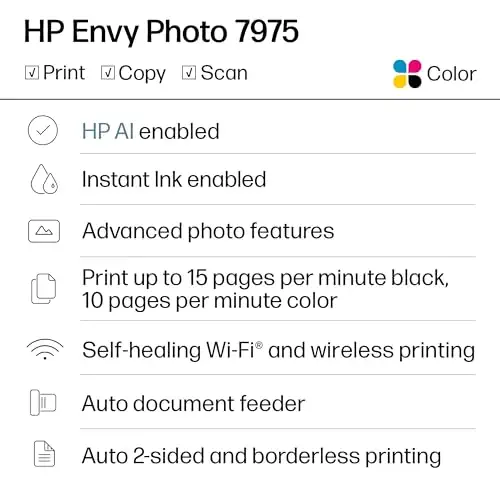


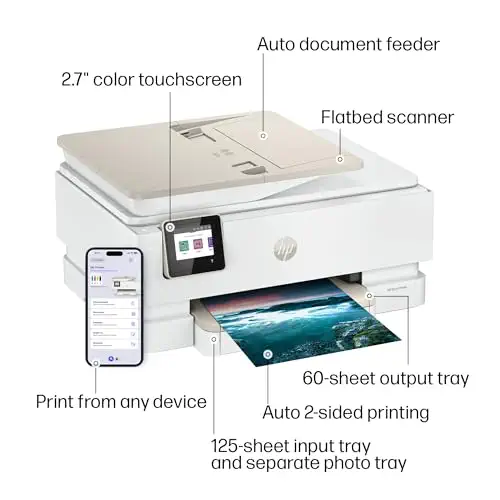
A home all-in-one with borderless photo printing, duplex and a separate photo tray.
Prices and availability on Amazon change often.
If your household prints school photos, crafts or family pictures, the Envy Photo 7975 is the most photo-capable pick. HP's home printer listing highlights AI-formatted prints and customizable photo backs.
It still handles everyday documents, scanning and copying, so it does not force a choice between photos and paperwork.


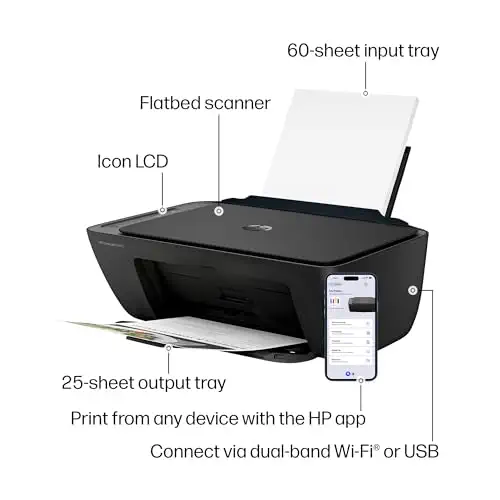
An affordable wireless color all-in-one for simple home printing.
Prices and availability on Amazon change often.
The DeskJet 2955 is the value choice for light home use. Its Wi-Fi reconnects automatically when the connection drops, and it covers copying and scanning without a large footprint.
Expect slower speeds and a smaller tray than the premium models, so it suits households that print occasionally rather than heavily.
Choose the Pro 8125 for home office printing with a large tray and touchscreen. Choose the Envy Photo 7975 if photos matter. Choose the DeskJet 2955 if you print lightly and want the lowest price.
The HP OfficeJet Pro 8125 is our top pick for most home offices, with 20 ppm black speed, duplex printing and a 225-sheet tray.
The OfficeJet Pro 8125 fits home office work best, with a large tray, auto duplex and an auto document feeder.
Inkjet models such as the OfficeJet Pro 8125 and DeskJet 2955 are the usual home choices, depending on your budget and volume.
Laser models suit high text volume, but photos look weaker. For mixed home use, an inkjet like the Envy Photo 7975 is usually the better fit.
The Smart Tank Plus 651 has the lowest running cost, with up to 2 years of ink included and refillable tanks.
All of our picks have dual-band Wi-Fi. The OfficeJet Pro 8125 offers the strongest wireless and touchscreen experience for the price.
Meet the reviewer
Fact checker and editor
An experienced e-commerce editor and fact-checker specialising in product information, pricing, specifications and online retail content. Focused on ensuring accuracy, credibility and consumer confidence through clear, reliable and informative content.
Why trust CheckedBest
We built this shortlist from three in-stock HP all-in-one listings on Amazon, checked against the specs and advice in expert reviews and owner discussions. Each pick is weighed for home use, from everyday documents to photos.
Our expert team tests products when it is needed and researches online and in interviews. Every guide is fact-checked and edited by a real person.
The CheckedBest editorial team · Updated Nov 8, 2026
How we pickEditorial standardsAffiliate disclosureReport a mistake
We earn a commission when you buy through our links, at no extra cost to you. It never decides the winner.
