 Apple MacBook NeoBest overall
- Processor
- Apple A18 Pro
- Memory
- 8GB unified
- Storage
- 256GB SSD
- Display
- 13-inch Liquid Retina
Most recommended by reviewers
Check price at Amazon

Reviewed by
Fact-checker and content editor
Experienced researcher and AI content editor, having worked on various merchant websites.
We earn a commission when you buy through our links, at no extra cost to you. How this works.
Picking a computer comes down to what you'll actually do on it: browsing and schoolwork, a family PC, or gaming. The right machine is one with enough memory and storage for that job, at a price that makes sense.
Our top pick is the Apple MacBook Neo, which combines a strong everyday chip with a bright, portable screen at a price that's hard to beat. The other picks cover a Windows laptop with a lot of power, a budget Chromebook, a family desktop and an all-in-one for the home office.
1 Apple MacBook Neo | 2 Acer Aspire 16 AI | 3 Lenovo Flagship Chromebook | 4 Dell XPS 8940 | 5 HP OmniStudio 27 | |
|---|---|---|---|---|---|
| Best for | Best overall | Best Windows laptop | Best budget | Best family desktop | Best home office all-in-one |
| Processor | Apple A18 Pro | Snapdragon X X1-26-100 | MediaTek Kompanio 520 | Intel Core i7-11700 | AMD Ryzen AI 7 445 |
| Memory | 8GB unified | 16GB LPDDR5X | 4GB RAM | 16GB DDR4 | 16GB DDR5 |
| Storage | 256GB SSD | 512GB SSD | 64GB eMMC | 256GB SSD + 4TB HDD | 512GB SSD |
| Display | 13-inch Liquid Retina | 16-inch OLED | 14-inch FHD touchscreen | Not listed | 27-inch |
| Check price at Amazon | Check price at Amazon | Check price at Amazon | Check price at Amazon | Check price at Amazon |
Apple MacBook NeoBest overallMost recommended by reviewers
Check price at Amazon Acer Aspire 16 AIBest Windows laptop
 Lenovo Flagship ChromebookBest budget
 Dell XPS 8940Best family desktop
 HP OmniStudio 27Best home office all-in-one


A light, long-lasting laptop for everyday work, school and streaming.
Most recommended by reviewers
Check price at AmazonPrices and availability on Amazon change often.
The Apple MacBook Neo 13-inch is our best overall pick for students and everyday home or work use, offering a bright, sharp display and up to 16 hours of battery life in a durable aluminum body.
At $599, it is the most affordable MacBook Apple has made, and reviewers note that its A18 Pro chip with 8GB of memory and 256GB of storage handles browsing, email, streaming, documents and spreadsheets without trouble. The 13-inch Liquid Retina screen is bright at 500 nits and supports 1 billion colors, and Apple rates battery life at up to 16 hours, so a full school or workday is realistic. The macOS experience is quiet and smooth, which reviewers appreciate.
The screen covers only sRGB, so it is not the right choice for serious photo or color work. Memory is 8GB, which is modest if you plan to run many heavy apps at once. If it's not for you, the Acer Aspire 16 AI suits Windows fans who want a larger 16-inch OLED screen, and the Lenovo Chromebook suits buyers who want the lowest price and mainly use web apps.
If it's not for you, the Acer Aspire 16 AI suits Windows fans who want a larger 16-inch OLED screen, and the Lenovo Chromebook suits buyers who want the lowest price and mainly use web apps.
One expert review calls it the most affordable MacBook ever and says the battery easily lasts all day for normal use. The 13-inch screen is bright and sharp, and the A18 Pro chip with 8GB of memory handles browsing, documents and streaming without strain.
It suits students and anyone who wants a dependable everyday laptop. Serious photo or video editors should look elsewhere.


A 16-inch OLED laptop with strong battery life for work and study.
Prices and availability on Amazon change often.
One expert review rates it the best laptop overall, praising the vibrant OLED panel and an 11-hour-plus battery in testing. At 3.23 pounds it's easy to carry all day.
It fits buyers who want a big, colourful Windows screen for work, study and video calls.


A cheap, simple laptop for web browsing, documents and online classes.
Prices and availability on Amazon change often.
If your computer use is limited to the web, email and documents, this Chromebook does the job for a fraction of the price. The touchscreen and full HD display are better than you'd expect at this level.
Don't buy it if you need one expert review Office or other Windows-only software.


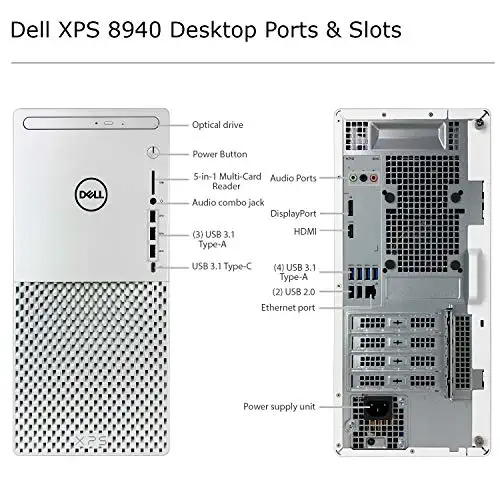

A full-size tower with room to upgrade and enough power for VR.
Prices and availability on Amazon change often.
One expert review picks the XPS Special Edition as its full-size tower pick and says it starts out powerful enough for VR games, with room to upgrade later. Towers offer the best value and upgradeability, though they need more space.
It's a good fit for families or anyone who wants a desktop that can grow.


A large 27-inch all-in-one with a modern AMD chip for home office and light gaming.
Prices and availability on Amazon change often.
One expert review notes that all-in-ones are clutter-free and easy to move, though if the display fails you lose the whole computer. The 27-inch screen and Ryzen AI 7 chip suit a tidy home office.
It's a good choice when desk space matters more than upgrade options.
Browsing and school: the MacBook Neo or a Chromebook. Power and gaming: a Windows laptop or tower. A family PC: a tower or Mac. A tidy home office: an all-in-one.
Check the memory, storage and processor against what you'll do, and read independent reviews of the exact model. Look for battery and display results measured by reviewers, not just spec sheets.
Apple and Acer both come out well in reviews here. Brand matters less than the internal parts that fit your needs.
Reviewers recommend 8GB to 16GB for everyday multitasking, and at least 16GB for photo or video editing.
The Lenovo Chromebook is the cheapest option for web-based work, and the MacBook Neo gives the most everyday performance for the price.
The MacBook Neo is a strong pick for students: long battery life and a bright screen for classes.
Meet the reviewer
Fact-checker and content editor
Experienced researcher and AI content editor, having worked on various merchant websites. Experience in AI transcription, prompt engineering and taxonomy mapping for search engines.
Why trust CheckedBest
We compared five Amazon listings for laptops, desktops and all-in-ones, and checked each one is in stock before it made the page. The shortlist is built from the reviews that name these models, plus reader advice on memory, storage and graphics.
Our expert team tests products when it is needed and researches online and in interviews. Every guide is fact-checked and edited by a real person.
The CheckedBest editorial team · Updated Nov 7, 2026
How we pickEditorial standardsAffiliate disclosureReport a mistake
We earn a commission when you buy through our links, at no extra cost to you. It never decides the winner.
