 ASUS ProArt PA34VCNV 34 inch curved monitorBest overall
- Panel
- IPS, 3800R curve
- Resolution
- 3440 x 1440 (1440p ultrawide)
- Colour
- 100% sRGB, 100% Rec. 709, Delta E under 2
- USB-C power delivery
- 96W
Most recommended by reviewers
Check price at Amazon
 ASUS ProArt PA34VCNV 34 inch curved monitorBest overallRunner-up2
 Dell UltraSharp U3423WE 34 inch curved monitorBest value

Reviewed by
Fact checker and editor
An experienced e-commerce editor and fact-checker specialising in product information, pricing, specifications and online retail content.
We earn a commission when you buy through our links, at no extra cost to you. How this works.
A 34 inch curved monitor lets you spread out several windows side by side without bezels breaking up the view. For most office work the key things are a clean picture, one cable to your laptop, and a stand that adjusts to your height.
The ASUS ProArt PA34VCNV is the best fit for most people at a work desk. It is factory calibrated and has the most useful connections for that setup. Three alternatives sit at a value price, a budget price, and a wider bargain, so you can pick based on what you can spend and what you need.
1 ASUS ProArt PA34VCNV 34 inch curved monitor | 2 Dell UltraSharp U3423WE 34 inch curved monitor | 3 Samsung ViewFinity S50GC 34 inch curved monitor | 4 LG 34WR55QK-B 34 inch curved monitor | |
|---|---|---|---|---|
| Best for | Best overall | Best value | Best budget | Best for connections |
| Panel | IPS, 3800R curve | Curved WQHD, 21:9 | Not listed | Curved WQHD, 21:9 |
| Resolution | 3440 x 1440 (1440p ultrawide) | Not listed | Ultra WQHD, 21:9 | Not listed |
| Colour | 100% sRGB, 100% Rec. 709, Delta E under 2 | 98% DCI-P3 (owner report) | Not listed | HDR10, up to 99% sRGB |
| USB-C power delivery | 96W | Not listed | Not listed | 65W |
| Brightness | Not listed | 300 nits | 300 cd/m2 | Not listed |
| Response time | Not listed | 5 ms GTG | Not listed | 5 ms |
| Check price at Amazon | Check price at Amazon | Check price at Amazon | Check price at Amazon |
ASUS ProArt PA34VCNV 34 inch curved monitorBest overallMost recommended by reviewers
Check price at Amazon Dell UltraSharp U3423WE 34 inch curved monitorBest value
 Samsung ViewFinity S50GC 34 inch curved monitorBest budget
 LG 34WR55QK-B 34 inch curved monitorBest for connections
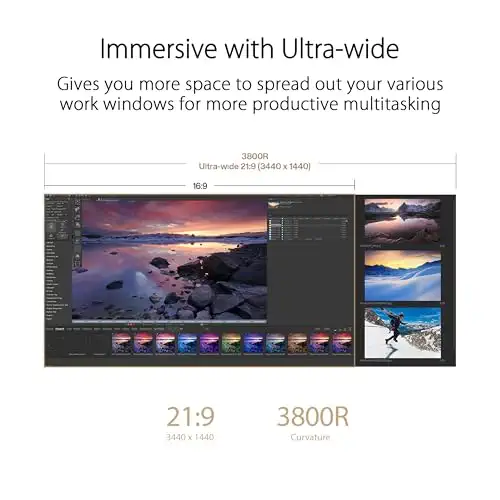


A factory-calibrated, professional-grade curved monitor with one-cable docking for a tidy desk.
Most recommended by reviewers
Check price at AmazonPrices and availability on Amazon change often.
One catchAt 599 dollars it is the most expensive pick here.
Expert reviewers single this one out for colour accuracy straight from the box, with a verified Delta E under 2 and full sRGB and Rec. 709 coverage. That matters if you edit photos or send work to clients who check colours.
The USB-C port charges a laptop at 96W and adds an Ethernet port, so one cable can replace a whole dock.
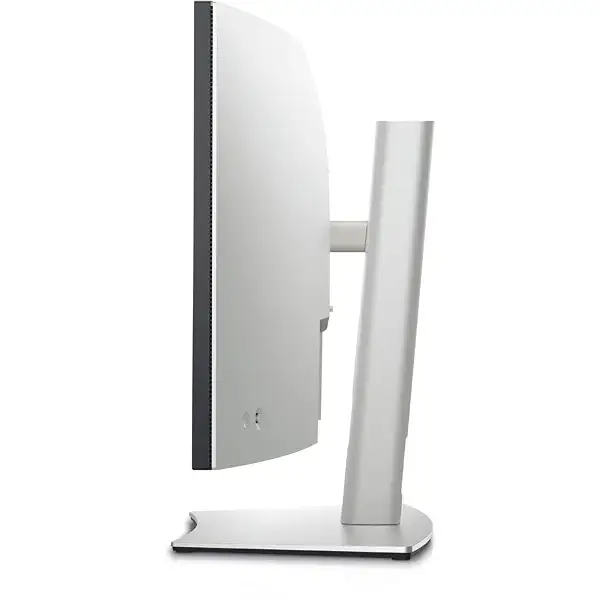


A well-rounded curved office monitor with USB-C and strong colour coverage.
Prices and availability on Amazon change often.
Owners who use it for client work say the colours stay consistent across devices, and the USB-C connection keeps the desk tidy. It is a solid all-round choice if you want a larger screen and do not need a calibrated panel.


A budget ultrawide with eye-care features and a sharp picture for everyday office tasks.
Prices and availability on Amazon change often.
It costs well under a third of the top pick and still gives you a wide 21:9 screen. The eye-care features and picture-by-picture mode make it a practical second screen for office work.


A curved ultrawide with USB-C charging and reader mode, aimed at people who work from a laptop.
Prices and availability on Amazon change often.
If your laptop is your main computer, a single USB-C cable that also charges it at 65W keeps the desk simple. Reader mode helps during long reading and document sessions.
If your work is mostly documents, email and browsing, the budget or value picks give you the most screen for the money. If you edit photos or need accurate colour, choose the calibrated ProArt. If you work from a laptop and want one cable to charge and connect, the connection pick is the simplest.
Look for a curve and resolution that suit your desk. Ultrawide 21:9 screens give you about a third more horizontal room than a standard 16:9 screen of the same height. USB-C with power delivery keeps cables tidy. For colour work, IPS panels hold their colour across viewing angles better than VA panels.
A curved screen is not required for office work. Wider curved monitors take up more desk depth, which can be a problem in small spaces. If your desk is small, a flat monitor of similar width may fit better.
Yes, for many people. Experts say the curve follows your field of view, which can be more comfortable for long days. It is not essential, and a flat monitor works just as well if you prefer one.
Sit about an arm's length away, so the whole screen sits comfortably in your view. A curved screen works best when it is at a comfortable distance from your eyes.
Experts say 27 to 34 inches suits most office setups with several windows open. A 34 inch ultrawide gives room for two documents side by side without a second monitor.
For most people the ASUS ProArt PA34VCNV is the best overall, because it is factory calibrated and has the most useful connections.
The Samsung ViewFinity S50GC is the budget pick, with a 21:9 screen, eye-care features and picture-by-picture for two sources.
Yes, most of these monitors handle both. The Samsung Odyssey G85SB is the strongest gaming option, but it costs much more and needs care against burn-in.
Meet the reviewer
Fact checker and editor
An experienced e-commerce editor and fact-checker specialising in product information, pricing, specifications and online retail content. Focused on ensuring accuracy, credibility and consumer confidence through clear, reliable and informative content.
Why trust CheckedBest
We started from eight 34 inch curved monitors that are in stock on Amazon today. We weighed what expert reviews and owner discussions say about colour, connectivity, refresh rate and ergonomics for office work.
Our expert team tests products when it is needed and researches online and in interviews. Every guide is fact-checked and edited by a real person.
The CheckedBest editorial team · Updated Nov 8, 2026
How we pickEditorial standardsAffiliate disclosureReport a mistake
We earn a commission when you buy through our links, at no extra cost to you. It never decides the winner.
