 Elo 2770LBest overall
- Resolution
- 1920 x 1080
- Touch
- 10-point PCAP
- Panel
- Anti-glare glass
- Stand
- Tilt 20 to 70 degrees, VESA mount
Most recommended by reviewers
Check price at Amazon

Reviewed by
Commerce Writer & Editor
Luka Lucheski is a content writer and editor with more than five years of experience in commerce content and digital publishing.
We earn a commission when you buy through our links, at no extra cost to you. How this works.
If you want a 27-inch screen you can tap, draw on, or use as a point-of-sale display, touch support matters more than raw speed. The Elo 2770L is our top pick for a dependable touch monitor with a narrow bezel and scratch-resistant glass, though it costs far more than the rest. The Pisichen 2K model is the runner-up for a sharper, faster screen at a lower price, with touch built in.
The other two picks cover a budget touch monitor and a 4K touch model for detailed work.
1 Elo 2770L | 2 Pisichen 2K 100Hz Touchscreen | 3 CUNPU 10-Point Touchscreen Monitor | 4 Pisichen 4K UHD Touchscreen | |
|---|---|---|---|---|
| Best for | Best overall | Best for sharp detail | Best budget | Best for 4K |
| Resolution | 1920 x 1080 | 2560 x 1440 | 1920 x 1080 | 3840 x 2160 |
| Touch | 10-point PCAP | 10-point | 10-point, USB-B | 10-point |
| Refresh rate | Not listed | 100Hz | 60Hz | Not listed |
| Ports | Not listed | HDMI, DisplayPort, USB-C | Not listed | HDMI, DisplayPort, USB-C |
| Check price at Amazon | Check price at Amazon | Check price at Amazon | Check price at Amazon |
Elo 2770LBest overallMost recommended by reviewers
Check price at Amazon Pisichen 2K 100Hz TouchscreenBest for sharp detail
 CUNPU 10-Point Touchscreen MonitorBest budget
 Pisichen 4K UHD TouchscreenBest for 4K


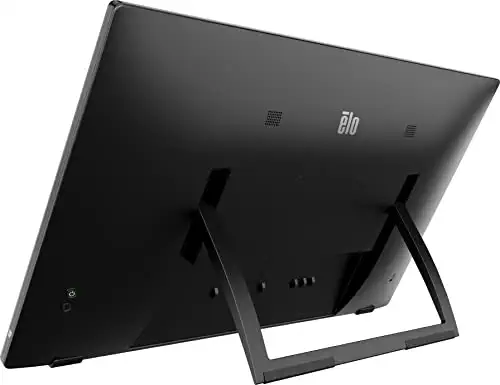
A dependable 27-inch touch screen with a narrow bezel and scratch-resistant glass, built for shared or public use.
Most recommended by reviewers
Check price at AmazonPrices and availability on Amazon change often.
The Elo 2770L is our pick for the best overall 27 inch touch screen monitor, thanks to a thin bezel, a tough surface and a stand that adjusts easily.
The Elo 2770L stands out for its narrow TouchPro PCAP border, which the maker says is up to 70% narrower than similar models, so the screen feels more like one continuous surface. Its IK07 rating and scratch-resistant glass suit a touch display that gets handled every day. The stand tilts from 20 to 70 degrees and can also collapse for VESA mounting, and the panel includes low blue light and flicker-free features for comfortable viewing.
Its resolution is 1920 x 1080, which is lower than the 2K and 4K options in this guide, so text and fine detail will look less sharp. Reviewers have not listed any other drawbacks for this model, but if sharper detail matters most, the Pisichen 2K model is the better fit.
If it's not for you, the Pisichen 2K 100Hz suits buyers who want sharper detail and smoother motion, while the Pisichen 4K model suits crisp text and portrait use.
The Elo 2770L uses PCAP touch, the type that handles multi-touch well and works reliably when a user wears gloves or the screen is wet. The IK07 rating and scratch-resistant surface suit a screen that gets handled daily.
The narrow bezel and wide tilt range make it a good fit for a counter or shared workstation.


A 2K touch monitor with a 100Hz refresh rate, USB-C, and built-in speakers.
Prices and availability on Amazon change often.
At a lower price than the Elo, this Pisichen gives you a sharper 2K image and a faster refresh rate. The USB-C port carries video, data, and power in one cable, which keeps a desk tidy.
Check touch compatibility with your computer before you buy, as Mac support is not stated.


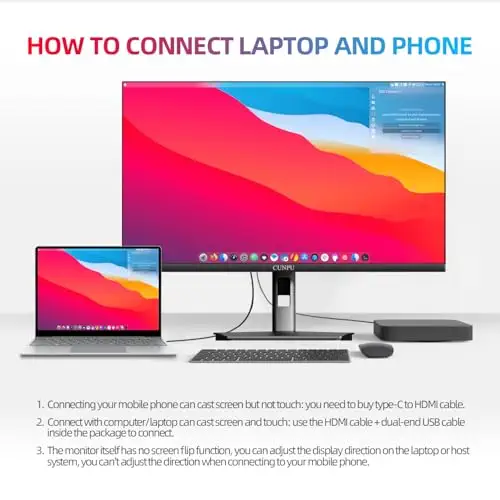
An affordable 27-inch touch screen for office work, with VESA mounting and tilt adjustment.
Prices and availability on Amazon change often.
The touch works on Windows and most laptops through a single USB-B cable.
It is best for office and point-of-sale use, not gaming.




A 4K touch monitor for text-heavy work, with 400 nits of brightness and a tilt-and-rotate stand.
Prices and availability on Amazon change often.
This model gives the most detail of the four picks. The 4K panel and 400 nits brightness suit spreadsheets and design work in a lit room.
The listing states that USB-C alone may not power the screen, so use the included adapter.
Look for PCAP touch if you want multi-touch that works reliably with gloves or on a wet screen. Check the listing for the touch cable and make sure your computer supports it. Mac, Linux, and some gaming consoles often lack touch support.
Skip a touch monitor if you only need a standard screen for web browsing or gaming. A non-touch 27-inch monitor costs less and avoids the touch compatibility issues.
1440p (2K) is a good balance of sharpness and cost for most people. 4K gives the most detail for text-heavy work, but needs a more powerful computer for gaming.
It is worth it if you draw, use point-of-sale software, or want to tap on the screen. For general use, a standard monitor is cheaper and simpler.
A 27-inch screen gives more workspace and suits touch use better, but it needs more desk space. Smaller screens are cheaper and fit tighter setups.
Choose 27 inches if you want room for two windows side by side or a touch display for larger tasks. Choose 24 inches for a smaller desk.
Meet the reviewer
Commerce Writer & Editor
Luka Lucheski is a content writer and editor with more than five years of experience in commerce content and digital publishing. He specializes in product reviews, buying guides, and comparison content. Over the years, he has edited and reviewed hundreds of articles across a wide range of categories, from tech and software to ecommerce and everyday consumer products.
Why trust CheckedBest
This shortlist is built from listing specs, touch support details, and expert guidance on 27-inch screens. Every pick below was checked to be in stock on Amazon right now.
Our expert team tests products when it is needed and researches online and in interviews. Every guide is fact-checked and edited by a real person.
The CheckedBest editorial team · Updated Nov 10, 2026
How we pickEditorial standardsAffiliate disclosureReport a mistake
We earn a commission when you buy through our links, at no extra cost to you. It never decides the winner.
