 LG UltraGear 27GS93QEBest overall
- Panel
- OLED
- Resolution
- 2560×1440
- Refresh rate
- 240Hz
- Response
- 0.03ms GtG
Most recommended by reviewers
Check price at Amazon

Reviewed by
Fact-checker and content editor
Experienced researcher and AI content editor, having worked on various merchant websites.
We earn a commission when you buy through our links, at no extra cost to you. How this works.
Before you buy, check whether your graphics card can push 1440p at a steady 240 frames per second. A 1440p monitor running at 240Hz gives you sharp detail and very smooth motion, but it needs a strong GPU to feed it. If you game competitively or want a faster-looking screen, this is the middle ground between 1080p and 4K.
Best fit for image quality: the LG UltraGear 27GS93QE. It is a 27-inch 1440p OLED at 240Hz with a 0.03ms response time and very deep blacks, so it suits players who care most about how the picture looks. Shoppers on a tighter budget, those who want a balanced IPS panel, or anyone after a premium 4K screen will find options for each in the list below.
1 LG UltraGear 27GS93QE | 2 AOC 27 QHD 260Hz Gaming Monitor | 3 SANSUI 27 1440p 260Hz/240Hz Gaming Monitor | 4 Samsung 27 Odyssey OLED G6 (G61SH) | 5 KTC 27 240Hz Gaming Monitor H27E6S | |
|---|---|---|---|---|---|
| Best for | Best overall | Best balanced | Best value | Best OLED alternative | Best adjustable IPS |
| Panel | OLED | IPS | Fast IPS | QD-OLED | Fast IPS |
| Resolution | 2560×1440 | 2560×1440 | 2560×1440 | QHD 1440p | 2560×1440 |
| Refresh rate | 240Hz | 240Hz native, 260Hz overclock | 240Hz, 260Hz overclock | 240Hz | 240Hz, 275Hz overclock |
| Response | 0.03ms GtG | 0.3ms MPRT | 1ms MPRT | 0.03ms | 1ms MPRT |
| HDR | DisplayHDR True Black 400 | Not listed | Not listed | HDR10 | HDR400 |
| Sync | FreeSync Premium Pro, G-Sync Compatible | Adaptive-Sync, G-Sync Compatible | FreeSync Premium | Not listed | Not listed |
| Check price at Amazon | Check price at Amazon | Check price at Amazon | Check price at Amazon | Check price at Amazon |
LG UltraGear 27GS93QEBest overallMost recommended by reviewers
Check price at Amazon AOC 27 QHD 260Hz Gaming MonitorBest balanced
 SANSUI 27 1440p 260Hz/240Hz Gaming MonitorBest value
 Samsung 27 Odyssey OLED G6 (G61SH)Best OLED alternative
 KTC 27 240Hz Gaming Monitor H27E6SBest adjustable IPS


A 27-inch 1440p OLED at 240Hz for players who want the best picture.
Most recommended by reviewers
Check price at AmazonPrices and availability on Amazon change often.
One catchOLED needs care around static on-screen elements like HUDs.
The 27GS93QE pairs a 240Hz refresh with a near-instant 0.03ms response, so fast motion looks clean. The OLED panel gives deep blacks and contrast that LCD monitors struggle to match.
It is the top-tier choice in its class. Buy it if picture quality matters most; a budget IPS panel will be easier on the wallet.


A 1440p IPS panel that balances gaming and everyday desktop use.
Prices and availability on Amazon change often.
A 27-inch 1440p IPS at 240Hz is the choice most builders actually want. You get extra desktop room without giving up competitive refresh.
Expect to need a capable graphics card to feed 240Hz consistently.
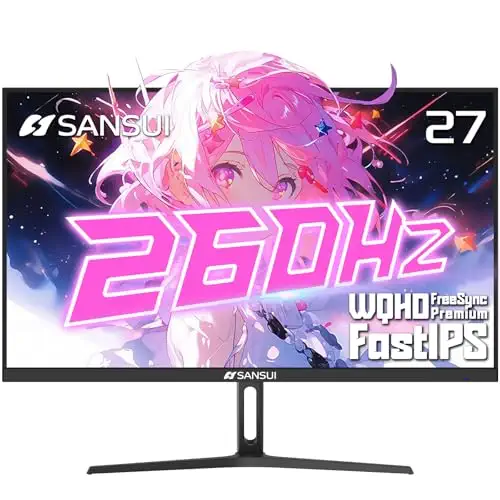


A budget 1440p IPS at 240Hz with HDR10 and a crosshair overlay.
Prices and availability on Amazon change often.
If you want 1440p at 240Hz without spending much, this monitor covers the core needs. It is a sensible starting point for a mid-range PC.
Check the included cable supports the full refresh rate, as cheap cables can cap it.


A QD-OLED 1440p 240Hz monitor with strong color and anti-glare coating.
Prices and availability on Amazon change often.
If you want OLED speed and color but prefer the Samsung QD-OLED look, this is a strong choice. Its anti-glare coating helps in bright rooms.
It costs more than IPS picks, so it suits buyers who will use the picture quality daily.


A 1440p Fast IPS with a full stand that rotates for portrait use.
Prices and availability on Amazon change often.
This KTC has a stand that moves in every direction, which helps if you rotate the screen for coding or browsing. It also includes speakers and a long warranty.
Choose it if ergonomics and a clean white look matter more than a famous brand name.
For competitive shooters, pick an IPS or OLED panel with a fast response. For mixed gaming and desktop work, the 27-inch IPS picks give more room for windows.
Expert advice is clear: a 1440p 240Hz panel needs a strong GPU, roughly RTX 4070-class or better, or the monitor will not reach its refresh target.
Most HDMI 2.0 ports cap at 144Hz at 1440p. Use DisplayPort to reach 240Hz.
240Hz is the more practical target for most PCs. Going higher only helps if your graphics card can hold those frame rates.
Some high-end setups can, but most 4K 240Hz monitors need a premium GPU and a DisplayPort connection.
The LG UltraGear 27GS93QE is our top pick for gaming, thanks to its 0.03ms OLED response.
The SANSUI 27 1440p 240Hz is the best value pick on our list.
The LG UltraGear 27GS93QE for OLED quality, or the AOC 27 QHD 260Hz for a balanced IPS.
Meet the reviewer
Fact-checker and content editor
Experienced researcher and AI content editor, having worked on various merchant websites. Experience in AI transcription, prompt engineering and taxonomy mapping for search engines.
Why trust CheckedBest
We built this shortlist from five Amazon listings that are in stock right now. Each pick was weighed against expert reviews and their advice for 1440p at 240Hz.
Our expert team tests products when it is needed and researches online and in interviews. Every guide is fact-checked and edited by a real person.
The CheckedBest editorial team · Updated Nov 8, 2026
How we pickEditorial standardsAffiliate disclosureReport a mistake
We earn a commission when you buy through our links, at no extra cost to you. It never decides the winner.
