ApoloSign 15.6-inch Digital CalendarBest overall
- Screen size
- 15.6 inches
- Subscription
- None required
- Calendar sync
- Google Calendar, iCloud, Outlook
- Chore chart
- Yes
Most recommended by reviewers
Check price at Amazon
 ApoloSign 15.6-inch Digital CalendarBest overallRunner-up2
 ApoloSign 21.5-inch Digital CalendarBest big screen
We earn a commission when you buy through our links, at no extra cost to you. How this works.
A digital wall calendar can replace the paper calendar, the whiteboard and the scattered reminders that keep a busy family on track. The best ones sync with the calendars you already use, so nobody has to type events twice.
Our top pick is the ApoloSign 15.6-inch calendar with dual calendar and Android modes and no subscription needed. The other picks cover larger screens, a lower price and a fuller family dashboard.
1 ApoloSign 15.6-inch Digital Calendar | 2 ApoloSign 21.5-inch Digital Calendar | 3 Linkdaze 15.6-inch Digital Calendar | |
|---|---|---|---|
| Best for | Best overall | Best big screen | Best value touchscreen |
| Screen size | 15.6 inches | 21.5 inches | 15.6 inches |
| Subscription | None required | None required | Not listed |
| Calendar sync | Google Calendar, iCloud, Outlook | Google Calendar, iCloud, Outlook | Google, iCloud, Outlook, Cozi, Yahoo |
| Check price at Amazon | Check price at Amazon | Check price at Amazon |
ApoloSign 15.6-inch Digital CalendarBest overallMost recommended by reviewers
Check price at Amazon ApoloSign 21.5-inch Digital CalendarBest big screen
 Linkdaze 15.6-inch Digital CalendarBest value touchscreen

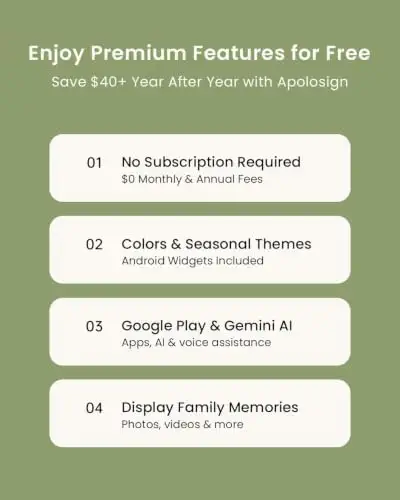


A 15.6-inch smart wall calendar that works as a calendar or a full Android dashboard, with no subscription.
Most recommended by reviewers
Check price at AmazonPrices and availability on Amazon change often.
The ApoloSign 15.6-inch is our top pick for families who want a calendar and a flexible dashboard without paying a monthly subscription.
The ApoloSign lets you switch between a simple Calendar Mode and a fully customizable Android Mode with apps and widgets, all without a subscription for its core features. It syncs with Google Calendar, iCloud and Outlook, and includes a chore chart and meal planner. One owner reviewing the larger ApoloSign model noted that it runs as a full Android device if you want it to, and the 15.6-inch model shares that same setup. Owners on r/homeassistant report that the ApoloSign 15.6-inch runs Fully Kiosk well on Android 16 and feels like an intentional wall fixture, though it costs more than a tablet.
Setting up the dashboard widgets and downloading extra apps takes more effort than using a basic calendar. If you only want a plain family schedule on the wall, a simpler device will be quicker to get running.
If it's not for you, the Everblog HomeCal 21.5-inch suits families who want a bigger screen and a photo frame with no subscription, while the Cozyla Calendar Plus 2 24-inch suits those who want the largest display and Google Play access.


The same dual-mode calendar in a larger touchscreen for kitchens and shared spaces.
Prices and availability on Amazon change often.


A 1080p touchscreen calendar with chore rewards, a meal planner and a 64GB photo frame, for less than the ApoloSign.
Prices and availability on Amazon change often.


A 21.5-inch family hub with calendar sync, chores, a fridge tracker and recipes, and no subscription.
Prices and availability on Amazon change often.

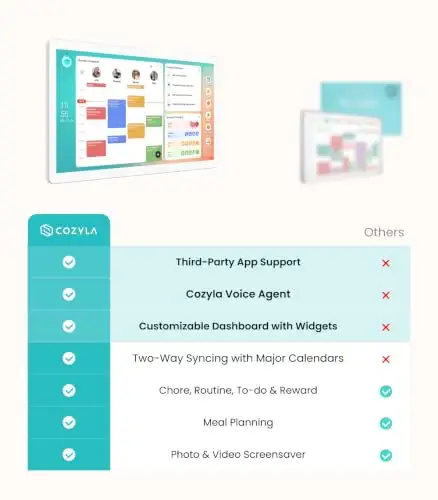


A 24-inch Android calendar with app store access, a voice assistant and a customizable dashboard.
Prices and availability on Amazon change often.
A smaller 15.6-inch screen suits a kitchen or hallway with two or three people. A 21.5-inch or 24-inch display works better for larger families or viewing from across a room. If you do not want to pay ongoing fees, the ApoloSign and Everblog both avoid a subscription.
They are a large purchase for a device that mainly shows a schedule. They can pay off if the family uses the chore chart, meal planner and shared calendar every day, and if the device replaces paper and whiteboards.
The Linkdaze 15.6-inch model costs less than most premium calendars and syncs with common calendar services, though its feature set differs from pricier models on this page.
Some need Wi-Fi at all times, some lock features behind a subscription, and sync can lag behind changes made on other devices.
The ApoloSign and Everblog HomeCal both run their core features without a monthly fee.
Why trust CheckedBest
This shortlist is built from published expert reviews and community discussions about digital wall calendars. Every listing was checked to be available on Amazon right now, and each pick was weighed on sync, subscription costs, chore and meal features, and display size.
Our expert team tests products when it is needed and researches online and in interviews. Every guide is fact-checked and edited by a real person.
The CheckedBest editorial team · Updated Nov 17, 2026
How we pickEditorial standardsAffiliate disclosureReport a mistake
We earn a commission when you buy through our links, at no extra cost to you. It never decides the winner.