 Anker Prime TB5 Docking StationBest overall
- Ports
- 14-in-1
- Max charging
- 140W
- Max data transfer
- 120Gbps
- Display output
- Up to 8K@60Hz, dual 8K@60Hz on Windows
Most recommended by reviewers
Check price at Amazon
We earn a commission when you buy through our links, at no extra cost to you. How this works.
A Thunderbolt 5 dock turns one cable into a full desk setup: monitors, storage, Ethernet, and laptop charging. The right one depends on your laptop, how many displays you run, and whether you need built-in storage.
Our top pick is the Anker Prime TB5 Docking Station, a 14-in-1 dock with 140W charging, dual display output, and a cooling system that keeps it steady under load. Our other picks cover Mac-focused setups, storage-heavy workflows, and budget-friendly options.
1 Anker Prime TB5 Docking Station | 2 CalDigit TS5 Dock | 3 UGREEN Maxidok Docking Station | 4 WAVLINK Thunderbolt 5 Dock | |
|---|---|---|---|---|
| Best for | Best overall | Best for Mac | Best for storage | Best budget |
| Ports | 14-in-1 | 15 | 17-in-1 | 12-in-1 |
| Max charging | 140W | Not listed | 140W | 140W |
| Display output | Up to 8K@60Hz, dual 8K@60Hz on Windows | Dual 6K 60Hz or dual 8K 60Hz on Mac; up to dual 8K 60Hz on Windows Thunderbolt 5 | Dual or single 8K@60Hz on Windows; dual displays on Mac | Single 8K@144Hz; dual 8K@60Hz on Windows; dual displays on Mac |
| Ethernet | 2.5Gbps | 2.5GbE | 2.5GbE | 2.5G RJ45 |
| Warranty | 24 months | Not listed | Not listed | 2 years |
| Check price at Amazon | Check price at Amazon | Check price at Amazon | Check price at Amazon |
Anker Prime TB5 Docking StationBest overallMost recommended by reviewers
Check price at Amazon CalDigit TS5 DockBest for Mac
 UGREEN Maxidok Docking StationBest for storage
 WAVLINK Thunderbolt 5 DockBest budget

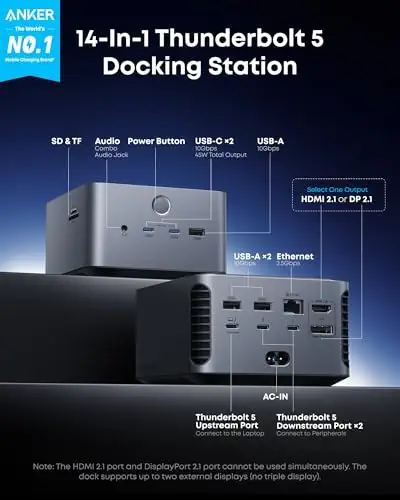


A well-rounded Thunderbolt 5 dock with 140W charging, dual 8K display output, and a built-in cooling system.
Most recommended by reviewers
Check price at AmazonPrices and availability on Amazon change often.
The Anker Prime TB5 14-in-1 is our pick for the best overall Thunderbolt 5 dock, offering a well-rounded mix of ports, power and display support.
The Anker dock pairs 140W of laptop charging through its Thunderbolt 5 port with support for dual 8K at 60Hz on Windows Thunderbolt 5 laptops. It also includes SD and TF card readers, 2.5Gbps Ethernet and active cooling meant to keep it from overheating under heavy load. Owners and reviewers note the dock has a 24-month warranty and a clean set of ports for a single desk setup.
The two front USB-C ports share only 45W in total, so charging several accessories at once will be slower. If you need the most ports or a fixed power budget across every port, the CalDigit dock with its 240W power supply may suit you better.
If it's not for you, the CalDigit TS5 suits Mac users who want dual 6K or 8K displays and a 240W power supply, while the UGREEN Maxidok fits anyone who wants a built-in M.2 NVMe storage slot.
The Anker Prime TB5 covers most desk setups without needing extras. Its 140W upstream port charges a laptop while you work, and two Thunderbolt 5 downstream ports drive displays and fast drives. Dual 8K@60Hz output is available on Windows Thunderbolt 5 laptops, which makes it a solid pick for multi-monitor setups.
The 24-month warranty and included cables add value. The active cooling system is a practical addition for a dock that runs all day with multiple devices attached.


A 15-port dock with a 240W power supply, built for MacBook Pro setups that need high charging and display output.
Prices and availability on Amazon change often.
The CalDigit TS5 is built for high-power MacBook Pro setups. Its 240W power supply keeps every port fed, including the 140W host charging port that suits 16-inch MacBook Pro models. Mac users can drive up to dual 6K or 8K displays depending on the model, and the dock has a wide spread of ports for storage, cards, and audio.
It costs more than the other picks, but the power and port count make it a strong long-term dock for Mac users who want one cable to manage everything.


A 17-port dock with a built-in M.2 NVMe slot that supports up to 8TB of storage.
Prices and availability on Amazon change often.
The UGREEN Maxidok is the best option here if you want storage built into the dock. Its M.2 NVMe slot supports up to 8TB, which makes it useful for video editing, large project libraries, and game files. Port count is high, with three Thunderbolt 5 downstream ports and multiple USB-A and USB-C ports.
The cooling fan makes some noise under load, though the maker says it stays below 30 dB. For a quiet setup, check that before you buy.


A lower-priced Thunderbolt 5 dock with 140W charging, 2.5G Ethernet, and a two-year warranty.
Prices and availability on Amazon change often.
The WAVLINK dock gives you Thunderbolt 5 speeds and 140W laptop charging at a lower price. You get 2.5G Ethernet, an SD 4.0 card reader, and four USB-A ports for a keyboard and mouse. It is a sensible choice for a single-monitor setup or a basic home office.
Triple display output needs a Windows 11 PC with a Thunderbolt 5 port. Mac users get dual external displays. Check your laptop's Thunderbolt version before you buy.
For a single display and basic desk setup: the WAVLINK is enough, with 140W charging and an SD reader.
For dual monitors and lots of ports: the Anker Prime TB5 covers most needs in one cable.
For a MacBook Pro with high charging needs: the CalDigit TS5 offers a 240W power supply that keeps every port powered.
For built-in storage: the UGREEN Maxidok has an M.2 NVMe slot.
The Anker Prime TB5 is our top pick for most setups. It offers 140W charging, dual display support, and 14 ports in one unit, with a 24-month warranty.
The CalDigit TS5 suits MacBook Pro setups best, with 240W power and dual 6K or 8K display support on compatible Macs. The Anker Prime TB5 is a strong alternative with a large port selection for Mac desks.
For a MacBook Pro with 140W charging needs, the CalDigit TS5 is the strongest choice. For a Mac mini or Mac Studio, the Anker Prime TB5 and UGREEN Maxidok both offer plenty of ports for a full desk setup.
Get Thunderbolt 5 if your laptop supports it, since you get 120Gbps data speeds and higher display output. Thunderbolt 4 docks still work on older laptops, with reduced performance.
A Thunderbolt dock uses the faster Thunderbolt connection, which supports more displays, higher data speeds, and laptop charging through one cable. A USB-C dock is usually cheaper but has lower performance for multiple displays and storage.
The UGREEN Maxidok has a built-in M.2 NVMe slot that supports up to 8TB, with a large port count. The Anker Prime TB5 is another option if you need many ports without built-in storage.
Why trust CheckedBest
This shortlist is built from current Amazon listings for Thunderbolt 4 docks, checked for availability and key port and power specs. We compared power delivery, display support, and storage options to find docks that fit different setups.
Our expert team tests products when it is needed and researches online and in interviews. Every guide is fact-checked and edited by a real person.
The CheckedBest editorial team · Updated Nov 7, 2026
How we pickEditorial standardsAffiliate disclosureReport a mistake
We earn a commission when you buy through our links, at no extra cost to you. It never decides the winner.
