Epson SureColor F170Best overall
- Max print size
- 8.5 x 11 in
- Ink
- Epson sublimation ink, bought separately
- Price
- See Amazon for current price
Most recommended by reviewers
Check price at Amazon

Reviewed by
Fact checker and editor
An experienced e-commerce editor and fact-checker specialising in product information, pricing, specifications and online retail content.
We earn a commission when you buy through our links, at no extra cost to you. How this works.
If you want to print designs onto mugs, tumblers, or shirts, a sublimation printer is the machine that does the job, and the right one depends on how much you print and what you print on. Owners and reviewers agree that a dedicated sublimation printer, one built to use sublimation ink from the start, saves a lot of trouble compared with a converted office printer.
Our top pick is the Epson SureColor F170. It is a purpose-built desktop sublimation printer with lower-cost ink than Sawgrass, and reviewers say it sets up quickly. Below it, the Sawgrass SG500 bundle is the easiest all-in-one option, and the Brother SP-1 is a budget-friendly dedicated printer with owner praise for self-cleaning.
1 Epson SureColor F170 | 2 Sawgrass SG500 | 3 Brother SP-1 | |
|---|---|---|---|
| Best for | Best overall | Best all-in-one | Best budget |
| Max print size | 8.5 x 11 in | 8.5 x 14 in | 8.5 x 11 in |
| Ink | Epson sublimation ink, bought separately | SubliJet UHD, included | Not listed |
| Check price at Amazon | Check price at Amazon | Check price at Amazon |
Epson SureColor F170Best overallMost recommended by reviewers
Check price at Amazon Sawgrass SG500Best all-in-one
 Brother SP-1Best budget

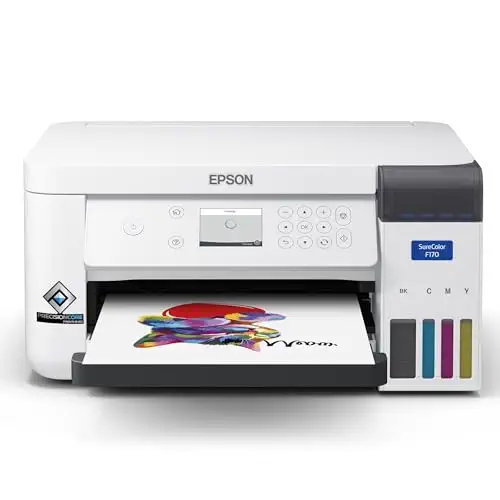


A purpose-built desktop sublimation printer that sets up quickly and keeps its warranty.
Most recommended by reviewers
Check price at AmazonPrices and availability on Amazon change often.
The Epson SureColor F170 is our pick for most people, because it is a purpose-built sublimation printer that avoids the hassle of converting a standard inkjet.
Being made for sublimation from the start means no converting a printer and no guessing at ink compatibility, and the bundle comes with a full set of Epson sublimation ink and a 150-sheet auto-feed tray. Reviewers note that its ink costs less over time than Sawgrass ink, and owners on forums say the color is close enough for CMYK work and that it suits smaller items well. Setup is quick and straightforward on Mac and Windows. Owners on r/Sublimation report that the F170 has run for years with few cleanings when left on continuously, and that it handles continuous-tone photos well.
The desktop width limits transfers to small items like mugs, coasters and tumblers, so larger jobs will need a bigger machine. Some owners also report dithering and moire problems with light solid colors, and the printer does not support borderless printing.
If it's not for you, the Sawgrass SG500 suits buyers who want ink, software and setup support included and don't mind paying more, while the Brother SP-1 Starter Bundle suits anyone on a tighter budget who wants paper and blanks thrown in.
Reviewers and owners point to the F170 as the choice that just works for everyday sublimation. Because it is designed for sublimation from the box, you avoid the clogs and warranty problems that come with converted printers. Owners also note the ink cost stays lower than Sawgrass over time, which matters if you print often.
The trade-off is size: the 8.5 x 11 inch width suits mugs, coasters and left-chest designs, not full shirt fronts.


A bundled sublimation system with ink, paper and software included, aimed at buyers who want one purchase.
Prices and availability on Amazon change often.
Expert reviewers call the SG500 the top-of-the-line choice for a home crafter. Its ink-cartridge design makes installation easy, and built-in colour profiles for polyester, metal and plastic take the guesswork out of colour. The bundle helps narrow the price gap once ink is counted.
It is the costliest of the three, and its SubliJet ink is among the most expensive on the market.


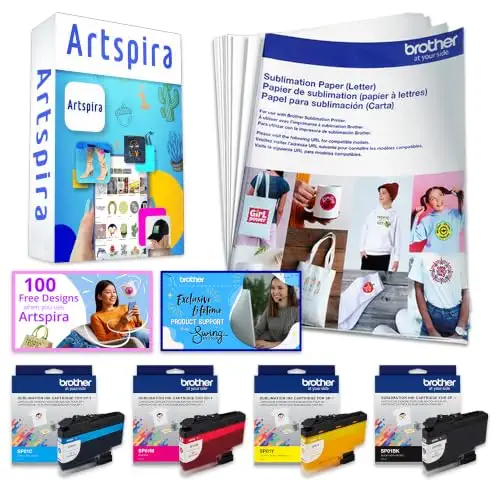
A dedicated sublimation printer bundled with a starter set of ink, paper and blanks.
Prices and availability on Amazon change often.
Owners who chose the Brother over Sawgrass report comparable results at lower cost, with cheaper ink per cartridge. The bundle gives a new buyer paper, blanks and tape in one order, and owners say the printer self-cleans, so idle days don't cause clogs.
Connectivity is the weak point: it depends on the Artspira app, and some reviewers report disconnects.
A heat press, sublimation paper and blanks are separate purchases and often cost more than the printer itself. Only polyester or polymer-coated items take sublimation well, so cotton shirts need a poly blend.
The Sawgrass SG500 is the easiest for beginners because ink, paper and software come in one bundle, and set-up support is included.
For shirts, an 8.5 x 14 inch printer such as the SG500 handles most garment transfers. Full shirt fronts need a wider machine such as the SG1000.
Epson is cheaper to run, while Sawgrass bundles ink and software and is easier to set up. Pick Epson for lower running cost and Sawgrass for a single-purchase start.
Meet the reviewer
Fact checker and editor
An experienced e-commerce editor and fact-checker specialising in product information, pricing, specifications and online retail content. Focused on ensuring accuracy, credibility and consumer confidence through clear, reliable and informative content.
Why trust CheckedBest
We built this shortlist from three Amazon listings checked for stock and price, weighed against expert reviews and owner discussions. Each pick is matched to a different kind of buyer.
Our expert team tests products when it is needed and researches online and in interviews. Every guide is fact-checked and edited by a real person.
The CheckedBest editorial team · Updated Nov 3, 2026
How we pickEditorial standardsAffiliate disclosureReport a mistake
We earn a commission when you buy through our links, at no extra cost to you. It never decides the winner.