 ScanSnap iX1300 Wireless Duplex ScannerBest overall
- Scan speed
- Up to 30 ppm duplex
- Feeder
- Auto document feeder with manual feeder
- Connectivity
- USB or Wi-Fi
- Footprint
- Compact, space-saving design
Most recommended by reviewers
Check price at Amazon
 ScanSnap iX1300 Wireless Duplex ScannerBest overallRunner-up2
 Canon imageFORMULA DR-C225 IIBest vertical design

Reviewed by
Fact checker and editor
An experienced e-commerce editor and fact-checker specialising in product information, pricing, specifications and online retail content.
We earn a commission when you buy through our links, at no extra cost to you. How this works.
An office scanner has to keep up with a stack of paper without jamming, and fit on a crowded desk. The best choice depends on how many pages you process and whether you want to scan straight to the cloud or to a computer.
The ScanSnap iX1300 Wireless Duplex Scanner is the best all-round pick for most small offices, thanks to its compact body and double-sided scanning. Other models in this guide handle heavier volumes, a vertical footprint and shared wireless workgroup use.
1 ScanSnap iX1300 Wireless Duplex Scanner | 2 Canon imageFORMULA DR-C225 II | 3 Epson WorkForce ES-400 II | 4 Brother ADS-3100 High-Speed Desktop Scanner | |
|---|---|---|---|---|
| Best for | Best overall | Best vertical design | Best for shared desk use | Best for higher volume |
| Scan speed | Up to 30 ppm duplex | Up to 25 ppm double-sided | Not listed | Up to 40 ppm single and double sided |
| Feeder | Auto document feeder with manual feeder | 30-sheet automatic feeder | 50-sheet automatic feeder | 60-sheet capacity |
| Connectivity | USB or Wi-Fi | Cloud and PC; TWAIN driver included | Scans to email and cloud | Hi-Speed USB 3.0 |
| Check price at Amazon | Check price at Amazon | Check price at Amazon | Check price at Amazon |
ScanSnap iX1300 Wireless Duplex ScannerBest overallMost recommended by reviewers
Check price at Amazon Canon imageFORMULA DR-C225 IIBest vertical design
 Epson WorkForce ES-400 IIBest for shared desk use
 Brother ADS-3100 High-Speed Desktop ScannerBest for higher volume

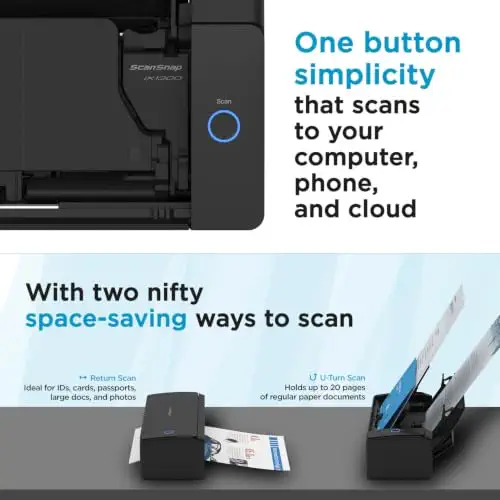


A compact double-sided scanner that fits small offices and scans to a computer, phone or cloud.
Most recommended by reviewers
Check price at AmazonPrices and availability on Amazon change often.
One catchIts feeder holds fewer pages than the larger desk models.
For most small offices the ScanSnap iX1300 hits the right balance. It scans both sides of a page at up to 30 pages per minute, which keeps a typical stack moving, and it takes up little desk space. Reader lists single it out for being simple to set up, and it can send files to a computer, a phone or a cloud service without extra hardware.
It is not built for heavy daily volume, but for steady office use it is the easiest scanner to recommend.


An upright scanner that saves desk space and handles receipts, cards and long documents.
Prices and availability on Amazon change often.
The DR-C225 II stands on end, so it takes less room than a flat scanner. It reads both sides of a page at once at up to 25 pages per minute and copes with receipts, business cards and plastic cards as well as plain paper. A three-year limited warranty adds peace of mind for a scanner that will sit on a desk for years.


A desktop duplex scanner with a 50-sheet feeder and built-in image cleanup.
Prices and availability on Amazon change often.
With a 50-sheet feeder the ES-400 II copes with larger stacks than the compact models, and it cleans up scans automatically by cropping and removing blank pages. It can turn a page into a searchable PDF or an editable Word or Excel file, which suits offices that file a lot of paper.


A compact desktop scanner rated up to 40 pages per minute with a 60-sheet feeder.
Prices and availability on Amazon change often.
The ADS-3100 is built for offices that scan more than a handful of pages a day. Its 40 pages per minute rating and 60-sheet feeder keep larger batches moving, and the bundled software helps with cleanup. It is a sensible choice for small offices and work-from-home setups with steady volume.
For a single desk with steady but modest volume, the ScanSnap iX1300 is the simplest choice. Offices that process large stacks or share one scanner should look at the Epson ES-400 II or the Canon DR-S350NW.
The ScanSnap iX1300 is our top pick for a compact office setup. The Epson WorkForce ES-400 II suits larger stacks with its 50-sheet feeder.
A compact duplex scanner like the ScanSnap iX1300 or the Brother ADS-1300 handles everyday home office work without taking much desk space.
The ScanSnap iX1300 and Canon DR-C225 II both support Mac and Windows, so they work well if you use a Mac at the office.
Meet the reviewer
Fact checker and editor
An experienced e-commerce editor and fact-checker specialising in product information, pricing, specifications and online retail content. Focused on ensuring accuracy, credibility and consumer confidence through clear, reliable and informative content.
Why trust CheckedBest
We built this shortlist from four Amazon listings that are in stock now, weighing reader recommendations, expert picks and each scanner's speed, feeder and connectivity against typical office use.
Our expert team tests products when it is needed and researches online and in interviews. Every guide is fact-checked and edited by a real person.
The CheckedBest editorial team · Updated Nov 8, 2026
How we pickEditorial standardsAffiliate disclosureReport a mistake
We earn a commission when you buy through our links, at no extra cost to you. It never decides the winner.
