 Vixtan Triple Laptop Screen ExtenderBest overall
- Screen size
- 14 inches
- Resolution
- 1920x1080 FHD
- Weight
- 3.0 lbs
- Brightness
- 300 nits (listing)
Most recommended by reviewers
Check price at Amazon
 Vixtan Triple Laptop Screen ExtenderBest overallRunner-up2
 SMISEACOW Triple Laptop Screen ExtenderBest big screens
We earn a commission when you buy through our links, at no extra cost to you. How this works.
The Vixtan 14" Triple Laptop Screen Extender is our top pick for adding two extra screens to a laptop. It is light, connects with plug and play, and gives you a 14-inch IPS panel at a sensible size for travel and desk use.
Every product here attaches to a laptop with a USB-C or HDMI connection, so the choice comes down to screen size, weight, and whether your laptop has the right ports. Some suit travelers, others suit a desk setup that needs bigger panels.
1 Vixtan Triple Laptop Screen Extender | 2 SMISEACOW Triple Laptop Screen Extender | 3 KEFEYA Dual Screen Extender | 4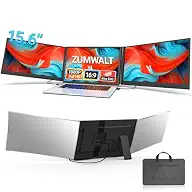 ZUMWALT Laptop Screen Extender | |
|---|---|---|---|---|
| Best for | Best overall | Best big screens | Best budget | Best slim design |
| Screen size | 14 inches | 15.6 inches | 14 inches | 15.6 inches |
| Resolution | 1920x1080 FHD | 1920x1080 FHD | 1920x1080 FHD | 1920x1080 FHD |
| Weight | 3.0 lbs | 3.9 lbs | Not listed | 4 lbs |
| Brightness | 300 nits (listing) | 300 nits | 300 nits | 280 nits |
| Connection | 2x USB-C, HDMI | 2x USB-C or USB-C plus HDMI | USB-C, HDMI, USB-A | 2x USB-C |
| Check price at Amazon | Check price at Amazon | Check price at Amazon | Check price at Amazon |
Vixtan Triple Laptop Screen ExtenderBest overallMost recommended by reviewers
Check price at Amazon SMISEACOW Triple Laptop Screen ExtenderBest big screens
 KEFEYA Dual Screen ExtenderBest budget
 ZUMWALT Laptop Screen ExtenderBest slim design


A light 14-inch extender that adds two screens with plug and play.
Most recommended by reviewers
Check price at AmazonPrices and availability on Amazon change often.
For most people searching for a multi screen for a laptop, the Vixtan 14-inch Triple Laptop Screen Extender is the pick we'd choose, mainly because it is the lightest of the 15.6-inch-class options at 3.0 lbs.
The Vixtan weighs 3.0 lbs, which is lighter than both 15.6-inch alternatives at 3.9 and 4 lbs, so it suits anyone who carries a second screen to cafes, hotels or client offices. It ships with every cable you need, including two USB-C cables, a USB-C to USB-A cable and an HDMI cable, and it works with Windows, Mac and Chrome without drivers. The 1920x1080 IPS panel offers 300 nits of brightness and a 12-month warranty.
The screen is 14 inches, a little smaller than the two 15.6-inch picks. The main catch is that M1, M2 and M3 MacBooks support only one extra screen without a DisplayLink adapter, so Apple laptop owners who want three displays will need to buy that adapter separately.
If it's not for you, the SMISEACOW suits anyone who wants larger 15.6-inch panels and a leather carry bag, while the KEFEYA is the best budget choice for a dual screen setup.
At 3.0 lbs and 0.3 inches thin, this is the easiest pick to carry while still giving you two extra screens. The 14-inch panel is a good middle size for reading documents and watching video calls.
Setup needs no drivers, and every cable needed comes in the box, which makes it a sensible first purchase for someone new to multi-screen setups.


Larger 15.6-inch screens in a slim aluminium body.
Prices and availability on Amazon change often.
If you want more room than the 14-inch options, the 15.6-inch panels here give you a bigger workspace without much more weight. The aluminum shell helps with heat and durability.
Check that your laptop has two video output ports before you buy, because listings warn that some laptops need an extra cable.


A lower-cost 14-inch extender that covers the basics.
Prices and availability on Amazon change often.
This is the cheapest way to add a second screen to a laptop. The 14-inch IPS panel gives a usable workspace for email and documents, but colour coverage is lower than the pricier picks.
Choose it if you need one extra screen for basic work and don't need accurate colours.
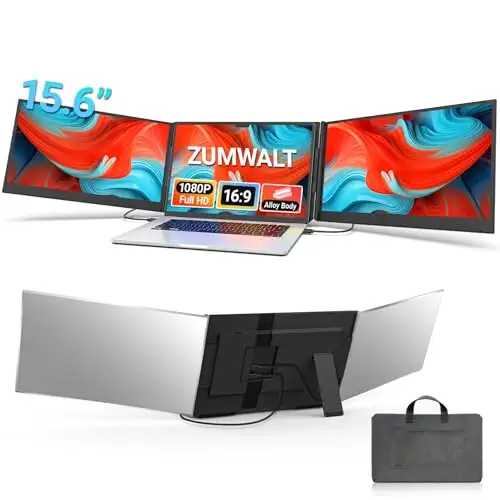


Slim aluminum shell with a 280-nit 15.6-inch display.
Prices and availability on Amazon change often.
The clip-free design is kind to laptop hinges, and the two-cable setup keeps the desk tidy. The 15.6-inch screens are a good size for side-by-side work.
Brightness is lower than the other picks, so it suits indoor desks more than bright rooms.
Travelers and students will do best with the lighter 14-inch Vixtan. Desk users who want bigger panels should look at the 15.6-inch SMISEACOW. Buyers on a budget can start with the KEFEYA 14-inch.
Check that your laptop has a full-featured USB-C port or an HDMI port. Some MacBooks with M1, M2, or M3 chips need a DisplayLink adapter or an H5 cable to run two extra screens.
The Vixtan 14" Triple Laptop Screen Extender is our top pick. It weighs 3.0 lbs and connects with plug and play, so it suits travel and everyday work.
This page covers portable screen extenders, not laptops. For editing, the SMISEACOW 15.6-inch screens give the most room to work.
For most people the 14-inch Vixtan or the 15.6-inch SMISEACOW are the strongest choices, depending on whether you put weight or screen size first.
Yes. Each pick connects by USB-C or HDMI, and most work with Windows and Mac without drivers. Check your ports first.
Connect the extender with the included cables, then choose extend, mirror, or portrait mode in your system display settings.
Why trust CheckedBest
Our shortlist is built from four Amazon listings that were in stock when checked. We compared screen size, weight, connection type and what buyers say about each setup.
Our expert team tests products when it is needed and researches online and in interviews. Every guide is fact-checked and edited by a real person.
The CheckedBest editorial team · Updated Nov 11, 2026
How we pickEditorial standardsAffiliate disclosureReport a mistake
We earn a commission when you buy through our links, at no extra cost to you. It never decides the winner.
