 ASUS VA27ECPSNBest overall
- Screen size
- 27 inches
- Resolution
- 1920 x 1080 (Full HD)
- Refresh rate
- Up to 75Hz
- USB-C power delivery
- Up to 65W
Most recommended by reviewers
Check price at Amazon
We earn a commission when you buy through our links, at no extra cost to you. How this works.
If you want one cable to connect your laptop, charge it and drive a screen, check that the monitor has USB-C with power delivery, enough watts for your laptop, and the ports you use every day. The ASUS 27-inch Docking Monitor is our top pick: it gives you Full HD, USB-C charging up to 65W, RJ45 and a USB hub at a sensible price.
The other two picks cover a bigger, more productive screen and a sharper, higher-resolution 27-inch option, so you can choose by size and resolution rather than by price alone.
1 ASUS VA27ECPSN | 2 Philips 34E1C5600HE | 3 ViewSonic VG2758-2K | |
|---|---|---|---|
| Best for | Best overall | Best for a big screen | Best for sharp text |
| Screen size | 27 inches | 34 inches, curved 1500R | 27 inches |
| Resolution | 1920 x 1080 (Full HD) | 3440 x 1440 (UltraWide QHD) | 2560 x 1440 (QHD) |
| Refresh rate | Up to 75Hz | 100Hz | 100Hz |
| USB-C power delivery | Up to 65W | Up to 65W | Up to 100W |
| Ports | HDMI, USB-C, DisplayPort, RJ45, USB hub | Not listed | USB-C, HDMI, DisplayPort, RJ45 |
| Check price at Amazon | Check price at Amazon | Check price at Amazon |
ASUS VA27ECPSNBest overallMost recommended by reviewers
Check price at Amazon Philips 34E1C5600HEBest for a big screen
 ViewSonic VG2758-2KBest for sharp text


A straightforward Full HD docking monitor with USB-C charging, RJ45 and a USB hub for a tidy single-cable desk.
Most recommended by reviewers
Check price at AmazonPrices and availability on Amazon change often.
The ASUS 27-inch Full HD docking monitor is our pick for most people who want one cable to power and connect a laptop without spending much.
A single USB-C cable carries video, data and up to 65W of charging, so the laptop plugs in and the desk setup is done. The RJ45 port and USB hub add wired networking and accessories, and the stand adjusts for height, tilt, swivel and pivot. Owner reports were not available for this pick, so these impressions come from its listed features.
Full HD resolution on a 27-inch screen looks softer than QHD, and text is the most noticeable place for that. If sharp text matters most, the ViewSonic VG2758-2K at 2560 x 1440 is the better fit, and it offers up to 100W of charging.
If it's not for you, the Philips 34-inch UltraWide suits people who want a wide curved screen with a built-in webcam and microphone, and the ViewSonic VG2758-2K suits those who want sharper text at the same 27-inch size.
This is the simplest way to turn a laptop into a proper desk setup. One USB-C cable carries the picture, the data and up to 65W of charging, and the built-in RJ45 port gives you a wired network connection without a separate dock.
The stand adjusts for height and angle, and the panel is IPS with a wide viewing angle, so the screen is comfortable to look at from the side.


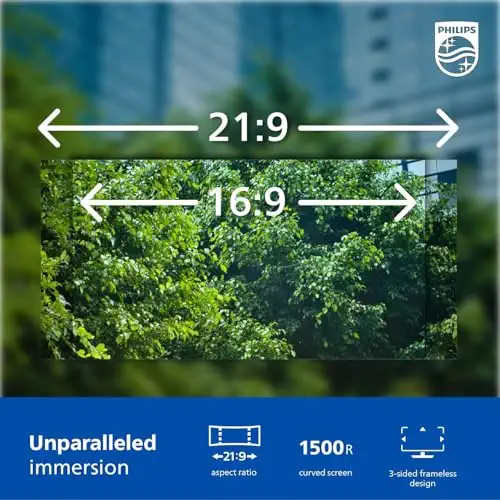


A curved 34-inch ultrawide with a built-in webcam, microphone and USB-C docking, good for multitasking and video calls.
Prices and availability on Amazon change often.
If your work involves spreadsheets, documents or video calls, the extra width saves constant window juggling. The 1500R curve keeps the edges within comfortable view.
The built-in webcam and microphone remove the need for separate peripherals, and the USB-C connection charges the laptop while you work.


A 27-inch QHD docking monitor with 100W USB-C charging and a 100Hz refresh rate for sharper text and smoother scrolling.
Prices and availability on Amazon change often.
For spreadsheets and reading, a QHD screen gives noticeably more room and crisper text than Full HD at 27 inches. One reader noted that the extra space is worth more than colour accuracy or refresh rate for spreadsheet work.
The 100W charging is a useful step up if your laptop draws more power than the ASUS allows.
Check your laptop's USB-C port first: it needs DisplayPort Alt Mode for video and enough wattage to charge the laptop through the monitor. Then choose the screen size and resolution that suits your work.
For one monitor, a docking monitor with USB-C is usually enough. For two monitors, check that your laptop can drive two external screens natively.
A docking monitor puts the dock's ports inside the screen, so you need only one device on the desk. A separate docking station gives you more flexibility but adds another box and cables.
The ASUS 27-inch Docking Monitor, the Philips 34-inch UltraWide and the ViewSonic 27-inch QHD all have USB-C docking built in, as listed above.
It depends on your laptop's ports. Expert reviewers often point to Thunderbolt docks for the most capable setups and to DisplayLink docks for wider compatibility.
Why trust CheckedBest
This shortlist is built from three Amazon listings that are in stock today, checked against expert reviews and owner discussions. Each pick is weighed on its docking ports, power delivery and screen size.
Our expert team tests products when it is needed and researches online and in interviews. Every guide is fact-checked and edited by a real person.
The CheckedBest editorial team · Updated Nov 11, 2026
How we pickEditorial standardsAffiliate disclosureReport a mistake
We earn a commission when you buy through our links, at no extra cost to you. It never decides the winner.
