 ASUS TUF Gaming VG27AQ3ABest overall
- Size
- 27 inch
- Resolution
- 2560 x 1440
- Refresh rate
- 180Hz
- Response time
- 1ms
Most recommended by reviewers
Check price at Amazon

Reviewed by
Content Reviewer & Fact-Checker
I’m an e-commerce content reviewer and fact-checker with a background in copywriting and over six years of professional experience.
We earn a commission when you buy through our links, at no extra cost to you. How this works.
A monitor can stand in for a TV when you play a PS5, and the right one depends on how much you want to spend and what you care about most. Here is what's available right now.
Our No. 1 pick is the ASUS TUF Gaming VG27AQ3A, a 27-inch 1440p monitor with a 180Hz refresh rate and built-in VRR support that works well with the PS5. The other picks cover a budget option and a premium OLED.
1 ASUS TUF Gaming VG27AQ3A | 2 Dell SE2726HG | 3 ASUS ROG XG27AQDMGR | |
|---|---|---|---|
| Best for | Best overall | Best budget | Best premium |
| Size | 27 inch | 27 inch | 26.5 inch |
| Resolution | 2560 x 1440 | 1920 x 1080 | 2560 x 1440 |
| Refresh rate | 180Hz | 240Hz | 240Hz |
| Response time | 1ms | 0.5ms | 0.03ms |
| Panel | Fast IPS | IPS | WOLED |
| HDR | HDR10 | Not listed | DisplayHDR 400, true 10-bit |
| Check price at Amazon | Check price at Amazon | Check price at Amazon |
ASUS TUF Gaming VG27AQ3ABest overallMost recommended by reviewers
Check price at Amazon Dell SE2726HGBest budget
 ASUS ROG XG27AQDMGRBest premium


A fast 1440p IPS gaming monitor with 180Hz, ELMB Sync and built-in VRR, marketed for PS5 and Xbox.
Most recommended by reviewers
Check price at AmazonPrices and availability on Amazon change often.
For most PS5 owners, the ASUS TUF Gaming VG27AQ3A is the monitor we'd pick, pairing a 27-inch 1440p panel with a 180Hz refresh rate.
The 180Hz refresh rate and 1ms response time give motion a crisp, smooth look, and ELMB Sync works alongside variable refresh rate to cut both blur and tearing. The Fast IPS panel covers 130% sRGB, and built-in speakers and HDR10 support add convenience. Compared with the 1080p Dell, its 1440p resolution gives a sharper image at 27 inches.
HDR is limited to HDR10 with no local dimming, so highlights won't be as punchy as on OLED or mini-LED screens. If you want the deepest blacks and richest HDR, the OLED ASUS ROG XG27AQDMGR is the step up, though it costs the most of the three.
If it's not for you, the Dell SE2726HG suits budget-minded players who want 240Hz and HDMI VRR at 1080p, while the ASUS ROG XG27AQDMGR OLED suits those who want premium HDR and a three-year warranty with burn-in coverage.
A 180Hz 1440p IPS panel gives smooth motion and sharp detail, and the listing states both FreeSync Premium and G-Sync compatibility for variable refresh rate.
It is marketed for PS5 and Xbox, and the built-in speakers add some convenience if you do not want a separate sound setup.


A low-cost 1080p IPS monitor with 240Hz, FreeSync Premium and HDMI VRR, a good match for PS5 on a tight budget.
Prices and availability on Amazon change often.
If the budget is the priority, this Dell gives you a high refresh rate and HDMI VRR for much less than the other picks. It is a fair way to get smooth PS5 play without spending much.
The trade-off is 1080p resolution, which looks softer than the 1440p monitors on a 27-inch screen.


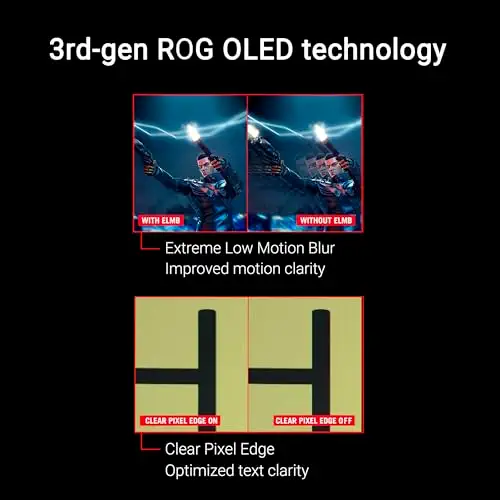

A premium 1440p OLED with 240Hz, a 0.03ms response time and burn-in protection, marketed for PS5 and Xbox.
Prices and availability on Amazon change often.
If you want the best picture and can pay for it, this OLED has the strongest image of the three. The 0.03ms response and 240Hz refresh make fast games look very clean, and the three-year warranty covers burn-in.
It costs a lot more than the others, so it only makes sense if picture quality is the main reason you are buying.
If you mostly play fast shooters or sports titles, a high refresh rate with VRR matters most, which points to the top pick or the budget Dell. If picture quality matters more and budget allows, the OLED is the strongest option.
The listings do not state PS5 upscaling behaviour, so we cannot confirm it from this research. Check the monitor's HDMI and resolution specs against your console settings.
Yes, the top pick lists both HDMI and DisplayPort inputs, so you can connect a PS5 and a PC to the same monitor and switch between them.
A monitor needs a refresh rate of at least 120Hz and HDMI VRR support to display 120 FPS properly. The top pick at 180Hz and the budget Dell at 240Hz both meet the refresh rate requirement.
The Dell SE2726HG is the budget pick. It offers a 240Hz refresh rate and FreeSync Premium at a much lower price, with 1080p resolution as the main compromise.
Meet the reviewer
Content Reviewer & Fact-Checker
I’m an e-commerce content reviewer and fact-checker with a background in copywriting and over six years of professional experience. My experience in creating and refining digital content allows me to assess product information, review written content for accuracy and clarity, and help ensure shoppers have access to reliable, informative and engaging content.
Why trust CheckedBest
We built this shortlist from expert reviews, retailer roundups and owner discussions about PS5 monitors. Each listing was checked to confirm it is currently in stock on Amazon.
Our expert team tests products when it is needed and researches online and in interviews. Every guide is fact-checked and edited by a real person.
The CheckedBest editorial team · Updated Nov 7, 2026
How we pickEditorial standardsAffiliate disclosureReport a mistake
We earn a commission when you buy through our links, at no extra cost to you. It never decides the winner.
