 Dell S2725QCBest overall
- Resolution
- 3840 x 2160 (4K)
- Refresh rate
- 120Hz
- Color
- 99% sRGB
- USB-C power delivery
- Up to 65W
Most recommended by reviewers
Check price at Amazon

Reviewed by
Content Reviewer & Fact-Checker
I’m an e-commerce content reviewer and fact-checker with a background in copywriting and over six years of professional experience.
We earn a commission when you buy through our links, at no extra cost to you. How this works.
A Mac mini needs a monitor that shows sharp text and accurate color without a lot of fuss. Most people want a 4K screen that connects with one USB-C cable and charges the machine at the same time.
Our top pick is the Dell S2725QC. It pairs 4K resolution and wide color with a single USB-C cable and suits most desks well. The other picks cover a slightly larger screen, an extra USB-C port with more power, and a more budget-friendly option.
1 Dell S2725QC | 2 Samsung ViewFinity S8 | 3 LG 27UP850K | 4 INNOCN 27C1U-D | |
|---|---|---|---|---|
| Best for | Best overall | Best for a bigger screen | Best for color | Best budget |
| Resolution | 3840 x 2160 (4K) | 3840 x 2160 (4K) | 3840 x 2160 (4K) | 3840 x 2160 (4K) |
| Refresh rate | 120Hz | 60Hz | 60Hz | 60Hz |
| Color | 99% sRGB | Not listed | 95% DCI-P3 (typical) | Delta E under 2 (listing) |
| USB-C power delivery | Up to 65W | 90W | Up to 90W | Not listed |
| Screen size | Not listed | 32 inches | Not listed | 27 inches |
| HDR | Not listed | Not listed | DisplayHDR 400 | HDR400 |
| Check price at Amazon | Check price at Amazon | Check price at Amazon | Check price at Amazon |
Dell S2725QCBest overallMost recommended by reviewers
Check price at Amazon Samsung ViewFinity S8Best for a bigger screen
 LG 27UP850KBest for color
 INNOCN 27C1U-DBest budget


A sharp 4K screen with one USB-C cable that charges your Mac mini and gives you a clean desk.
Most recommended by reviewers
Check price at AmazonPrices and availability on Amazon change often.
For most Mac mini owners, the Dell S2725QC is the monitor we'd pick, because its 4K panel, 120Hz refresh rate and single USB-C cable for both video and power make a tidy, capable desk setup.
The 27-inch 4K panel gives sharp text and plenty of room for a Mac mini desktop, and the 120Hz refresh rate with AMD FreeSync Premium makes scrolling and motion feel noticeably smooth. Running everything through one USB-C cable, with up to 65W of power delivery, keeps the desk clean. Its 99% sRGB coverage is a solid fit for everyday work and general viewing. One owner on the discussion boards has also been asking others about it, which suggests it is on plenty of shoppers' lists. Owners on r/macmini report that the USB-C version of the Dell S2725QC works well with the M4 Mac mini, with one owner running two units over USB-C without problems.
The color is sRGB only, so it is less suited to wide-gamut photo or video work. Its 65W charging also trails the 90W offered by the Samsung and LG picks, which matters if you want more power for a laptop-class machine. If you want a larger screen, the Samsung ViewFinity S8 is a good alternative, though it is capped at 60Hz.
If it's not for you, the Samsung ViewFinity S8 suits anyone wanting a bigger 32-inch 4K screen with 90W charging, while the LG 27UP850K suits buyers who care most about wide DCI-P3 color.
The Dell S2725QC gives you a 4K screen at a size that suits most desks, and its USB-C port can charge a Mac mini while carrying the picture. For everyday work, browsing and streaming, the text stays crisp and the colors look natural.
Owners in a Mac mini community recommend it as a good match for the machine, and it is one of the simplest ways to get a clean, tidy setup.


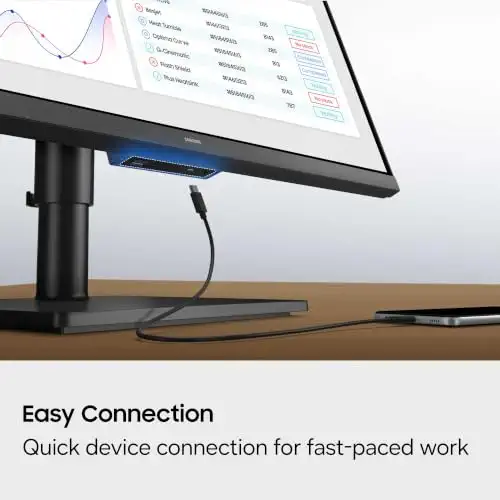

A larger 4K screen with USB-C charging, a built-in KVM switch and a stand that adjusts.
Prices and availability on Amazon change often.
The ViewFinity S8 gives you more room than a 27-inch screen while keeping 4K sharpness. Its 90W USB-C port charges a Mac mini and carries the picture, and the built-in KVM switch helps if you share the display between computers.
An expert review calls it a good budget choice as long as the room is not very bright, and it is a solid pick for a larger desk.


A 4K screen with wide color, built-in speakers and a USB-C port that charges the machine.
Prices and availability on Amazon change often.
The LG 27UP850K adds wider color coverage than a basic sRGB screen, which helps with photos and video. Its USB-C port delivers up to 90W, so one cable can power and connect a Mac mini.
It also has DisplayPort, HDMI and extra USB ports, so you can keep other devices plugged in.


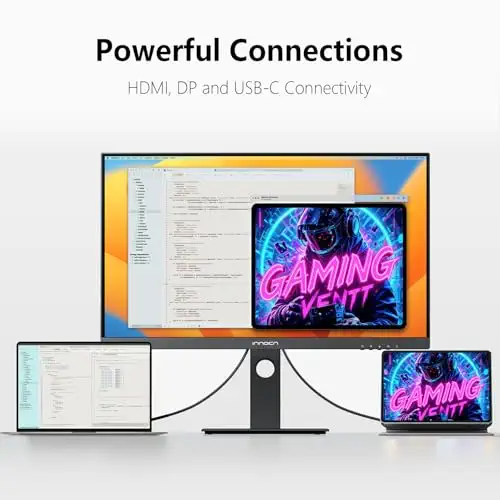


A low-cost 4K screen aimed at Mac mini and laptop users, with a stand that adjusts.
Prices and availability on Amazon change often.
The INNOCN 27C1U-D is a sensible way to get 4K without spending a lot. It has a USB-C port, HDMI and DisplayPort, and a stand you can set to a comfortable height.
Brightness is modest, so it suits an indoor office better than a sunny room. It is a good choice when cost matters most.
Look for 4K resolution for sharp text, a USB-C port that delivers power, and enough wide color for your work. A stand you can adjust helps with comfort.
If you need very high brightness for a sunny room or professional HDR editing, a different display may suit you better.
Any monitor with HDMI, DisplayPort or USB-C will work. For the simplest setup, choose a 4K monitor with a USB-C port that delivers power, so one cable handles both picture and charging.
The Dell S2725QC is our top pick for its 4K sharpness and single USB-C cable. A larger option like the Samsung ViewFinity S8 is a good choice if you want more screen space.
A 4K monitor gives sharper text at 27 inches and above. Smaller screens can work, but 4K matches the Mac's display quality more closely.
Meet the reviewer
Content Reviewer & Fact-Checker
I’m an e-commerce content reviewer and fact-checker with a background in copywriting and over six years of professional experience. My experience in creating and refining digital content allows me to assess product information, review written content for accuracy and clarity, and help ensure shoppers have access to reliable, informative and engaging content.
Why trust CheckedBest
Our shortlist is built from Amazon listings checked for stock, expert reviews and owner discussions about pairing a monitor with a Mac mini. We weigh resolution, color support, USB-C power delivery and price.
Our expert team tests products when it is needed and researches online and in interviews. Every guide is fact-checked and edited by a real person.
The CheckedBest editorial team · Updated Nov 7, 2026
How we pickEditorial standardsAffiliate disclosureReport a mistake
We earn a commission when you buy through our links, at no extra cost to you. It never decides the winner.
