 Satechi Mac mini Hub StandBest overall
- Ports
- 2 USB-A 10Gbps, 1 USB-A 2.0, SD card reader
- Storage
- M.2 NVMe SSD bay, up to 4TB (SSD not included)
- Warranty
- 2-year limited
Most recommended by reviewers
Check price at Amazon
 Satechi Mac mini Hub StandBest overallRunner-up2
 ACASIS 40Gbps Mac mini DockBest for speed and displays
We earn a commission when you buy through our links, at no extra cost to you. How this works.
A Mac mini has few ports on its back, so a dock adds the USB, display and storage connections you need without crowding your desk. Most buyers want one of three things: more USB ports, a built-in SSD bay, or extra monitor support.
Our shortlist covers the Satechi hub, the Acasis 40Gbps dock for heavy storage and multi-display work, the UGREEN dock for budget buyers, and the Acasis 2-bay dock for maximum capacity.
1 Satechi Mac mini Hub Stand | 2 ACASIS 40Gbps Mac mini Dock | 3 UGREEN Mac mini Dock Stand | 4 ACASIS 2-Bay Mac mini Dock | |
|---|---|---|---|---|
| Best for | Best overall | Best for speed and displays | Best budget | Best for maximum storage |
| Ports | 2 USB-A 10Gbps, 1 USB-A 2.0, SD card reader | 3 USB-A 10Gbps, SD/TF reader, 30W PD | 3 USB-A 10Gbps, 2 USB-A 5Gbps, 2 USB-C 10Gbps, SD/TF | 3 USB-A 10Gbps, HDMI 4K at 60Hz, SD/TF 3.0 |
| Storage | M.2 NVMe SSD bay, up to 4TB (SSD not included) | 2 M.2 NVMe bays at 20Gbps each, RAID 0 or RAID 1 | M.2 NVMe bay, up to 8TB (SSD not included) | 2 NVMe bays, up to 16TB (RAID 0) or 8TB (other modes) |
| Check price at Amazon | Check price at Amazon | Check price at Amazon | Check price at Amazon |
Satechi Mac mini Hub StandBest overallMost recommended by reviewers
Check price at Amazon ACASIS 40Gbps Mac mini DockBest for speed and displays
 UGREEN Mac mini Dock StandBest budget
 ACASIS 2-Bay Mac mini DockBest for maximum storage


A stand-style hub that adds front ports, an SD reader and an SSD bay without taking extra desk space.
Most recommended by reviewers
Check price at AmazonPrices and availability on Amazon change often.
The Satechi Mac mini Hub and Stand is our pick for most people, because it sits neatly under the Mac mini with only about 0.81 inches of added height and puts its ports where you can reach them.
The front-facing ports, including two USB-A 10Gbps ports and an SD card slot, are easy to get to, and the M.2 bay supports up to 4TB of NVMe storage. The dock is built from aluminum and comes with a two-year limited warranty, which is the longest of the three warranties we can see in the listings we reviewed. Its compact footprint, five inches square, makes it a tidy addition to a desk.
The internal SSD bay is limited to 10Gbps, so the fastest drives will run below their potential; reviewers measured a 980 Pro at about 850 to 900MB/s. The SSD is not included, and SSDs with heatsinks will not fit.
If it's not for you, the ACASIS 40Gbps dock suits heavy storage and multi-monitor work, while the UGREEN dock suits buyers who want the lowest price and the most ports.
The Satechi Stand & Hub gives the Mac mini a stand, front-facing USB and an SD slot, and a hidden NVMe bay in one piece. It sits beneath the Mac mini, so it does not take up extra desk space.
Choose it if you want a tidy setup with some storage expansion.


A high-speed dock with two SSD bays, dual display output and three 10Gbps USB-A ports.
Prices and availability on Amazon change often.
This dock is built for video editors, designers and streamers who need Mac Studio-style expansion. The two 20Gbps SSD bays and the dual DisplayPort outputs cover storage and screens in one unit.
It costs more than the Satechi, but it does far more. Expect RAID speeds to drop when two monitors are connected.


A low-cost dock with an NVMe bay, three 10Gbps USB-A ports and an SD reader.
Prices and availability on Amazon change often.
If you want an SSD bay and extra ports without spending much, the UGREEN dock is a good fit. Its 11 ports cover most everyday needs, and it costs the least of the group.
Do not expect it to match the speed of the 40Gbps models for large video files.
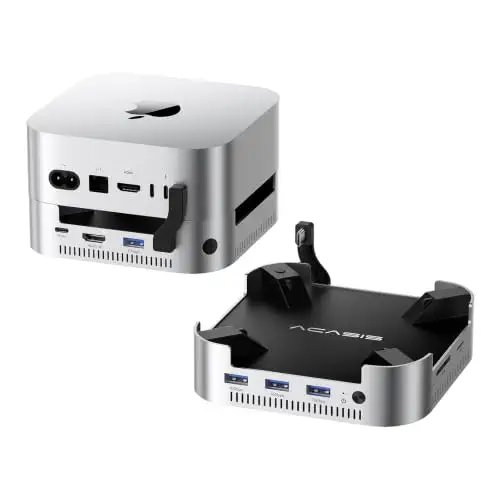


A dock that supports two SSDs for up to 16TB in RAID 0, with three USB-A 10Gbps ports and a 65W adapter.
Prices and availability on Amazon change often.
This is the dock for people who need the most space for a Mac mini. Two NVMe bays and an included 65W power adapter make it a steady choice for large libraries.
It has only one HDMI output, so pick it for storage rather than for multiple monitors.
If you mainly want a tidy desk and a few front ports, the Satechi stand is the simplest choice. If you need two displays and fast SSDs, pick the ACASIS 40Gbps dock. If you want the most storage, choose the 2-bay ACASIS. For the lowest price, the UGREEN is the entry point.
The Satechi Stand & Hub is our top pick for most people.
For the most storage, the 2-bay ACASIS dock supports up to 16TB in RAID 0. For speed, the ACASIS 40Gbps dock runs its two SSD bays at 20Gbps each.
No. The Mac mini works without one, but a dock adds USB ports, display outputs and SSD storage that the base machine does not have.
Yes. The docks on this page are built for the Mac mini, and most connect through one of its rear USB-C or Thunderbolt ports.
The Mac mini supports up to two external monitors, and a dock with DisplayPort lets you run a 4K 144Hz screen. A 4K 60Hz display is enough for most users.
We do not have a source for that claim in our research, so we do not recommend a model here. Check the current Mac mini lineup on Amazon for the latest models.
Why trust CheckedBest
four picks were chosen from listings that are in stock on Amazon right now, weighed against what expert and community sources say about each dock. The shortlist is built to cover different storage, display and budget needs.
Our expert team tests products when it is needed and researches online and in interviews. Every guide is fact-checked and edited by a real person.
The CheckedBest editorial team · Updated Nov 8, 2026
How we pickEditorial standardsAffiliate disclosureReport a mistake
We earn a commission when you buy through our links, at no extra cost to you. It never decides the winner.
