 Apple iPad Air 11-inchBest overall
- Chip
- Apple M4
- Display
- 11-inch Liquid Retina
- Storage
- 128GB (up to 1TB)
- Connectivity
- Wi-Fi 7 with Apple N1
Most recommended by reviewers
Check price at Amazon

Reviewed by
Commerce Writer & Editor
Luka Lucheski is a content writer and editor with more than five years of experience in commerce content and digital publishing.
We earn a commission when you buy through our links, at no extra cost to you. How this works.
Choosing an iPad for college comes down to what you will actually do with it: taking notes in lectures, reading PDFs, writing papers, or running heavier creative software. The right model should fit your budget without leaving you short on power for the next four years.
The iPad Air M4 is our top pick because it delivers near-Pro performance, a bright display, Wi-Fi 7 and Apple Intelligence at a price well below the Pro line. Our other picks cover a larger screen, a cheaper model for basic use and a budget option.
1 Air 11-inch | 2 Air 13-inch | 3 10th Generation | 4 Air 13-inch | |
|---|---|---|---|---|
| Best for | Best overall | Best big screen | Best budget | Best value big screen |
| Chip | Apple M4 | Apple M4 | A14 Bionic | Apple M4 |
| Display | 11-inch Liquid Retina | 13-inch Liquid Retina | 10.9-inch Liquid Retina | 13-inch Liquid Retina |
| Storage | 128GB (up to 1TB) | 128GB (up to 1TB) | 64GB or 256GB | 128GB (up to 1TB) |
| Connectivity | Wi-Fi 7 with Apple N1 | Wi-Fi 7 with Apple N1 | Wi-Fi 6 | Wi-Fi 7 with Apple N1 |
| Camera | 12MP front and back | 12MP front and back | 12MP front and back | 12MP front and back |
| Check price at Amazon | Check price at Amazon | Check price at Amazon | Check price at Amazon |
Apple iPad Air 11-inchBest overallMost recommended by reviewers
Check price at Amazon Apple iPad Air 13-inchBest big screen
 Apple iPad 10th GenerationBest budget
 Apple iPad Air 13-inchBest value big screen


The best all-round choice for most college students: a fast M4 chip, a bright Liquid Retina display and all-day battery in a size that fits in a backpack.
Most recommended by reviewers
Check price at AmazonPrices and availability on Amazon change often.
For most students, the Apple iPad Air 11-inch (M4) is the one we'd pick, because it brings Pro-level performance into a size that is easy to carry between classes.
Reviewers call the iPad Air the best value in the range, noting that it offers iPad Pro-level power without the usual Pro price tag. Multitasking and heavy video or photo editing run without visible limits, and the M4 chip, Apple Intelligence and Wi-Fi 7 make it well suited to a full semester of note-taking, research and streaming. It is also light enough to carry all day.
The main trade-off is the display. It runs at 60Hz, so it lags behind the 120Hz ProMotion screens on the Pro models. If smoothness matters more to you than price, that gap is the thing to weigh.
If it's not for you, the 13-inch Air suits students who want a bigger screen for split-screen work and reading, while the base iPad (10th Generation) suits those on a tight budget.
The 11-inch iPad Air with the M4 chip is the iPad most students should buy. It handles note-taking, reading, research and light video or photo editing without strain, and the Liquid Retina display is bright enough for lecture halls and dorm rooms.
Reviewers describe it as the iPad family most people should choose, and as offering near-Pro performance at a much lower price. The 128GB base storage is fine for most students, though the 256GB option gives more room for video and large apps.

The same M4 Air with a larger 13-inch screen, better for split-screen note-taking, reading textbooks and watching lectures side by side.
Prices and availability on Amazon change often.
If you want the same M4 Air but more screen real estate, the 13-inch model is the one. It makes split-screen note-taking and reading textbooks easier, and it suits students who mostly sit at a desk.
The trade-off is weight and price: it is the heaviest iPad on the list and costs noticeably more than the 11-inch version, so it's best for students who will not carry it around all day.


The most affordable new iPad that still supports Apple Pencil and the Magic Keyboard Folio, suited to note-taking, reading and browsing on a tight budget.
Prices and availability on Amazon change often.
The 10th-generation iPad is the cheapest way into a current iPad with a modern design. It's enough for notes, reading, streaming and light coursework, and it works with Apple Pencil and the Magic Keyboard Folio.
Expect limits: 4GB of RAM and 64GB of base storage mean heavier apps and large media files will push it. Choose it for basic college use, not demanding creative work.


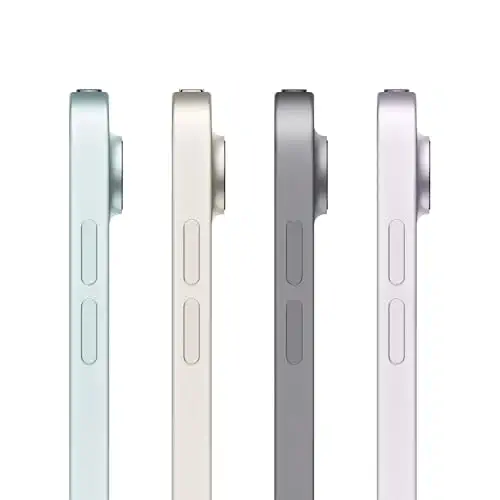
The 13-inch M4 Air in the Starlight finish, at a lower listed price than the Space Gray version, for students who want the big screen for less.
Prices and availability on Amazon change often.
This is the same 13-inch M4 Air, just in the Starlight finish and at a lower listed price than the Space Gray version. It's a good pick for students who want the larger screen without paying the highest listing price.
Like the other 13-inch model, it is heavier than the 11-inch iPad Air, so it suits a desk-based workflow better than carrying it everywhere.
Most students should choose the 11-inch iPad Air M4. Pick the 13-inch version if split-screen work matters more than portability, and the 10th-generation iPad if you need the lowest current price.
The iPad Air 11-inch with the M4 chip is the best overall choice for most college students. It balances performance, battery life and portability at a sensible price.
Any iPad with Apple Pencil support will do well for note-taking. The 11-inch iPad Air M4 is a strong pick, and the 13-inch version gives more writing space.
The 10th-generation iPad is the most affordable new model. It supports Apple Pencil and the Magic Keyboard Folio, though its 64GB storage and 4GB of RAM limit heavier use.
Yes. An iPad handles reading, notes, writing and streaming well, and works with a keyboard and Apple Pencil for more laptop-like use.
iPads usually stay useful for several years with regular updates, though battery wear and the level of software support will shape how long a specific model is worth keeping.
Meet the reviewer
Commerce Writer & Editor
Luka Lucheski is a content writer and editor with more than five years of experience in commerce content and digital publishing. He specializes in product reviews, buying guides, and comparison content. Over the years, he has edited and reviewed hundreds of articles across a wide range of categories, from tech and software to ecommerce and everyday consumer products.
Why trust CheckedBest
We built this shortlist from four in-stock Amazon listings, weighed against four expert reviews and a reader community discussion. Each pick is checked for current availability before it appears here.
Our expert team tests products when it is needed and researches online and in interviews. Every guide is fact-checked and edited by a real person.
The CheckedBest editorial team · Updated Nov 8, 2026
How we pickEditorial standardsAffiliate disclosureReport a mistake
We earn a commission when you buy through our links, at no extra cost to you. It never decides the winner.
