 Razer Blade 16Best overall
- GPU
- RTX 5070 Ti, 12GB GDDR7
- CPU
- Intel Core Ultra 9 386H
- Memory
- 32GB DDR5
- Storage
- 1TB SSD
Most recommended by reviewers
Check price at Amazon

Reviewed by
Commerce Writer & Editor
Luka Lucheski is a content writer and editor with more than five years of experience in commerce content and digital publishing.
We earn a commission when you buy through our links, at no extra cost to you. How this works.
Roblox runs on almost any laptop, but a smooth experience at high settings or heavy Roblox Studio work needs real hardware. Here are the laptops that handle it well, from budget builds to premium machines.
The Razer Blade 16 is our top pick: it combines strong performance, excellent battery life and a slim build. The rest cover budget, mid-range and creator needs.
1 Razer Blade 16 | 2 Lenovo LOQ RTX 4050 | 3 MSI Vector 16 HX | |
|---|---|---|---|
| Best for | Best overall | Best budget | Best mid-range |
| GPU | RTX 5070 Ti, 12GB GDDR7 | GeForce RTX 4050, 6GB GDDR6 | RTX 5070 Ti |
| CPU | Intel Core Ultra 9 386H | AMD Ryzen 5 7235HS | Intel Core Ultra 7 255HX |
| Memory | 32GB DDR5 | 16GB DDR5 | 16GB DDR5 |
| Storage | 1TB SSD | 512GB SSD | 512GB NVMe SSD |
| Display | 16-inch QHD+ OLED, 240Hz | 15.6-inch FHD, 144Hz | 16-inch FHD+, 144Hz |
| Check price at Amazon | Check price at Amazon | Check price at Amazon |
Razer Blade 16Best overallMost recommended by reviewers
Check price at Amazon Lenovo LOQ RTX 4050Best budget
 MSI Vector 16 HXBest mid-range


A premium 16-inch gaming laptop with an RTX 5070 Ti and a 240Hz OLED screen, ideal if you want the best experience across Roblox and beyond.
Most recommended by reviewers
Check price at AmazonPrices and availability on Amazon change often.
The Razer Blade 16 is our top pick for Roblox because it pairs an RTX 5070 Ti with a 240Hz OLED panel, giving you smooth high-FPS play on a laptop that is still slim enough to carry anywhere.
The Razer Blade 16 comes with an Intel Core Ultra 9 386H, 32GB of DDR5 memory and a 1TB SSD, so it has plenty of headroom for demanding games and multitasking. Its 16-inch QHD+ OLED display runs at 240Hz with a 0.2 ms response time, which makes fast-moving scenes look crisp. One reviewer called it the best gaming laptop they have tested, praising its slimmer chassis, improved cooling and battery life.
The main drawback is price. Reviewers note it costs $2,400 and that the price is hard to accept, well above most gaming laptops. If that budget is out of reach, the Lenovo LOQ offers a far lower entry point.
If it's not for you, the Lenovo LOQ (RTX 4050) suits budget shoppers, while the MSI Vector 16 HX AI (RTX 5070 Ti) gives strong graphics for less money with a larger, louder chassis.


A well-built budget gaming laptop that handles Roblox at high settings without a big bill.
Prices and availability on Amazon change often.


A mid-range performer with an RTX 5070 Ti and Intel Core Ultra 7, a good balance of price and speed.
Prices and availability on Amazon change often.
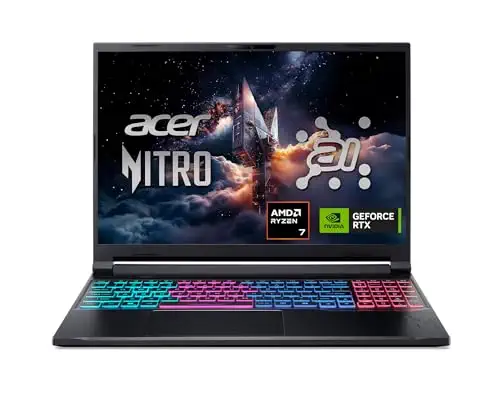


A capable mid-price laptop with 32GB of RAM, good for Roblox Studio multitasking.
Prices and availability on Amazon change often.


A recognised ROG gaming laptop with an RTX 5070 and Ryzen 9, strong on performance and cooling.
Prices and availability on Amazon change often.
Experts recommend a multi-core processor, at least 16GB of RAM for Roblox Studio, and a discrete GPU if you do 3D modelling. A 120Hz or higher display gives smoother visuals. Prioritise strong cooling to avoid frame drops from overheating.
If Roblox is the only game and you play casually, a budget laptop with an integrated GPU can run it fine. Reviewers note that a lighter laptop works for casual play, though heavy servers and custom maps will show lag.
The Razer Blade 16 is our top pick for overall performance. For a budget choice, the Lenovo LOQ is a well-reviewed option that handles Roblox well.
Most modern laptops can run Roblox, but performance varies. For high settings and smooth frame rates, a laptop with a discrete GPU and 16GB of RAM is more reliable.
16GB is enough for most players. If you use Roblox Studio with several windows open, 32GB gives you more room.
The Acer Nitro V 16S and the Lenovo Legion 5a both offer 32GB of RAM with capable GPUs, which suits Roblox Studio multitasking.
Meet the reviewer
Commerce Writer & Editor
Luka Lucheski is a content writer and editor with more than five years of experience in commerce content and digital publishing. He specializes in product reviews, buying guides, and comparison content. Over the years, he has edited and reviewed hundreds of articles across a wide range of categories, from tech and software to ecommerce and everyday consumer products.
Why trust CheckedBest
Our shortlist is built from expert reviews, owner discussions and the listings themselves, with every pick checked for current Amazon availability. Only products you can buy today make the list.
Our expert team tests products when it is needed and researches online and in interviews. Every guide is fact-checked and edited by a real person.
The CheckedBest editorial team · Updated Nov 8, 2026
How we pickEditorial standardsAffiliate disclosureReport a mistake
We earn a commission when you buy through our links, at no extra cost to you. It never decides the winner.
