 iContact Camera ProBest overall
- Resolution
- 3840×2160 at 30 fps
- Sensor
- 13MP
- Field of view
- 78°
- Mount
- Retractable arm, fits 20–30 in monitors
Most recommended by reviewers
Check price at Amazon

Reviewed by
Commerce Writer & Editor
Luka Lucheski is a content writer and editor with more than five years of experience in commerce content and digital publishing.
We earn a commission when you buy through our links, at no extra cost to you. How this works.
If you spend hours on video calls, a webcam sitting above your screen makes you look like you're gazing past the other person. An eye contact webcam mounts at screen center or on an arm that brings the lens level with your eyes, so the conversation feels more natural.
Our top pick is the iContact Camera Pro 4K, because its retractable arm brings the lens to eye level and it's built for 20 to 30 inch monitors. The other picks cover smaller laptop screens, a budget option and a clip-on design.
1 iContact Camera Pro | 2 iContact Camera ProMini | 3 Poeubmo 1080P Webcam | 4 Uyissykia NIVEOLI Webcam | |
|---|---|---|---|---|
| Best for | Best overall | Best for laptops | Best budget | Best clip-on |
| Resolution | 3840×2160 at 30 fps | 3840×2160 at 30 fps | 1080p | 4K at 60 fps |
| Sensor | 13MP | 13MP | Not listed | Not listed |
| Field of view | 78° | 78° | 70° | 73° |
| Mount | Retractable arm, fits 20–30 in monitors | Retractable arm, fits screens under 20 in | Suction cup, fits curved screens | Adjustable clip |
| Privacy | Secure Switch cuts camera and mic power | Secure Switch cuts camera and mic power | Not listed | Not listed |
| Microphone | Not listed | Not listed | Noise-reducing array, up to 8 m | Noise-canceling, up to 26 ft |
| Check price at Amazon | Check price at Amazon | Check price at Amazon | Check price at Amazon |
iContact Camera ProBest overallMost recommended by reviewers
Check price at Amazon iContact Camera ProMiniBest for laptops
 Poeubmo 1080P WebcamBest budget
 Uyissykia NIVEOLI WebcamBest clip-on


A 4K webcam on a retractable arm that brings the lens to eye level for 20 to 30 inch monitors.
Most recommended by reviewers
Check price at AmazonPrices and availability on Amazon change often.
For most desks with a standard 20 to 30 inch monitor, the iContact Camera Pro is the eye contact webcam we'd pick first.
Its retractable arm brings the lens up to eye level, so you look at the person on screen rather than down and away from them. The 13MP sensor records 3840×2160 video at 30 fps with a 78° field of view designed for one person, and it is plug-and-play and Zoom certified with no drivers needed. Owners on forums say the arm is what sets it apart, with one describing it as a really cool retractable arm that allows eye contact over video. Folding the arm up also cuts power to the camera and microphones through its Secure Switch, which gives you hardware-level privacy.
Quality is not uniformly praised, and one commenter reported horrible video quality along with a difficult refund process, so it's worth checking the return terms before you buy. The light mount holds the optional SoftLight, which is sold separately. It only fits monitors from 20 to 30 inches, so laptop users should look elsewhere.
If it's not for you, the ProMini suits laptops and screens under 20 inches, while the Uyissykia NIVEOLI suits anyone who wants 4K at 60 fps with a clip-on mount instead of an arm.
The iContact Camera Pro is the clearest answer to the eye contact problem. Its arm sits the lens level with the person on your screen, and it is designed for 20 to 30 inch monitors. The 13MP sensor records 4K at 30 fps, and the Secure Switch physically cuts power to the camera and microphones when the arm is folded up.
It works with Zoom, Teams, Meet and Webex, and needs no drivers.


The same eye-level arm design, sized for laptops and screens under 20 inches.
Prices and availability on Amazon change often.
If your screen is a laptop or a small display, the ProMini gives you the eye-level benefit at a lower price than the Pro. The arm is shorter and fits smaller screens, and it keeps the same 4K sensor and privacy switch as the larger model.
It is not a fit for 20 inch and larger monitors. For those, the Pro is the better buy.
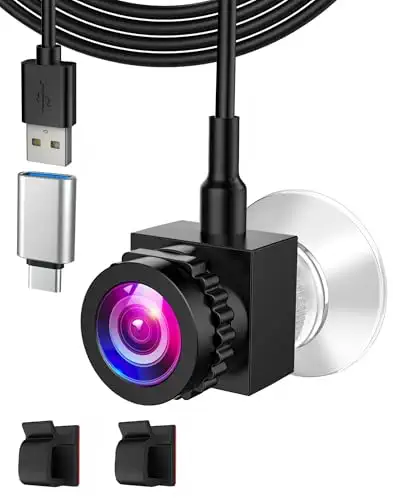


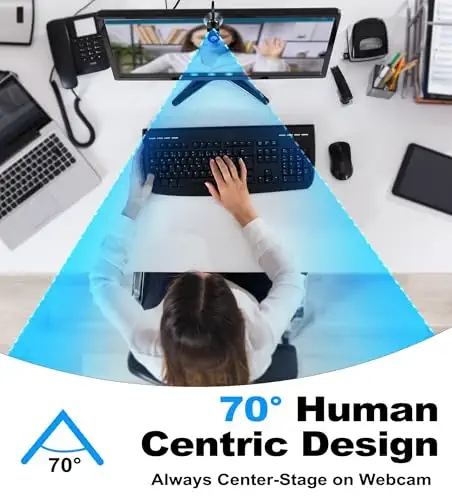

A low-cost 1080p webcam with suction mounting for centering on the top of your screen.
Prices and availability on Amazon change often.
If you want screen-center placement without spending much, the Poeubmo is the cheapest route. It mounts on the top edge of the monitor with suction cups and records 1080p with a 70° lens, which is enough for everyday calls.
It is a centre-screen camera rather than a retractable arm, so the lens sits at the top of the screen and not at eye level. Its listing does not state the sensor type.


A 4K webcam with a clip mount that works on monitors, shelves and tripods.
Prices and availability on Amazon change often.
The NIVEOLI is the choice if you want to place the camera in several spots. The adjustable clip grips monitors, shelves and tripods, and the 4K sensor records at 60 fps with autofocus across a wide range.
It is a clip-on, so it places the lens at the centre of the screen and not at eye level like the iContact arm.
A webcam above the screen points down toward your face, so you look like you're gazing away from the person you're talking to. An eye-level arm or a centre-mounted camera brings the lens closer to where you look, which is why these models exist.
If you mostly use a laptop with its built-in camera at a comfortable angle, an extra camera adds little. A basic 1080p webcam on top of your monitor is enough for most calls.
Not in the sense of tracking where you look. An eye contact webcam simply places the lens closer to eye level. Some software can adjust your gaze in video, but these webcams do not track eyes.
Place the lens at eye level, for example on a retractable arm or centred on the top of your screen. Eye level placement means the other person sees you looking at them.
For casual calls, 720p is usable but looks soft. Our picks are 1080p or 4K, which gives a sharper image for work calls and streams.
Look at the camera lens when speaking, and at the other person's face when listening. Most people find the lens sits close enough to the screen to feel natural.
Meet the reviewer
Commerce Writer & Editor
Luka Lucheski is a content writer and editor with more than five years of experience in commerce content and digital publishing. He specializes in product reviews, buying guides, and comparison content. Over the years, he has edited and reviewed hundreds of articles across a wide range of categories, from tech and software to ecommerce and everyday consumer products.
Why trust CheckedBest
Each pick is weighed on eye-level placement, video quality, audio, mounting and the owner comments we found.
Our expert team tests products when it is needed and researches online and in interviews. Every guide is fact-checked and edited by a real person.
The CheckedBest editorial team · Updated Nov 7, 2026
How we pickEditorial standardsAffiliate disclosureReport a mistake
We earn a commission when you buy through our links, at no extra cost to you. It never decides the winner.
