 Skylight Calendar 15-inchBest overall
- Screen size
- 15.4 inch touchscreen
- Sync
- Google, iCloud, Outlook, Cozi, Yahoo
- Subscription
- Optional Plus plan
- Price
- See live Amazon price
Most recommended by reviewers
Check price at Amazon

Reviewed by
Commerce Writer & Editor
Luka Lucheski is a content writer and editor with more than five years of experience in commerce content and digital publishing.
We earn a commission when you buy through our links, at no extra cost to you. How this works.
An electronic calendar hangs on the wall or sits on the counter so the whole household can see the week at a glance. The right one depends on how many people use it, whether you want to pay a monthly fee, and how big the screen needs to be to read from across the room.
Our top pick is the Skylight Calendar. It is the one most reviewers point to as a dedicated family calendar, with broad sync support and a polished setup. The other picks cover budget, no-subscription and larger-screen needs.
1 Skylight Calendar 15-inch | 2 Yemsd 15.6-inch Digital Calendar | 3 JSUSOU Magnetic Smart Digital Calendar | 4 Apolosign 21.5-inch Digital Calendar | 5 BSIMB 21.5-inch Digital Family Calendar | |
|---|---|---|---|---|---|
| Best for | Best overall | Best budget | Best for fridge mounting | Best for customisation | Best large screen |
| Screen size | 15.4 inch touchscreen | 15.6 inch touchscreen | 15.6 inch | 21.5 inch | 21.5 inch touchscreen |
| Sync | Google, iCloud, Outlook, Cozi, Yahoo | Google, Outlook, iCloud | Google, Outlook, iCloud | Google, iCloud, Outlook | Google, iCloud, Outlook, Cozi, Yahoo |
| Subscription | Optional Plus plan | None for core features | None stated by brand | None stated | Paid upgrade for Magic Import |
| Check price at Amazon | Check price at Amazon | Check price at Amazon | Check price at Amazon | Check price at Amazon |
Skylight Calendar 15-inchBest overallMost recommended by reviewers
Check price at Amazon Yemsd 15.6-inch Digital CalendarBest budget
 JSUSOU Magnetic Smart Digital CalendarBest for fridge mounting
 Apolosign 21.5-inch Digital CalendarBest for customisation
 BSIMB 21.5-inch Digital Family CalendarBest large screen


A 15-inch touchscreen family calendar that syncs with most major calendar services and is the device reviewers name most often.
Most recommended by reviewers
Check price at AmazonPrices and availability on Amazon change often.
Skylight Calendar is our top pick for families who want one shared hub that syncs with the calendars they already use.
The 15.4-inch touchscreen syncs with Google, iCloud, Outlook, Cozi and Yahoo, which covers most households without extra setup. Built-in chore charts and weekly meal planning sit alongside the family calendar, and it can either mount on a wall or sit on a counter. Owners on the product's reviews generally describe it as an easy, plug-and-play centerpiece for the kitchen or hallway.
The screen has narrow viewing angles, so the picture looks washed out when seen from the side or above, and the touchscreen can be slow to register taps when entering events. Features like Magic Import and the photo screensaver require the optional Plus plan, which adds a yearly cost.
If it's not for you, the Apolosign 21.5-inch suits households wanting a larger screen and customizable Android dashboard, while the Yemsd 15.6-inch works well if you want no subscription at all.
The Skylight Calendar is the most complete dedicated family display in this shortlist. Two expert sources recommend it, and it covers the calendar services most households already use.
Setup is straightforward and the chore chart and meal plan sit on the same screen as the schedule, so everyone sees the same information in one place.


A 15.6-inch wall calendar with chore charts, a photo frame mode and no subscription for core features.
Prices and availability on Amazon change often.
This is the lowest-cost route to a wall calendar that syncs with the main calendar services. Core features need no monthly fee, which matters if you want to avoid ongoing costs.
The 15.6-inch screen suits a kitchen or hallway, but check the room before buying if you plan to read it from across a larger space.
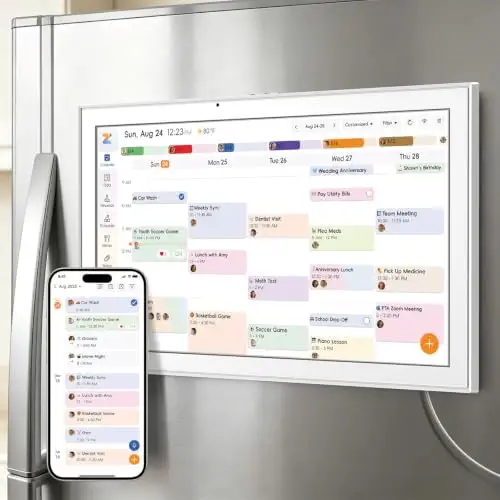


A 15.6-inch calendar with a magnetic back so it can sit directly on the fridge, plus stand and wall options.
Prices and availability on Amazon change often.
If the fridge is where your household already checks plans, this is the most practical mounting option in the shortlist. The magnetic back means no drilling.
It packs many functions into one interface, so expect a short learning curve before the chores and meal plans run smoothly.


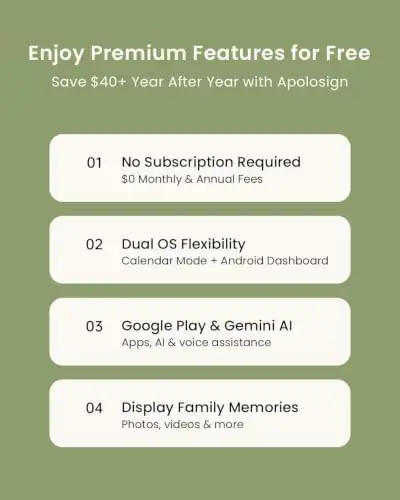


A 21.5-inch calendar that switches between a simple family calendar and a full Android dashboard with widgets and apps.
Prices and availability on Amazon change often.
This is the most flexible option here. Calendar mode keeps things simple for daily use, while Android mode lets you add widgets for weather, smart home controls and other apps.
Expect to spend time on setup if you want the dashboard features working properly.


A 21.5-inch family calendar with chores, meal plans, rewards and a 30-day money-back guarantee.
Prices and availability on Amazon change often.
If you need a calendar you can read from the other side of the room, the 21.5-inch screen is a real advantage. The guarantee and warranty make it lower-risk to try.
Read recent feedback on screen reliability before buying, since one expert review mentions flickering.
For a household of four or more, a 21.5-inch screen is easiest to read across a room. For a single person or a couple, a 15-inch model on a kitchen wall is usually enough. If you want to avoid monthly fees, look for models that state no subscription is needed for core features.
The Skylight Calendar is the most often recommended dedicated family calendar, with sync across the main calendar services and a chore chart. Expect to pay an optional yearly fee for advanced features.
The JSUSOU 15.6-inch model has a magnetic back that sits directly on a fridge, with stand and wall options if you want to move it.
The Yemsd 15.6-inch calendar and the Apolosign 21.5-inch model state that core calendar features need no monthly fee. Check the advanced features before you buy.
For a busy household, a 21.5-inch screen such as the BSIMB model is easier to read from across the room than a 15-inch display.
Meet the reviewer
Commerce Writer & Editor
Luka Lucheski is a content writer and editor with more than five years of experience in commerce content and digital publishing. He specializes in product reviews, buying guides, and comparison content. Over the years, he has edited and reviewed hundreds of articles across a wide range of categories, from tech and software to ecommerce and everyday consumer products.
Why trust CheckedBest
This shortlist is built from five Amazon listings that were in stock at the time of the check. We weighed what expert reviewers said about each product against its listed features, sync options and running costs.
Our expert team tests products when it is needed and researches online and in interviews. Every guide is fact-checked and edited by a real person.
The CheckedBest editorial team · Updated Nov 7, 2026
How we pickEditorial standardsAffiliate disclosureReport a mistake
We earn a commission when you buy through our links, at no extra cost to you. It never decides the winner.
