 Huion KAMVAS Slate 11Best overall
- Screen
- 10.95 in, 1920x1200, 90Hz
- Pen
- H-Pencil, 4096 pressure levels, 60° tilt
- Processor
- 8-core, 8GB RAM, 128GB storage
- Operating system
- Android 14
Most recommended by reviewers
Check price at Amazon

Reviewed by
Fact checker and editor
An experienced e-commerce editor and fact-checker specialising in product information, pricing, specifications and online retail content.
We earn a commission when you buy through our links, at no extra cost to you. How this works.
A drawing tablet with no computer needed lets you sketch, paint or take notes straight out of the box, with no cables and no laptop. If you want to draw on the sofa, in class or on the go, a standalone model is the simplest way to start.
The main trade-off in this category is screen size against portability: larger screens give you more room to work but weigh more and cost more to carry. The Huion KAMVAS Slate 11 gets that balance right, pairing a sharp, paper-like screen and a responsive pen with a fully self-contained Android system in a package you can easily take anywhere. Bigger screens, budget buys and a premium Wacom option also appear below.
1 Huion KAMVAS Slate 11 | 2 PicassoTab X14 | 3 PicassoTab A12 | 4 XPPen Magic Drawing Pad 12.2 | 5 Wacom MovinkPad 11 | |
|---|---|---|---|---|---|
| Best for | Best overall | Best large screen | Best mid-size | Best premium | Best premium brand |
| Screen | 10.95 in, 1920x1200, 90Hz | 14 in, laminated FHD | 12 in, laminated 2K | 12.2 in, 2160x1440, 97% sRGB | 11.45 in, matte etched glass |
| Pen | H-Pencil, 4096 pressure levels, 60° tilt | 4096-level active pen | Picasso Pen 3, 4096 levels, palm rejection | X3 Pro, 16384 pressure levels, 60° tilt | Pro Pen 3 slim, 8192 pressure levels, 3 buttons |
| Processor | 8-core, 8GB RAM, 128GB storage | Octa-core, 6GB RAM, 128GB storage (expandable to 1TB) | Octa-core, 6GB RAM, 128GB storage (expandable to 1TB) | Not listed | Not listed |
| Operating system | Android 14 | Not listed | Android 15 | Android 14 | Android 14 |
| Check price at Amazon | Check price at Amazon | Check price at Amazon | Check price at Amazon | Check price at Amazon |
Huion KAMVAS Slate 11Best overallMost recommended by reviewers
Check price at Amazon PicassoTab X14Best large screen
 PicassoTab A12Best mid-size
 XPPen Magic Drawing Pad 12.2Best premium
 Wacom MovinkPad 11Best premium brand


A slim, laminated 11-inch standalone tablet with a battery-free tilt pen, best for drawing and notes.
Most recommended by reviewers
Check price at AmazonPrices and availability on Amazon change often.
One catchIts 10.95-inch screen is smaller than a laptop and not ideal for large artwork.
The Slate 11 is the most complete standalone drawing tablet on this list. The laminated, anti-glare screen gives a paper-like feel and keeps the pen tip close to the image, which helps line accuracy. The H-Pencil is battery-free and supports tilt, so shading feels natural.
It is light, runs Android 14 and comes with drawing apps already installed, so you can start right away. Reviewers note it suits kids, students and hobbyists who want a portable, no-computer setup.


A 14-inch laminated standalone tablet for those who want the biggest canvas without a computer.
Prices and availability on Amazon change often.
If a small screen feels cramped, the X14 gives a generous 14-inch workspace that still runs on its own. The laminated display and 4096-level pen give smooth, controlled strokes, and the octa-core processor handles drawing apps and multitasking.
The package includes a case, drawing glove and screen protector, which adds practical value. It is best for those who draw large and do not mind a heavier tablet.


A 12-inch standalone drawing tablet with a 4096-level pen and a strong bundle of extras.
Prices and availability on Amazon change often.
The A12 sits between a pocket-sized model and the largest tablet here. Its 12-inch laminated screen is roomy enough for detailed work, while the Picasso Pen 3 supports palm rejection so a resting hand does not leave marks.
Android 15 and the bundled lifetime app upgrades add value for students and beginners who want to learn with tutorials.


A 12.2-inch standalone tablet with a 16K-level pen, 8GB RAM and a long-lasting battery.
Prices and availability on Amazon change often.
The Magic Drawing Pad is the choice for serious artists who want maximum pen sensitivity and memory. The X3 Pro stylus needs no charging and supports 60-degree tilt, and the 8GB RAM and 256GB storage make it a capable everyday machine.
The screen carries a TÜV eye-comfort certification and ships with three months of Clip Studio Paint, which is a meaningful extra for illustrators.


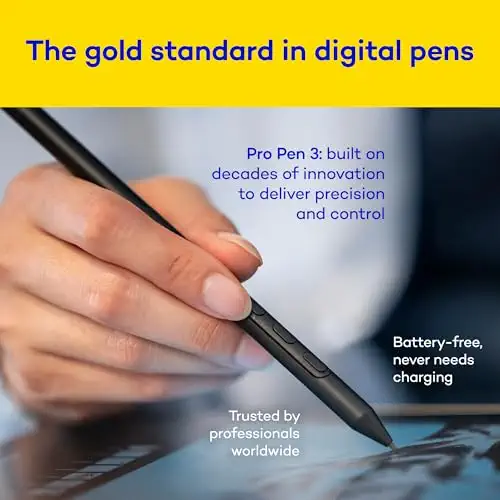
An 11.45-inch Android drawing tablet from Wacom with a Pro Pen 3 and a paper-like matte glass.
Prices and availability on Amazon change often.
Wacom is the brand most reviewers name as the gold standard for pen tablets, and the MovinkPad brings that pen quality to a standalone Android device. The Pro Pen 3 has 8192 pressure levels and comes with replacement nibs, and the matte etched glass gives a paper-like feel.
It weighs about 1.3 pounds and includes two years of Clip Studio Paint Debut, so it suits artists who want Wacom's reputation in a portable form.
Choose a smaller 10 to 11-inch model if you want to carry it everywhere, a 12 to 14-inch screen if you draw larger, and a premium brand if pen feel matters most. Budget models suit students and hobbyists.
Not if you buy a standalone drawing tablet. These run their own Android system and drawing apps, so no computer is needed. Pen display and pen tablets that connect to a computer or phone do need a connection.
The Huion KAMVAS Slate 11 is a good starting point, with a paper-like screen and a battery-free pen. The PicassoTab A10 is a compact alternative with beginner tutorials included.
The Huion KAMVAS Slate 11 is an option to consider if you want a budget drawing tablet that works without a computer. Check its current price and features on the product page before buying.
Yes, if you want to draw regularly or on the move. A standalone model avoids cables and monitors, and a stylus with pressure sensitivity makes lines more natural.
Standalone Android tablets here run drawing apps such as Clip Studio Paint and Ibis Paint. Illustrator is mainly used on a computer, so check each app's requirements before buying.
Meet the reviewer
Fact checker and editor
An experienced e-commerce editor and fact-checker specialising in product information, pricing, specifications and online retail content. Focused on ensuring accuracy, credibility and consumer confidence through clear, reliable and informative content.
Why trust CheckedBest
This shortlist is built from five Amazon listings that are in stock now, checked against expert reviews and reader discussions. Each pick is weighed on how it runs without a computer, its screen, its pen and its price.
Our expert team tests products when it is needed and researches online and in interviews. Every guide is fact-checked and edited by a real person.
The CheckedBest editorial team · Updated Nov 7, 2026
How we pickEditorial standardsAffiliate disclosureReport a mistake
We earn a commission when you buy through our links, at no extra cost to you. It never decides the winner.
