 JSAUX 6-in-1 DockBest overall
- HDMI
- 4K@120Hz
- Ethernet
- Gigabit
- USB
- 2x USB-A 3.2, 1x USB-C 3.2
- Charging
- 100W PD, bundled charger
Most recommended by reviewers
Check price at Amazon

Reviewed by
Commerce Writer & Editor
Luka Lucheski is a content writer and editor with more than five years of experience in commerce content and digital publishing.
We earn a commission when you buy through our links, at no extra cost to you. How this works.
If you're docking an ROG Xbox Ally X to play on a TV or monitor, the dock matters most for two things: whether it actually supports the console, and whether it can deliver enough power to run at full speed. The JSAUX 6-in-1 dock with its 100W charger is the one reviewers keep coming back to, because it names the Xbox Ally X and comes with the power brick it needs.
Below are five picks, from the bundled favourite to a cheaper dock for everyday desktop use and an official ASUS option with VRR. Each one notes what it does well and where it falls short.
1 JSAUX 6-in-1 Dock | 2 JSAUX 7-in-1 Dock | 3 iVANKY 8-in-1 Dock | |
|---|---|---|---|
| Best for | Best overall | Best for variable refresh | Best 4K@144Hz |
| HDMI | 4K@120Hz | 4K@120Hz, HDMI 2.1 | 4K@144Hz, HDMI 2.1 |
| Ethernet | Gigabit | Gigabit | 1Gbps |
| USB | 2x USB-A 3.2, 1x USB-C 3.2 | 2x USB-A 3.0, 1x USB-C 3.0 | 3x USB-A 3.0, 1x USB-C |
| Charging | 100W PD, bundled charger | 100W PD, charger not included | 100W PD |
| VRR/ALLM | Not supported | Supported | Not listed |
| Check price at Amazon | Check price at Amazon | Check price at Amazon |
JSAUX 6-in-1 DockBest overallMost recommended by reviewers
Check price at Amazon JSAUX 7-in-1 DockBest for variable refresh
 iVANKY 8-in-1 DockBest 4K@144Hz


The easiest all-in-one choice: it names the ROG Xbox Ally X and ships with the 100W charger it needs.
Most recommended by reviewers
Check price at AmazonPrices and availability on Amazon change often.
For a ROG Xbox Ally X owner who wants a dock that works out of the box, the JSAUX 6-in-1 with 100W Charger is our pick, since it names the Ally X in its compatibility list and includes the charger.
The bundled 100W charger means you won't see the low-power warning that many docks trigger, and the included adapter also keeps the Ally's 30W Turbo Mode running. The dock offers 4K@120Hz HDMI and Gigabit Ethernet, which covers most TV and wired-network needs at a sensible price. Its modular design lets you dock the handheld or detach the base and use it as a stand.
This version does not support VRR or ALLM, so it is less suited to TV play where those features smooth out frame rates. If you need them, the JSAUX 7-in-1 is the step up, though it does not include a charger.
If it's not for you, the JSAUX 7-in-1 suits buyers who want VRR and ALLM for TV gaming, and the iVANKY 8-in-1 suits those who need 4K@144Hz output for a high-refresh display.


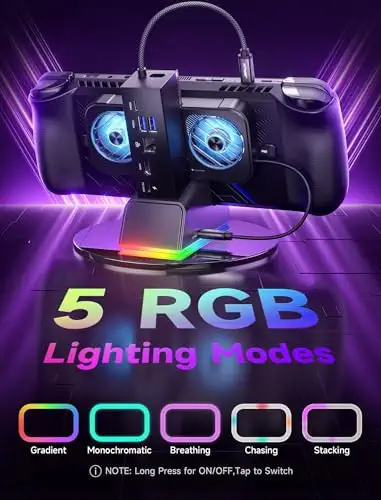
The step-up JSAUX dock for players who want VRR and ALLM on their TV.
Prices and availability on Amazon change often.


A fast 4K@144Hz option that also names the Xbox Ally X on its list.
Prices and availability on Amazon change often.


A feature-packed budget dock with RGB lighting and a card reader.
Prices and availability on Amazon change often.


A low-cost dock that covers the basics: 4K@120Hz, Ethernet and 100W charging.
Prices and availability on Amazon change often.
If you want the simplest setup, choose the bundled JSAUX 6-in-1. If your TV supports VRR, the 7-in-1 is worth the extra money. For a desk with lots of peripherals, the iVANKY 14-in-1 offers the most ports.
Yes. The ROG Ally X works with several third-party docks, but not every dock lists it. Choose one that names the ROG Xbox Ally X or ROG Ally X in its compatibility list.
The JSAUX 6-in-1 dock with its 100W charger is the most recommended choice, because it names the console and comes with the power it needs.
A dock with 100W PD charging, paired with a 100W adapter, gives full-speed charging. The JSAUX bundle includes the charger.
None of the docks in this list are eGPU docks. Look for a dedicated eGPU enclosure if that is what you need.
No. Handheld docks are made for specific devices, so check the compatibility list before buying.
Meet the reviewer
Commerce Writer & Editor
Luka Lucheski is a content writer and editor with more than five years of experience in commerce content and digital publishing. He specializes in product reviews, buying guides, and comparison content. Over the years, he has edited and reviewed hundreds of articles across a wide range of categories, from tech and software to ecommerce and everyday consumer products.
Why trust CheckedBest
This shortlist is built from five in-stock Amazon listings and a set of expert reviews and retailer guides. We weighed the dock's HDMI output, Ethernet, power delivery and whether it names the ROG Xbox Ally X in its compatibility list.
Our expert team tests products when it is needed and researches online and in interviews. Every guide is fact-checked and edited by a real person.
The CheckedBest editorial team · Updated Nov 8, 2026
How we pickEditorial standardsAffiliate disclosureReport a mistake
We earn a commission when you buy through our links, at no extra cost to you. It never decides the winner.
