 Apolosign 21.5-inch Digital CalendarBest overall
- Screen size
- 21.5 inch
- Subscription
- None required
- Calendar sync
- Google, iCloud, Outlook
- Operating system
- Android mode available
Most recommended by reviewers
Check price at Amazon
 Apolosign 21.5-inch Digital CalendarBest overallRunner-up2
 Cozyla Calendar Plus 2 24-inchBest for a full dashboard

Reviewed by
Fact checker and editor
An experienced e-commerce editor and fact-checker specialising in product information, pricing, specifications and online retail content.
We earn a commission when you buy through our links, at no extra cost to you. How this works.
A digital wall calendar can replace the paper one on your fridge, but many of the good ones charge a monthly fee to unlock their useful features. If you want a family hub that just works without another bill, this guide focuses on models where the calendar, chores, meals and photos are included upfront.
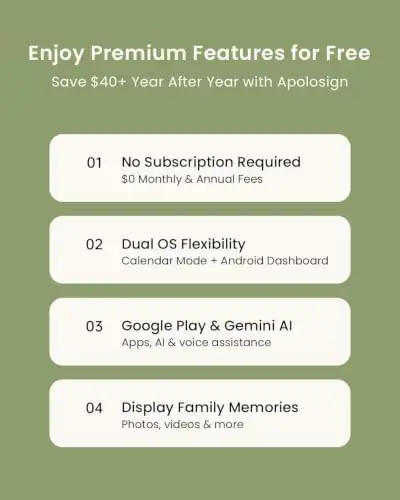
Start with the Apolosign 21.5-inch Digital Calendar. It has no annual fee and can run both a simple calendar mode and a full Android dashboard, so it covers most households without extra cost. Smaller budgets, tighter walls and bigger families each have a better fit elsewhere in this guide.
1 Apolosign 21.5-inch Digital Calendar | 2 Cozyla Calendar Plus 2 24-inch | 3 Yemsd 15.6-inch Digital Calendar | 4 SkyPeace 15.6-inch Digital Calendar | 5 Westsee 15.6-inch Digital Calendar | |
|---|---|---|---|---|---|
| Best for | Best overall | Best for a full dashboard | Best value for a large screen | Best for families with lots of activities | Best for a two-way-sync calendar |
| Screen size | 21.5 inch | 24 inch | 15.6 inch | 15.6 inch | 15.6 inch |
| Subscription | None required | Sync works without one | None required | None for everyday tools | Core functions free |
| Calendar sync | Google, iCloud, Outlook | Google, Apple, Outlook, Yahoo | Google, Outlook, iCloud | Google, Apple, Outlook, Yahoo, Cozi, TeamSnap | Two-way for Google, iCloud, Outlook |
| Check price at Amazon | Check price at Amazon | Check price at Amazon | Check price at Amazon | Check price at Amazon |
Apolosign 21.5-inch Digital CalendarBest overallMost recommended by reviewers
Check price at Amazon Cozyla Calendar Plus 2 24-inchBest for a full dashboard
 Yemsd 15.6-inch Digital CalendarBest value for a large screen
 SkyPeace 15.6-inch Digital CalendarBest for families with lots of activities
 Westsee 15.6-inch Digital CalendarBest for a two-way-sync calendar



A large, no-subscription family wall planner that doubles as an Android dashboard.
Most recommended by reviewers
Check price at AmazonPrices and availability on Amazon change often.
One catchThe large screen needs a wall with room for it, and some owners report the built-in assistant is less capable than a dedicated smart speaker.
The Dual Mode lets you keep the screen clean with just the calendar, or switch to an Android dashboard with widgets, apps and photo slideshows.
Family features like chore charts, shared grocery and meal lists, and Google Photos slideshows are included rather than locked behind a paywall. At 21.5 inches it suits a kitchen or hallway where the whole household can see it at once.


A 24-inch Android-based display with the Google Play Store for a fully custom family dashboard.
Prices and availability on Amazon change often.
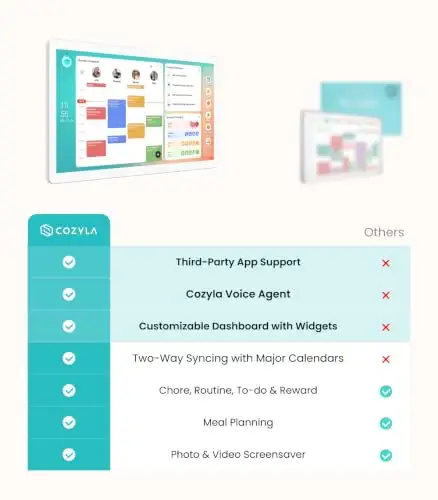
Because it runs a full Android environment, the Cozyla can take almost any widget or app.
The shared calendar and chore system work without a subscription, but expect some occasional app glitches, and the lack of USB-C power may matter if you want a single cable.


A 15.6-inch touchscreen family hub with calendar sync, chores and photos, and no subscription fees.
Prices and availability on Amazon change often.
At 15.6 inches this Yemsd model covers the mainstream family-calendar use case. It syncs with Google, Outlook and iCloud, handles chores and lists, and includes 32GB of storage for photos and videos sent from the free app.
The two-year warranty and 24/7 support add some reassurance for a device you will leave on the wall for years. The trade-off is a smaller screen and a brand with fewer owner reports than the bigger names.


A 15.6-inch calendar with two-way sync and a sports-friendly planner, without subscription fees.
Prices and availability on Amazon change often.
The two-way sync with Google, Apple, Outlook, Yahoo, Cozi and TeamSnap makes it a good fit for families with lots of activities, since sports and school schedules flow into one screen. Chore tracking, meal planning and shared lists come included without a monthly fee.
The price is higher than most rivals, and there is less owner feedback to judge how it holds up over years. It is best for families who will use the sync features every day.


A 15.6-inch calendar with two-way sync for Google, iCloud and Outlook, plus a 32GB photo frame.
Prices and availability on Amazon change often.
Westsee offers two-way sync with the three biggest calendar services, so adding an event on the screen or in the app updates everywhere. Schedules, tasks and rewards, meal plans and photo display all run without a subscription for the core functions.
The listing notes that optional advanced tools such as an AI Assistant may need a separate subscription in future, so check that before buying if you want to avoid any recurring cost.
Choose screen size by your wall space: a 15.6-inch screen fits a tighter wall, while a 21.5-inch screen works as a full command center. If you have young children, a larger screen is easier for them to read from across the room.
Confirm the calendar syncs with the service you already use, such as Google, iCloud, Outlook or Cozi. Check which features are included free, since some calendars keep their useful tools behind a monthly fee.
The Apolosign 21.5-inch is our top pick for families who want a large screen with no annual fees. Smaller budgets are covered by the 15.6-inch and 10.1-inch options.
Look for a model where calendar sync, chores and meal planning are included free. The Apolosign, Yemsd and SkyPeace picks all state that their everyday tools work without a monthly fee.
Yes. The Apolosign 21.5-inch Digital Calendar is a no-annual-fee option for a shared family display, and the Cozyla Calendar Plus 2 runs Android so you can add your own apps.
They are worth it if you want one shared view of the family schedule without opening phones. Choose one that syncs with your existing calendar and has no required subscription.
Yes, most models need Wi-Fi to sync your calendars and to receive photos from the companion app.
Meet the reviewer
Fact checker and editor
An experienced e-commerce editor and fact-checker specialising in product information, pricing, specifications and online retail content. Focused on ensuring accuracy, credibility and consumer confidence through clear, reliable and informative content.
Why trust CheckedBest
We built this shortlist from five Amazon listings that are in stock today, checked against expert reviews and owner discussions. Every pick is confirmed to have no required subscription for its core features.
Our expert team tests products when it is needed and researches online and in interviews. Every guide is fact-checked and edited by a real person.
The CheckedBest editorial team · Updated Nov 7, 2026
How we pickEditorial standardsAffiliate disclosureReport a mistake
We earn a commission when you buy through our links, at no extra cost to you. It never decides the winner.
