 Skylight Calendar 2Best overall
- Screen
- 15-inch Full HD touchscreen
- Memory
- 16GB, 4GB RAM
- Sync
- Google, iCloud, Outlook, Cozi, Yahoo
- Subscription
- Optional Plus plan for extras
Most recommended by reviewers
Check price at Amazon

Reviewed by
Commerce Writer & Editor
Luka Lucheski is a content writer and editor with more than five years of experience in commerce content and digital publishing.
We earn a commission when you buy through our links, at no extra cost to you. How this works.
A digital wall calendar puts the whole family's schedule, chores and meals in one place, so nobody has to ask what's happening next. Here is what's available right now.
The Skylight Calendar 2 is our top pick: a large, clear screen that syncs with the calendars your family already uses. Other picks suit tighter budgets, larger wall spaces or households that want no subscription.
1 Skylight Calendar 2 | 2 Dragon Touch Digital Calendar | 3 Apolosign Digital Calendar | 4 Yemsd Digital Calendar | |
|---|---|---|---|---|
| Best for | Best overall | Best no-subscription | Best for a big wall | Best budget |
| Screen | 15-inch Full HD touchscreen | 15.6-inch Full HD touchscreen | 21.5-inch anti-glare touchscreen | 15.6-inch touchscreen |
| Sync | Google, iCloud, Outlook, Cozi, Yahoo | Google, Outlook, iCloud | Google, iCloud, Outlook | Google, Outlook, iCloud |
| Subscription | Optional Plus plan for extras | None | None | Not listed |
| Warranty | Not listed | 2 years | Not listed | 2 years, 24/7 support |
| Check price at Amazon | Check price at Amazon | Check price at Amazon | Check price at Amazon |
Skylight Calendar 2Best overallMost recommended by reviewers
Check price at Amazon Dragon Touch Digital CalendarBest no-subscription
 Apolosign Digital CalendarBest for a big wall
 Yemsd Digital CalendarBest budget


The most established family calendar, with a clear 15-inch screen, chore chart and wide sync support.
Most recommended by reviewers
Check price at AmazonPrices and availability on Amazon change often.
The Skylight Calendar 2 is our top pick for a family that wants a calendar that works with the apps they already use and a screen that reads clearly from across the room.
The 15-inch Full HD touchscreen is easy to read at a glance in a busy kitchen or hallway, and it syncs with Google, iCloud, Outlook, Cozi and Yahoo calendars. Chore charts and meal planning come built in, so the calendar can handle more than appointments. One owner says their family loves it and that it is easy to use, even labeling chores with emojis for kids who cannot read yet.
Several features, including the photo screensaver and magic import, require the optional Plus subscription. One owner feels the yearly fee makes it not worth it unless you are comfortable paying for it. If you want no monthly cost, the Dragon Touch is the better fit.
If it's not for you, the Dragon Touch 15.6-inch suits families who want no subscription and a 2-year warranty, while the Apolosign 21.5-inch suits a large central wall and a no-subscription budget.
The Skylight Calendar 2 is the one most families come back to. It syncs with Google, iCloud, Outlook and Cozi, and its 15-inch screen reads easily from the kitchen.
Reader lists recommend it for busy households, and its chore chart and Snap Frames make it feel like part of the room.


A no-fee option that syncs with Google, Outlook and iCloud and works as a photo frame when idle.
Prices and availability on Amazon change often.
If you don't want a subscription, the Dragon Touch is the strongest choice here. It syncs Google, Outlook and iCloud, and the 2-year warranty adds reassurance.
One expert review noted that calendar, tasks and rewards can't all be viewed on one screen, so check that layout suits you.


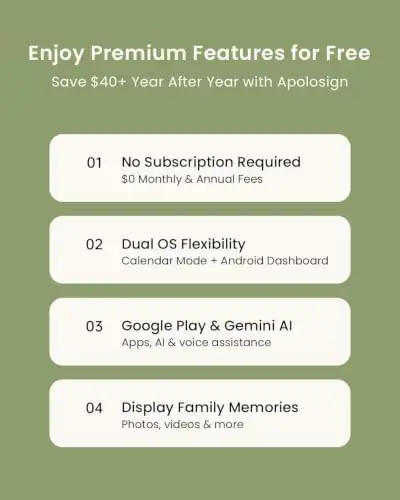


A large 21.5-inch smart wall planner with Android mode, widgets and a built-in voice assistant.
Prices and availability on Amazon change often.
The Apolosign suits a wall that needs a big, readable display. Its dual mode lets you switch between a clean calendar and a customisable dashboard.
Its built-in voice assistant and smart-home controls are useful extras for households that want more than a schedule.


A lower-priced family calendar with chore charts, meal planning and a 2-year warranty.
Prices and availability on Amazon change often.
If budget comes first, the Yemsd 15.6-inch gives you a family calendar with chore charts and meal planning for less. It syncs with the major calendar apps and has a 2-year warranty.
We could not find an expert review for this model, so treat its performance claims as the listing's own.
For most families, start with the Skylight Calendar 2 if sync and polish matter most. If you want to avoid a subscription, the Dragon Touch or a Yemsd model covers the basics.
Skylight's core calendar works best with its optional Plus plan. Reader discussions say the yearly fee is a dealbreaker for some, while subscription-free models cover similar daily needs.
For families juggling several schedules, a shared digital calendar can cut down on missed events and repeated reminders. It is most useful when everyone can add and see updates.
The Skylight Calendar 2 is our top pick for most families, because it syncs widely and has a clear 15-inch screen.
The Skylight and Apolosign models both sync with iCloud. Apple's own calendar app is for phones, not a wall display.
The Skylight Calendar 2, Dragon Touch and the Yemsd models all sync with one expert review.
The calendar works without one, but extras such as the photo screensaver and magic import need the optional Plus plan.
We could not confirm Cozyla from our research, so we can't compare it fairly here. The Apolosign is a strong large-screen option with no subscription.
Meet the reviewer
Commerce Writer & Editor
Luka Lucheski is a content writer and editor with more than five years of experience in commerce content and digital publishing. He specializes in product reviews, buying guides, and comparison content. Over the years, he has edited and reviewed hundreds of articles across a wide range of categories, from tech and software to ecommerce and everyday consumer products.
Why trust CheckedBest
Our shortlist is built from four Amazon listings checked for stock today, weighed against the features and cost of a family wall calendar. Owner discussions and one expert review shaped how we judged each pick.
Our expert team tests products when it is needed and researches online and in interviews. Every guide is fact-checked and edited by a real person.
The CheckedBest editorial team · Updated Nov 7, 2026
How we pickEditorial standardsAffiliate disclosureReport a mistake
We earn a commission when you buy through our links, at no extra cost to you. It never decides the winner.
