 HP Business Tower Desktop (Intel i5, 32GB, 1TB SSD)Best overall
- Processor
- Intel Core i5
- Memory
- 32GB RAM
- Storage
- 1TB SSD
- Operating system
- Windows 11 Home
Most recommended by reviewers
Check price at Amazon
 HP Business Tower Desktop (Intel i5, 32GB,Best overallRunner-up2
 Dell XPS 8960 Tower Business DesktopBest for heavier work

Reviewed by
Fact checker and editor
An experienced e-commerce editor and fact-checker specialising in product information, pricing, specifications and online retail content.
We earn a commission when you buy through our links, at no extra cost to you. How this works.
With business desktops, the main trade-off is between raw power and running cost: a bigger processor and more memory cost more up front and draw more power, while a leaner build keeps the budget down but limits how long it stays useful. The HP Business Tower Desktop (Intel i5, 32GB, 1TB SSD) gets that balance right for most offices, pairing a capable Intel i5 with 32GB RAM and a 1TB SSD for everyday work that should stay smooth for years.
A business desktop needs to be reliable, easy to upgrade and quick for everyday office work. Most people buying one want a machine that will last several years without fuss.
The HP Business Tower with 32GB RAM and a 1TB SSD is a dependable everyday workhorse. Other models in this guide offer a bigger jump in power, a Windows Pro option and a budget-friendly tower.
1 HP Business Tower Desktop (Intel i5, 32GB, 1TB SSD) | 2 Dell XPS 8960 Tower Business Desktop (i7-13700, RTX 4060 Ti) | 3 HP Premium Business Desktop (i5, 32GB, Windows 11 Pro) | 4 Dell Tower Desktop for Business (i3-14100, 16GB, 512GB SSD) | |
|---|---|---|---|---|
| Best for | Best overall | Best for heavier work | Best for Windows Pro security | Best budget |
| Processor | Intel Core i5 | Intel Core i7-13700 (16 cores) | Intel Core i5 (6 cores, up to 4.30GHz) | Intel Core i3-14100 (4 cores) |
| Memory | 32GB RAM | 32GB DDR5 | 32GB RAM | 16GB DDR5 |
| Storage | 1TB SSD | 1TB NVMe SSD + 1TB HDD | 1TB PCIe SSD | 512GB PCIe SSD |
| Operating system | Windows 11 Home | Not listed | Windows 11 Pro | Windows 11 Pro |
| Weight | 9.26 lbs | 22 lbs | 9.26 lbs | 12 lbs |
| Check price at Amazon | Check price at Amazon | Check price at Amazon | Check price at Amazon |
HP Business Tower Desktop (Intel i5, 32GB, 1TB SSD)Best overallMost recommended by reviewers
Check price at Amazon Dell XPS 8960 Tower Business Desktop (i7-13700, RTX 4060 Ti)Best for heavier work
 HP Premium Business Desktop (i5, 32GB, Windows 11 Pro)Best for Windows Pro security
 Dell Tower Desktop for Business (i3-14100, 16GB, 512GB SSD)Best budget


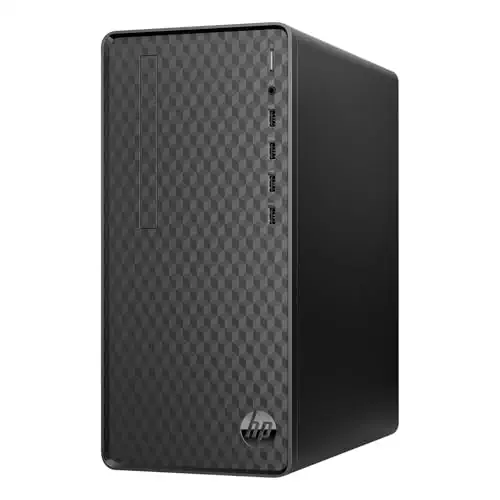

A business tower with 32GB RAM and a 1TB SSD for everyday office work.
Most recommended by reviewers
Check price at AmazonPrices and availability on Amazon change often.
One catchShips with Windows 11 Home, not Pro.
For most offices, this HP tower gives you the memory and storage to keep a full workday running smoothly. 32GB RAM means fewer slowdowns with spreadsheets, browser tabs and video calls open together, and the 1TB SSD keeps files and programs quick to reach.
It is a practical, no-frills office machine. Editorial guides tend to favour business towers from HP, Dell and Lenovo for their easy upgrades and on-site warranty options, and this one fits that profile.


A faster 16-core Dell tower for demanding office and creative work.
Prices and availability on Amazon change often.
If your business runs design, data or video tasks, the Dell XPS tower gives you a real step up in speed. The 13th-generation i7 and the RTX 4060 Ti graphics card handle demanding software that a basic office PC would struggle with.
It is the premium choice here. Reviewers praise the Dell XPS family for build quality and cooling, though the configuration you pick matters a lot for work versus gaming.


A business tower with Windows 11 Pro, 32GB RAM and a 1TB SSD.
Prices and availability on Amazon change often.
If the computer needs to join a company network or use remote desktop, Windows Pro is the version you want. Reader discussions often point out that Home edition can't do this, so this model saves you an upgrade later.
Otherwise it matches the everyday HP tower, with the same 32GB and 1TB setup and a security lock slot.


A budget Dell tower for a home office or small business.
Prices and availability on Amazon change often.
For email, documents and video calls, this Dell tower has enough power and comes with Windows 11 Pro. It is a sensible buy for a small team that doesn't need heavy processing.
Owners in budget-focused discussions say a wired Ethernet connection is the easiest route, since the model has no wireless card.
For everyday office work, the 32GB HP tower is the simplest choice. If you join a company network, Windows 11 Pro is worth paying for. For design or data work, the Dell XPS tower gives you the extra power.
The HP Business Tower with 32GB RAM and a 1TB SSD is our top pick for most offices. It has the memory and storage for everyday business work.
The Windows 11 Pro HP Premium tower suits small businesses that need network and remote access. It keeps the 32GB RAM and 1TB SSD for smooth daily use.
A tower with 16GB RAM and an SSD is enough for most home offices. The HP Business Tower with 16GB is a good pick if you want a lower price.
HP and Dell are the brands reviewers mention most for business towers, thanks to their upgradeable designs and warranty options. The HP Business Tower Desktop and Dell Tower Desktop for Business on this page are good places to start.
Aim for at least 16GB for productivity, and 32GB if you run many apps at once or do heavy work.
Meet the reviewer
Fact checker and editor
An experienced e-commerce editor and fact-checker specialising in product information, pricing, specifications and online retail content. Focused on ensuring accuracy, credibility and consumer confidence through clear, reliable and informative content.
Why trust CheckedBest
We started from four Amazon listings that are in stock and match a business desktop brief. We weighed reviewer picks from editorial sites and discussions from owners, and checked specs against the listings.
Our expert team tests products when it is needed and researches online and in interviews. Every guide is fact-checked and edited by a real person.
The CheckedBest editorial team · Updated Nov 8, 2026
How we pickEditorial standardsAffiliate disclosureReport a mistake
We earn a commission when you buy through our links, at no extra cost to you. It never decides the winner.
