 Apple Mac Studio M5 MaxBest overall
- Chip
- M5 Max, 18-core CPU, 32-core GPU
- Memory
- 36GB unified
- Storage
- 512GB
- Ports
- Four Thunderbolt 5, two USB-C, two USB-A, HDMI, SDXC
Most recommended by reviewers
Check price at Amazon
We earn a commission when you buy through our links, at no extra cost to you. How this works.
Video editing lives or dies on memory, storage and the graphics card, and the biggest trade-off is power versus portability: the most capable machines are desktops that you can't carry around. The Apple Mac Studio is the one to beat for most editors, and it is our top pick.
Our other two picks cover a Windows desktop with a dedicated RTX graphics card and a portable workstation laptop for editing on the move. Each suits a different kind of editor.
1 Apple Mac Studio M5 Max | 2 Dell Tower ECT1250 | 3 HP ZBook 8 G1i | |
|---|---|---|---|
| Best for | Best overall | Best Windows desktop | Best portable workstation |
| Memory | 36GB unified | 32GB DDR5 | 64GB DDR5 |
| Storage | 512GB | 1TB NVMe SSD | 2TB NVMe SSD |
| Ports | Four Thunderbolt 5, two USB-C, two USB-A, HDMI, SDXC | Not listed | Two Thunderbolt 4, HDMI 2.1, Ethernet |
| Processor | Not listed | Intel Ultra 7 265F, 20 cores | Intel Ultra 7 255H, 16 cores |
| Graphics | Not listed | NVIDIA RTX 5060, 8GB GDDR7 | NVIDIA RTX 500 Ada, 4GB |
| Check price at Amazon | Check price at Amazon | Check price at Amazon |
Apple Mac Studio M5 MaxBest overallMost recommended by reviewers
Check price at Amazon Dell Tower ECT1250Best Windows desktop
 HP ZBook 8 G1iBest portable workstation


The most powerful editing machine here, built for high-resolution timelines and heavy projects.
Most recommended by reviewers
Check price at AmazonPrices and availability on Amazon change often.
The Apple Mac Studio M5 Max is our pick for video editors who want a desktop that stays smooth on demanding timelines, and it is the one we would choose for this search.
Reviewers found 4K footage in Premiere Pro very smooth and responsive when scrubbing the timeline, and one noted it handled high-resolution editing effortlessly. The machine pairs an M5 Max chip with 18 CPU cores, a 32-core GPU and 36GB of unified memory, and it offers four Thunderbolt 5 ports plus USB-C, USB-A, HDMI and SDXC for drives and displays.
Nothing inside can be upgraded later, so memory, storage and GPU have to be chosen up front. The base configuration here has 512GB of storage, so you will likely want to plan for external drives. Reviewers also note the M4 Max version will handle most creative work unless you are rendering complex 3D or feature-length films.
If it's not for you, the Dell Tower Desktop ECT1250 suits Windows users who want a GPU-equipped desktop they can expand, and the HP ZBook 8 G1i suits editors who need a portable workstation with 64GB of memory.
For most editors, the Mac Studio is the strongest choice here. Reviewers found 4K footage in Premiere Pro very smooth, with the timeline responding well when scrubbing, and the chip has plenty of headroom for complex projects.
Apple machines cannot be upgraded, so the memory and storage you pick at checkout are the ones you keep. The 512GB storage is a good starting point but fills quickly with large video files, so plan on external drives.
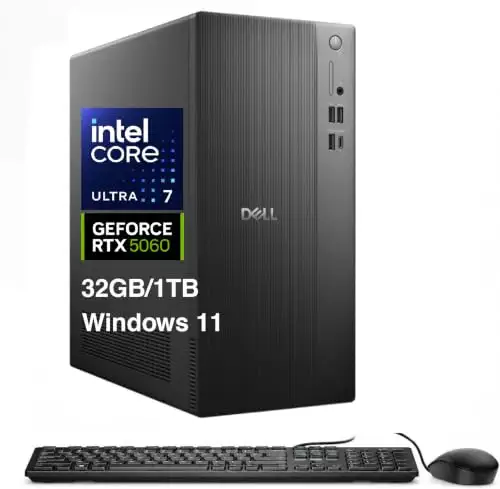


A Windows tower with a dedicated RTX 5060 and 32GB of memory, a sensible desktop for editing on a budget.
Prices and availability on Amazon change often.
This is the Windows option. It pairs a dedicated RTX 5060 with 32GB of memory, which meets the guidance for intensive projects, and a desktop has room to grow in ways a laptop does not. For a Windows editor who wants a tower, this is the sensible choice.
The 1TB storage is the first thing to add to, and the included peripherals are basic. Reviewers of similar Dell towers found performance strong and the fans quiet under load.


A 16-inch workstation laptop with 64GB of memory, for editing away from the desk.
Prices and availability on Amazon change often.
If you edit on the move, this is the workstation to look at. 64GB of memory and 2TB of storage are generous for a laptop, and the Thunderbolt ports let you drive an external 4K display for proper colour work.
The 4GB graphics card limits how far it goes with heavy effects and high-resolution timelines, so the desktop picks handle those better. It is the right machine when portability matters more than raw power.
Choose a desktop if you edit at a desk and want the most power for your money. Choose a laptop if you move between locations. Whichever you pick, aim for at least 16GB of memory with 32GB for heavy projects, and an SSD of at least 1TB.
The Apple Mac Studio is the strongest all-round choice, with fast and responsive 4K editing in reviewer testing. It cannot be upgraded later, so buy the memory and storage you need up front.
For a Windows desktop, the Dell Tower with an RTX 5060 and 32GB of memory is a sensible option. For the most power overall, the Mac Studio is the stronger desktop.
The Dell Tower is the most affordable of the three picks and still has a dedicated graphics card and 32GB of memory, so it is a good value starting point.
Look for at least 16GB of memory, a dedicated graphics card with 8GB or more of memory, and at least 1TB of SSD storage. The Mac Studio handles 4K timelines most smoothly of the three picks.
A gaming PC can edit video well, as long as it has enough memory and a capable graphics card. The Dell Tower has the graphics power to do this at a sensible price.
Why trust CheckedBest
This shortlist is built from the listings of three Amazon computers that are in stock now, weighed against editorial reviews and manufacturer guidance on memory, graphics, storage and display. Each pick is judged on what it does for editing, not on a single spec sheet.
Our expert team tests products when it is needed and researches online and in interviews. Every guide is fact-checked and edited by a real person.
The CheckedBest editorial team · Updated Nov 10, 2026
How we pickEditorial standardsAffiliate disclosureReport a mistake
We earn a commission when you buy through our links, at no extra cost to you. It never decides the winner.
