 HP OmniBook X FlipBest overall
- Processor
- AMD Ryzen AI 5 430
- Memory
- 16GB LPDDR5X
- Storage
- 512GB SSD
- Display
- 14-inch 2K OLED touchscreen
Most recommended by reviewers
Check price at Amazon
We earn a commission when you buy through our links, at no extra cost to you. How this works.
Before you buy a college computer, check two things: how much you will carry it each day, and whether your major needs a powerful graphics card. For most students, a light laptop with all-day battery life is the right starting point. Our top pick, the HP OmniBook X Flip 2-in-1, combines a sharp OLED touchscreen, pen support for notes, and a light frame that works in class and on the couch.
The other four picks cover a Mac, a larger Windows laptop, a budget option, and a gaming laptop for heavier coursework.
1 HP OmniBook X Flip | 2 Apple MacBook Neo | 3 Lenovo Yoga Slim 7i | 4 HP Pavilion Plus 14 | 5 ASUS TUF Gaming A14 | |
|---|---|---|---|---|---|
| Best for | Best overall | Best Mac for students | Best for creative work | Best large screen | Best gaming laptop for college |
| Processor | AMD Ryzen AI 5 430 | Apple A18 Pro | Intel Core Ultra 7 355 | AMD Ryzen 5 7540U | AMD Ryzen AI Max+ 392 |
| Memory | 16GB LPDDR5X | 8GB unified | 32GB LPDDR5X | 16GB LPDDR5 | 32GB LPDDR5X |
| Storage | 512GB SSD | 256GB SSD | 1TB SSD | 512GB SSD | 1TB SSD |
| Display | 14-inch 2K OLED touchscreen | 13-inch Liquid Retina | 14-inch 2.8K OLED, 1100 nits | 14-inch WUXGA 16:10 | 14-inch WQXGA 165Hz |
| Check price at Amazon | Check price at Amazon | Check price at Amazon | Check price at Amazon | Check price at Amazon |
HP OmniBook X FlipBest overallMost recommended by reviewers
Check price at Amazon Apple MacBook NeoBest Mac for students
 Lenovo Yoga Slim 7iBest for creative work
 HP Pavilion Plus 14Best large screen
 ASUS TUF Gaming A14Best gaming laptop for college


A light 2-in-1 with an OLED touchscreen and pen support, built for note-taking.
Most recommended by reviewers
Check price at AmazonPrices and availability on Amazon change often.
The HP OmniBook X Flip 2-in-1 14 is our best overall pick for college, pairing a sharp OLED touchscreen with pen support for note-taking.
The 14-inch 2K OLED touchscreen is the standout, and its 2-in-1 design lets you write notes with a pen in class and switch to a relaxed tablet mode on the couch. At 3.09 pounds it is easy to carry all day, and its claimed battery life of up to 24.5 hours is the longest of any pick here. Reviewers describe it as lightweight, well-built, and equally at home in a lecture hall or on a couch.
The laptop has no HDMI port, so connecting to some classroom projectors will need an adapter. Its large trackpad can also occasionally struggle with palm rejection while you type. It is heavier than the Lenovo Yoga Slim 7i Aura Edition at 2.15 pounds, so ultralight shoppers may prefer that one.
If it's not for you, the Apple MacBook Neo suits students who want a Mac with long battery life on a tighter budget, while the Lenovo Yoga Slim 7i Aura Edition suits creative majors who want 32GB of memory and a very bright OLED display.
A sharp OLED touchscreen and pen support make this a strong note-taking machine. At 3.09 lb it is easy to carry between classes, and the claimed battery life covers a full school day.
The trade-off is the missing HDMI port and an occasionally finicky trackpad. If you need to plug into a projector often, look at the Lenovo Slim 3i instead.


A durable Mac with all-day battery life at a lower price than the Pro line.
Prices and availability on Amazon change often.
The MacBook Neo is the easiest Mac to recommend for a student who mostly writes papers, browses, and joins video calls. Battery life is the standout, and the aluminum body handles a backpack well.
If your major runs heavy software, such as engineering or 3D work, choose a machine with more memory and a stronger GPU instead.


A premium OLED laptop with 32GB memory and a bright 2.8K screen.
Prices and availability on Amazon change often.
With 32GB of memory and a 2.8K OLED panel, this is the strongest pick for students in design, photography, or video. It stays light at 2.15 lb.
Most students will not need this much power, so it is best for majors that use demanding software.


A 14-inch WUXGA laptop with 16GB memory and a taller 16:10 display.
Prices and availability on Amazon change often.
The 16:10 display is taller than a standard widescreen, so you scroll less when reading papers or spreadsheets. With 16GB of memory it handles browser tabs, documents, and video calls comfortably.
It is a practical all-rounder if you want a Windows laptop without paying for the latest processor.

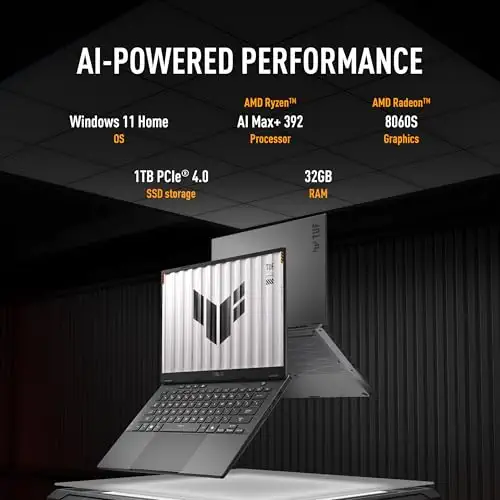


A gaming-class laptop that is still light enough for class.
Prices and availability on Amazon change often.
If your course uses CAD, simulation, or you game in your spare time, this is the strongest machine on the list. A 165Hz display and 32GB memory handle demanding work and play.
The price is high, so only buy it if your workload needs it.
Start with where you will use it. If you carry it every day, weight and battery life matter most. If your major uses CAD, simulation, or video editing, a stronger graphics card and more memory are worth paying for. Check your course's software requirements before you buy, especially if you need Windows-only programs.
For most students, a light laptop with all-day battery life and 16GB of memory is the right choice. Our top pick, the HP OmniBook X Flip 2-in-1, is a strong all-rounder.
A budget laptop with 8GB or more memory is enough for browsing, writing, and video calls. Look for one that includes Office 365 if you need the software.
The ASUS TUF Gaming A14 is the strongest choice here, with a powerful processor, a 165Hz display, and better battery life than most gaming laptops.
Eight gigabytes is the minimum for everyday schoolwork. Choose 16GB if you run several programs at once or use creative or engineering software.
Financial aid can sometimes cover a laptop as a school expense. Check with your school's financial aid office about what is included in your cost of attendance.
Why trust CheckedBest
Our shortlist is built from five Amazon listings that were in stock at the time of writing. We weighed the picks against published expert reviews and what students and owners say about battery life, portability, and everyday performance.
Our expert team tests products when it is needed and researches online and in interviews. Every guide is fact-checked and edited by a real person.
The CheckedBest editorial team · Updated Nov 10, 2026
How we pickEditorial standardsAffiliate disclosureReport a mistake
We earn a commission when you buy through our links, at no extra cost to you. It never decides the winner.
