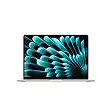
Lenovo Chromebook Plus 14Best overall
- Processor
- MediaTek Kompanio Ultra 910
- Display
- 14-inch 2K OLED touchscreen, 16:10
- Memory
- 16GB LPDDR5X
- Storage
- 256GB UFS
Most recommended by reviewers
Check price at Amazon

Reviewed by
Fact-checker and content editor
Experienced researcher and AI content editor, having worked on various merchant websites.
We earn a commission when you buy through our links, at no extra cost to you. How this works.
Choosing a Chromebook comes down to how you will use it: a student carrying it between classes, a parent setting one up for a child, or someone who mostly needs a dependable machine for browsing, documents and video calls. Prices vary a lot, so the right model is the one that matches your daily routine and budget.
Our top pick is the Lenovo Chromebook Plus 14, which reviewers consistently call the fastest Chromebook they have tested. It suits people who want a premium, quiet machine with a striking OLED screen. The other two picks cover a budget student laptop and a lightweight, portable option for kids.
1 Lenovo Chromebook Plus 14 | 2 Acer Chromebook 15.6 | 3 Acer Chromebook Spin 312 | |
|---|---|---|---|
| Best for | Best overall | Best budget | Best for kids and portability |
| Processor | MediaTek Kompanio Ultra 910 | Dual-core Intel Celeron | Intel Core i3-N305 |
| Display | 14-inch 2K OLED touchscreen, 16:10 | 15.6-inch FHD (1920x1080) | 12.2-inch WUXGA touchscreen, 16:10 |
| Memory | 16GB LPDDR5X | Not listed | 8GB LPDDR5 |
| Storage | 256GB UFS | 64GB | 128GB eMMC |
| Weight | 2.78 lb (expert review) | Not listed | 2.84 lb |
| Battery | About 15 hours 45 minutes in testing (one expert review) | Listed at 10 hours | Not listed |
| Check price at Amazon | Check price at Amazon | Check price at Amazon |
Lenovo Chromebook Plus 14Best overallMost recommended by reviewers
Check price at Amazon Acer Chromebook 15.6Best budget
 Acer Chromebook Spin 312Best for kids and portability


The fastest, quietest Chromebook in this group, with a bright 2K OLED touchscreen. Best for people who want a premium machine that runs without a fan.
Most recommended by reviewers
Check price at AmazonPrices and availability on Amazon change often.
For most people searching for the best Chromebook in 2026, the Lenovo Chromebook Plus 14 OLED is the pick we'd choose, since it pairs a stunning 2K OLED touchscreen with the fastest performance reviewers have seen on a Chromebook.
Owners and reviewers consistently point to how quiet and fast this machine is, with a fanless MediaTek Kompanio Ultra 910 processor, 16GB of LPDDR5X memory and 256GB of UFS storage. One reviewer called it their favorite Chromebook ever made, and reported about 15 hours and 45 minutes of battery life in testing. The 14-inch 2K OLED display at 16:10 looks sharp, and the 2.78 pound body stays easy to carry. Owners on r/chromeos report strong speakers, long battery life and fast performance on the Lenovo Chromebook Plus 14.
The price is high for most buyers, and it is more machine than a simple web laptop needs. If you only browse and write email, you can spend far less and still get a capable Chromebook.
If it's not for you, the Acer Chromebook 15.6-inch FHD suits budget shoppers who want a big screen and full keyboard, while the Acer Chromebook Spin 312 2-in-1 suits kids and anyone who wants a light convertible.
Reviewers at one expert review and one expert review both put this Lenovo at the top of their lists, and one expert review calls it the best Chromebook it has ever tested. The MediaTek Kompanio Ultra chip handles Android apps better than the Intel machines the reviewers have used, and the device stays silent under load.
The OLED display is the first thing people notice. It is sharp and vivid, and it makes video and photos look their best. At 2.78 pounds it is easy to carry, and the battery held up for long working days in testing.


A big, affordable laptop for students and home use, with a full-size keyboard and numeric keypad. Best for buyers who want a large screen on a tight budget.
Prices and availability on Amazon change often.
This is the easiest way to get a full Chromebook without spending much. The large 15.6-inch screen gives you room for two windows side by side, and the full-size keyboard with a numeric keypad helps with spreadsheets and homework.
The processor and 64GB of storage are the limits. It is built for browsing, documents, classes and streaming, not for heavy multitasking. If you need more power, step up to one of the Chromebook Plus models.


A light, compact 2-in-1 that suits small hands and school bags. Best for kids in grades K-8 and anyone who wants a portable tablet-style laptop.
Prices and availability on Amazon change often.
Reviewers single this Acer out as the ideal Chromebook for younger students. The 12.2-inch body is easy for small hands to handle, and the 360-degree hinge lets kids switch between laptop and tablet modes without fuss.
It is not a powerhouse. The screen is dimmer than we would like, and the keys feel soft for long typing sessions. For a child's schoolwork and web use, though, it is a practical and durable choice.
Chromebook Plus models get more processing power, Google AI features and access to the advanced version of Gemini, so they are worth a look if you can afford them. For heavy multitasking, reviewers recommend at least 16GB of memory. If you type heavily, prioritize keyboard quality.
Yes, for web-based work, school and everyday tasks. They are quick to start, secure and inexpensive. If you need specialized desktop software, a Windows or Mac laptop may suit you better.
The Acer Chromebook Spin 312 is a good choice for younger students because it is light and affordable. Older students who need more power may prefer the Lenovo Chromebook Plus 14.
Most Android apps run on Chromebooks through Google Play, and reviewers say the Chromebook Plus models handle them especially well. Some apps may not be available, so check before you buy.
Many everyday tasks work offline, such as editing documents, which sync once you reconnect. Streaming and cloud apps need an internet connection.
Meet the reviewer
Fact-checker and content editor
Experienced researcher and AI content editor, having worked on various merchant websites. Experience in AI transcription, prompt engineering and taxonomy mapping for search engines.
Why trust CheckedBest
Every pick below is available to buy today.
Our expert team tests products when it is needed and researches online and in interviews. Every guide is fact-checked and edited by a real person.
The CheckedBest editorial team · Updated Nov 3, 2026
How we pickEditorial standardsAffiliate disclosureReport a mistake
We earn a commission when you buy through our links, at no extra cost to you. It never decides the winner.