 SANSUI 24" Curved MonitorBest overall budget
- Size
- 24 inch
- Resolution
- 1920x1080
- Refresh rate
- 160Hz
- Panel
- Fast VA
Most recommended by reviewers
Check price at Amazon

Reviewed by
Fact checker and editor
An experienced e-commerce editor and fact-checker specialising in product information, pricing, specifications and online retail content.
We earn a commission when you buy through our links, at no extra cost to you. How this works.
Before you buy a budget monitor for PS5, check two things: whether it has HDMI 2.1 so you can get 120Hz output, and whether it is a 16:9 panel, since the PS5 does not support ultrawide signals. The Sansui 24-inch 160Hz is our top pick because it hits both points at the lowest price on the list.
The other two picks cover a step up in size and sharpness. The Dell 240Hz suits players who want more motion clarity, while the Hikers 27-inch 2K suits anyone who wants a larger, sharper screen.
1 SANSUI 24" Curved Monitor | 2 Dell SE2426HG | 3 Hikers G27H1Q | |
|---|---|---|---|
| Best for | Best overall budget | Best for smooth motion | Best for sharpness |
| Size | 24 inch | 23.8 inch | 27 inch |
| Resolution | 1920x1080 | 1920x1080 | 2560x1440 |
| Refresh rate | 160Hz | 240Hz | 170Hz |
| Panel | Fast VA | IPS | Fast VA |
| Ports | HDMI 2.0, DP 1.4 | 2x HDMI, DP 1.4 | 2x HDMI 2.1, DP 1.4 |
| Check price at Amazon | Check price at Amazon | Check price at Amazon |
SANSUI 24" Curved MonitorBest overall budgetMost recommended by reviewers
Check price at Amazon Dell SE2426HGBest for smooth motion
 Hikers G27H1QBest for sharpness


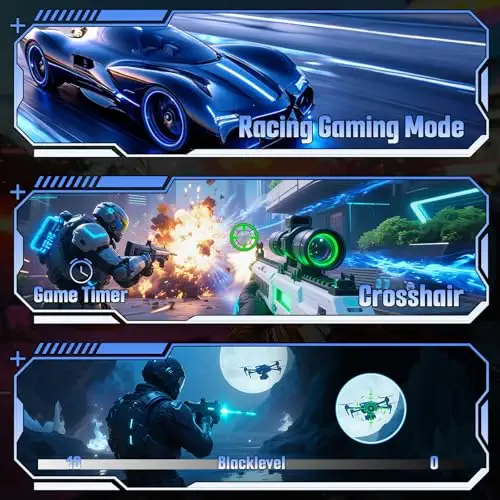
A low-cost curved 1080p monitor with a fast 160Hz refresh rate and HDMI 2.1 for PS5.
Most recommended by reviewers
Check price at AmazonPrices and availability on Amazon change often.
For a budget PS5 setup, the SANSUI 24-inch curved monitor is the one we'd pick, offering a 160Hz refresh rate and FreeSync at the lowest price on this shortlist.
The SANSUI pairs a 1500R curve and a fast VA panel with a 160Hz refresh rate and FreeSync compatibility, which is a lot of smooth motion for the money. It also carries a 110% sRGB color gamut, HDR support, and a 30-day money-back and free replacement warranty. Owner reports were not available for this pick, so these impressions come from its listed specs.
The only HDMI port is version 2.0, which limits the PS5 to 1080p at 120Hz, so you won't get the full 160Hz on console. Its 24-inch 1080p screen is also less sharp than the 27-inch 1440p Hikers option.
If it's not for you, the Dell 24-inch 240Hz suits players who want the smoothest motion with an IPS panel, while the Hikers 27-inch 1440p monitor suits those who value sharpness and can spend more.
It is a curved VA panel, so viewing angles are narrower than an IPS screen, but for a budget PS5 setup it covers the basics.
The HDMI port is version 2.0, so expect to run the PS5 at 1080p and up to 120Hz. If you want true 4K at 120Hz later, look at a higher-priced model.


A 1080p IPS monitor with a 240Hz refresh rate, FreeSync Premium and HDMI VRR for PS5.
Prices and availability on Amazon change often.
This is the choice for players who care most about motion. The 240Hz panel and fast IPS response keep fast-moving scenes clean, and the IPS panel holds colour from the side better than a VA monitor.
It is 1080p, so text and detail are less sharp than on a 1440p screen. If you play mostly action games on PS5, that trade-off is usually worth it.


A 27-inch 1440p monitor with 170Hz refresh and two HDMI 2.1 ports for PS5.
Prices and availability on Amazon change often.
If you have room and budget to spare, a 27-inch 1440p screen is noticeably sharper than the 1080p models above. Two HDMI 2.1 ports let you connect a PS5 and another console or PC without swapping cables.
It costs nearly twice as much as the Sansui, so it is a stretch for the cheapest build.
If you want 4K at 120Hz or HDR that looks bright, a budget monitor will fall short. Spend more on a model with a mini LED or OLED panel instead.
The Sansui 24-inch 160Hz curved monitor is our top pick. It is the lowest-priced option here and offers a fast refresh rate with FreeSync.
None of the budget picks here are 4K. For true 4K at 120Hz you will need to spend more, and the expert sources we checked point to premium panels.
The cable is not the limit. The monitor needs an HDMI 2.1 port to receive 120Hz from the PS5, so check the port version on the listing.
Connect the monitor to an HDMI 2.1 port, then enable 120Hz output in the PS5 display settings. The PS5 only offers 120Hz when the connected display reports support for it.
No. The PS5 does not support ultrawide signals, so a 16:9 27-inch or 32-inch monitor is the better choice.
Meet the reviewer
Fact checker and editor
An experienced e-commerce editor and fact-checker specialising in product information, pricing, specifications and online retail content. Focused on ensuring accuracy, credibility and consumer confidence through clear, reliable and informative content.
Why trust CheckedBest
We built this shortlist from three Amazon listings, checked for stock and PS5 compatibility. Picks are weighed on refresh rate, port support and price, using expert reviews and owner discussions.
Our expert team tests products when it is needed and researches online and in interviews. Every guide is fact-checked and edited by a real person.
The CheckedBest editorial team · Updated Nov 10, 2026
How we pickEditorial standardsAffiliate disclosureReport a mistake
We earn a commission when you buy through our links, at no extra cost to you. It never decides the winner.
