 ASUS ROG PG32UCDM 32-inch 4K 240Hz QD-OLEDBest overall
- Resolution
- 3840 x 2160 (4K)
- Refresh rate
- 240Hz
- Response time
- 0.03ms GtG
- Panel
- QD-OLED
Most recommended by reviewers
Check price at Amazon
 ASUS ROG PG32UCDM 32-inch 4K 240Hz QD-OLEDBest overallRunner-up2
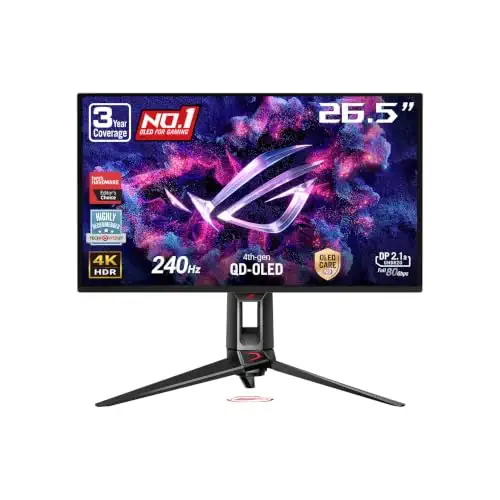 ASUS ROG PG27UCDM 27-inch 4K 240Hz QD-OLEDBest 27-inch

Reviewed by
Content Reviewer & Fact-Checker
I’m an e-commerce content reviewer and fact-checker with a background in copywriting and over six years of professional experience.
We earn a commission when you buy through our links, at no extra cost to you. How this works.
This guide is for buyers who want a 4K monitor with a 240Hz refresh rate and deep, clean blacks. OLED panels deliver fast, sharp, vivid images, but they cost more than LCD monitors and need some care to avoid burn-in.
The ASUS ROG PG32UCDM, a 32-inch 4K QD-OLED panel with a 240Hz refresh rate, full-bandwidth DisplayPort 2.1 and a three-year warranty that covers burn-in, is the best overall choice. If you need a lower price, the 27-inch model is a cheaper route. For those who play at 1080p, the dual-mode model that switches to 480Hz at that resolution is the one to consider. Buyers who want the brightest picture should look at the tandem OLED.
1 ASUS ROG PG32UCDM 32-inch 4K 240Hz QD-OLED | 2 ASUS ROG PG27UCDM 27-inch 4K 240Hz QD-OLED | 3 LG 32GX870A-B 32-inch 4K OLED Dual-Mode | 4 ASUS ROG PG32UCDM3 32-inch 4K 240Hz Tandem OLED | |
|---|---|---|---|---|
| Best for | Best overall | Best 27-inch | Dual-mode pick | Brightest pick |
| Resolution | 3840 x 2160 (4K) | 3840 x 2160 (4K) | 3840 x 2160 (4K) or 1920 x 1080 | 3840 x 2160 (4K) |
| Refresh rate | 240Hz | 240Hz | 240Hz at 4K, 480Hz at 1080p | 240Hz |
| Response time | 0.03ms GtG | 0.03ms | 0.03ms GtG | 0.03ms |
| Panel | QD-OLED | QD-OLED | OLED | Tandem QD-OLED |
| Warranty | 3 years with burn-in coverage | 3 years with ARR and burn-in coverage | Not listed | Not listed |
| Check price at Amazon | Check price at Amazon | Check price at Amazon | Check price at Amazon |
ASUS ROG PG32UCDM 32-inch 4K 240Hz QD-OLEDBest overallMost recommended by reviewers
Check price at Amazon ASUS ROG PG27UCDM 27-inch 4K 240Hz QD-OLEDBest 27-inch
 LG 32GX870A-B 32-inch 4K OLED Dual-ModeDual-mode pick
 ASUS ROG PG32UCDM3 32-inch 4K 240Hz Tandem OLEDBrightest pick


A large 32-inch 4K OLED at 240Hz with full-bandwidth DisplayPort 2.1 and a three-year warranty that covers burn-in.
Most recommended by reviewers
Check price at AmazonPrices and availability on Amazon change often.
One catchIt is expensive for a 240Hz monitor, so it suits buyers who will use the full 4K resolution.
The ASUS ROG PG32UCDM is the monitor most of the expert reviews point to when a reader wants a large 4K OLED at 240Hz. It delivers a sharp 4K image on a 32-inch panel and a 0.03ms response that keeps fast motion clean.
Its three-year warranty explicitly covers burn-in, which matters because OLED screens need some care over time. The full-bandwidth DisplayPort 2.1 connection also means it can make full use of a high-end PC.


A smaller 27-inch 4K OLED at 240Hz with the same modern connectivity and a three-year warranty.
Prices and availability on Amazon change often.
If a 32-inch screen is too big for your desk, the 27-inch PG27UCDM keeps the 4K resolution and 240Hz refresh rate in a smaller package. That gives you the same sharp image on a tighter footprint.
The Neo Proximity Sensor turns the screen black when you walk away, which lowers the risk of burn-in over time. The warranty also covers burn-in, which is a useful safety net for an OLED.


A 32-inch 4K OLED that switches to 1080p at 480Hz for fast competitive games.
Prices and availability on Amazon change often.
Tom's Guide named the LG UltraGear 32GS95UE its favourite gaming monitor of 2024, and the same dual-mode design is the reason. You get 4K at 240Hz for story-driven games and can switch to 1080p at 480Hz for fast shooters.
Reviewers say it is worth the price for what it offers, though the 480Hz mode is only useful if you play competitively, and a strong gaming PC is needed to use both modes fully.


A tandem OLED with extra brightness and scratch resistance for a 32-inch 4K panel at 240Hz.
Prices and availability on Amazon change often.
If brightness is what you want most, the tandem design in the PG32UCDM3 adds a layer that boosts how bright the panel can get, while keeping the 4K detail and 240Hz refresh rate. The BlackShield film also adds scratch resistance.
The trade-off is that some owners report grey banding in tandem panels, which can be noticeable in dark-mode work. It is a better pick for gaming and video than for text-heavy desk work.
Pick the 32-inch ASUS PG32UCDM if you want a large 4K screen and reliable burn-in cover. Choose the 27-inch PG27UCDM if your desk is smaller, and the LG dual-mode model if you play competitive shooters and want 480Hz at 1080p.
Skip these monitors if you mainly do text-heavy desk work, since colour fringing on some subpixel layouts can make text look soft. Also skip them if your PC cannot run 4K at high frame rates, because a 1440p OLED may suit you better.
The LG 32GX870A-B is the LG pick here. It is a 32-inch 4K OLED that switches to 1080p at 480Hz, with up to 1300 nits peak brightness.
For most gamers, yes. 240Hz gives smooth motion, and the 0.03ms response keeps it clean. Only competitive players chasing the highest frame rates need more.
300Hz is a small step up in smoothness. Most players will not notice much difference, so 240Hz is usually the better value unless you play at very high frame rates.
The ASUS ROG PG32UCDM is the best all-round choice, with 4K detail, a 0.03ms response and a three-year warranty that covers burn-in.
1440p 240Hz suits fast competitive games, while 4K 144Hz gives sharper detail for story-driven games. Choose based on whether smoothness or detail matters more to you.
Meet the reviewer
Content Reviewer & Fact-Checker
I’m an e-commerce content reviewer and fact-checker with a background in copywriting and over six years of professional experience. My experience in creating and refining digital content allows me to assess product information, review written content for accuracy and clarity, and help ensure shoppers have access to reliable, informative and engaging content.
Why trust CheckedBest
Each pick is a 4K OLED monitor with a 240Hz refresh rate that is in stock on Amazon right now. We weighed how often reviewers and owners recommend each model, along with its panel type, warranty and burn-in protection.
Our expert team tests products when it is needed and researches online and in interviews. Every guide is fact-checked and edited by a real person.
The CheckedBest editorial team · Updated Nov 8, 2026
How we pickEditorial standardsAffiliate disclosureReport a mistake
We earn a commission when you buy through our links, at no extra cost to you. It never decides the winner.
