 Bambu Lab P1SBest overall
- Max speed
- 500 mm/s
- Acceleration
- 20,000 mm/s²
- Enclosure
- Fully enclosed
- Bed leveling
- Automatic
Most recommended by reviewers
Check price at Amazon

Reviewed by
Contributing Reviewer
I'm a writer, horror junkie, and home baker who believes life is better with a good book in one hand and a freshly baked treat in the other.
We earn a commission when you buy through our links, at no extra cost to you. How this works.
A 3D printer turns a digital design into a real object, one thin layer at a time. Whether you want to make toys, household fixes, or prototypes, the right machine depends on your skill level, budget, and how much setup you're willing to do.
Our top pick is the Bambu Lab P1P, which one reviewer ranked near the top on every metric they test for. The rest of the list covers budget options, multi-colour printing, and enclosed machines for people who want something that runs quietly and safely at home.
1 Bambu Lab P1S | 2 Creality Ender 3 V3 SE | 3 Bambu Lab A1 mini | 4 FLASHFORGE Adventurer 5M | 5 Snapmaker U1 | |
|---|---|---|---|---|---|
| Best for | Best overall | Best budget | Best for multi-colour | Best enclosed value | Best for multi-material |
| Max speed | 500 mm/s | 250 mm/s | Not listed | 600 mm/s | 500 mm/s |
| Acceleration | 20,000 mm/s² | 2,500 mm/s² | Not listed | 20,000 mm/s² | Not listed |
| Bed leveling | Automatic | Automatic (CR Touch) | Full-auto calibration | Fully automatic | Not listed |
| Check price at Amazon | Check price at Amazon | Check price at Amazon | Check price at Amazon | Check price at Amazon |
Bambu Lab P1SBest overallMost recommended by reviewers
Check price at Amazon Creality Ender 3 V3 SEBest budget
 Bambu Lab A1 miniBest for multi-colour
 FLASHFORGE Adventurer 5MBest enclosed value
 Snapmaker U1Best for multi-material


An enclosed, fast CoreXY printer that is simple enough for beginners and capable enough for serious hobbyists.
Most recommended by reviewers
Check price at AmazonPrices and availability on Amazon change often.
The Bambu Lab P1S is our top pick for most people who want a reliable, fast printer that handles a wide range of materials without fuss.
The P1S is fully enclosed, which reviewers note suits advanced filaments better than open designs. It reaches 500 mm/s with 20,000 mm/s² acceleration, and automatic bed leveling plus a setup time of about 15 minutes mean you can start printing quickly. Owners we looked at praise its ecosystem, with a large library of ready-made models to print.
Multi-colour printing requires the separate AMS unit, so colour work adds to the total cost. If you only need single-colour prints on a tighter budget, the Creality Ender 3 V3 SE is a good choice for the price, though its open frame suits fume-sensitive filaments less well.
If it's not for you, the Bambu Lab A1 mini suits beginners who want quiet, compact multi-colour printing, and the FLASHFORGE Adventurer 5M suits buyers who want a fast enclosed machine at a lower price.
The P1S is the printer most often recommended in the community threads we reviewed, and it lands as the premium upgrade pick. The enclosed design keeps temperature stable for engineering filaments, and the 500 mm/s speed means finished prints arrive quickly.
Setup is straightforward, which matters most for first-time buyers. The main trade-off is price and the need for an add-on unit for colour.


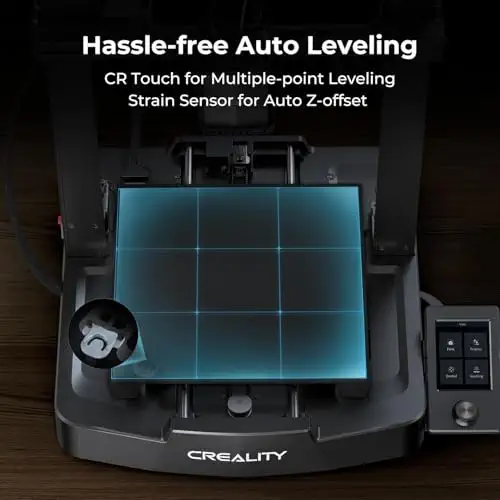


A low-cost, beginner-friendly printer that handles everyday projects well.
Prices and availability on Amazon change often.
The Ender 3 V3 SE is the budget pick in the community cheat sheet and the one commenters call a good choice for the price. Automatic bed leveling and a flexible build plate make it approachable for people who are new to printing.
It is not enclosed, so it suits everyday PLA and PETG rather than demanding materials.


A compact entry point to multi-colour printing that many owners say works out of the box.
Prices and availability on Amazon change often.
Community members single out the A1 mini as the best budget multi-colour pick and say the automatic flow calibration is worth the smaller build volume. For a desk printer that handles small toys and home items, it is a sensible way into colour printing.
The trade-off is size: larger parts will not fit.


A fast, enclosed-style machine with automatic leveling at a mid-range price.
Prices and availability on Amazon change often.
The Adventurer 5M is named the best enclosed value pick in the community guide. Its CoreXY frame and 600 mm/s travel speed make it one of the quicker printers on the list, and the app lets you watch prints from anywhere.
Owners have less history to draw on than with older models, so it is worth checking recent reviews before you buy.


A four-toolhead printer that switches materials quickly and wastes far less filament.
Prices and availability on Amazon change often.
The U1 is the most ambitious printer on the list. Its toolhead system lets you mix rigid and flexible materials, and it is a good fit for people who print multi-colour or multi-material parts often.
It costs more and has less track record than the Bambu models, so it suits experienced buyers more than beginners.
If you are new to printing, start with the Ender 3 V3 SE or the A1 mini. If you want colour, the A1 mini or the P1S with AMS suits most people. If you print engineering materials or want a safer enclosed machine, look at the P1S or the Adventurer 5M.
If you only need occasional prints, a model-printing service may cost less than buying a machine and filament. Very cheap printers can cost more over time once you deal with setup issues, so check the total cost before you buy.
The Creality Ender 3 V3 SE and the Bambu Lab A1 mini are the easiest starting points. Both offer automatic bed leveling and a quick setup.
The Bambu Lab P1S is the best all-round home printer in this list. Its enclosed frame and fast speed suit most household projects.
The Bambu Lab A1 mini 3D Printer is a good fit for kids and beginners. Its compact size makes it easy to set up and keep in view while supervising use.
Bambu Lab printers are the most recommended in the community threads we reviewed for speed and ease of use. Prusa machines have a long track record but are not included in this in-stock shortlist.
Meet the reviewer
Contributing Reviewer
I'm a writer, horror junkie, and home baker who believes life is better with a good book in one hand and a freshly baked treat in the other. When I'm not researching products, you'll find me chasing after my preschooler, getting lost in a creepy novel, or putting my mixer to good use in the kitchen. I love finding products that are genuinely worth the money and sharing my useful finds with readers. After all, nothing's scarier than spending money on something that doesn't live up to the hype!
Why trust CheckedBest
We built this list from five printers that are in stock on Amazon right now, weighing the same expert reviews and community recommendations we found. Each pick is chosen for a different kind of buyer.
Our expert team tests products when it is needed and researches online and in interviews. Every guide is fact-checked and edited by a real person.
The CheckedBest editorial team · Updated Nov 7, 2026
How we pickEditorial standardsAffiliate disclosureReport a mistake
We earn a commission when you buy through our links, at no extra cost to you. It never decides the winner.
