 MSI MAG 271QPX 27-inch QD-OLEDBest overall
- Panel
- QD-OLED
- Resolution
- 2560 x 1440
- Refresh rate
- 360Hz
- Response time
- 0.03ms GtG
Most recommended by reviewers
Check price at Amazon
 MSI MAG 271QPX 27-inch QD-OLEDBest overallRunner-up2
 ASUS ROG Strix XG27ACDNG 26.5-inch QD-OLEDBest premium pick

Reviewed by
Fact checker and editor
An experienced e-commerce editor and fact-checker specialising in product information, pricing, specifications and online retail content.
We earn a commission when you buy through our links, at no extra cost to you. How this works.
A 360Hz OLED monitor is built for competitive gamers who want the smoothest motion and near-instant pixel response, and who can keep their frame rate high enough to use it. The main trade-off is that OLED panels give up a little peak brightness in exchange for true black and no ghosting, which suits dark, fast-moving games. The MSI MAG 271QPX 27-inch QD-OLED gets that balance right, pairing strong color coverage with a 3-year warranty that covers burn-in.
The ASUS ROG Strix XG27ACDNG and Samsung Odyssey OLED G6 sit at the premium and value ends of the range, with the remaining models falling between them.
1 MSI MAG 271QPX 27-inch QD-OLED | 2 ASUS ROG Strix XG27ACDNG 26.5-inch QD-OLED | 3 Samsung Odyssey OLED G6 (G60SD) 27-inch | |
|---|---|---|---|
| Best for | Best overall | Best premium pick | Best value |
| Panel | QD-OLED | QD-OLED | QD-OLED |
| Resolution | 2560 x 1440 | 2560 x 1440 | QHD 2560 x 1440 |
| Refresh rate | 360Hz | 360Hz | 360Hz |
| Response time | 0.03ms GtG | 0.03ms | 0.03ms GtG |
| HDR | DisplayHDR True Black 400 | DisplayHDR 400 True Black | Not listed |
| Warranty | 3 years, covers burn-in | 3 years, covers burn-in | 3 years |
| Check price at Amazon | Check price at Amazon | Check price at Amazon |
MSI MAG 271QPX 27-inch QD-OLEDBest overallMost recommended by reviewers
Check price at Amazon ASUS ROG Strix XG27ACDNG 26.5-inch QD-OLEDBest premium pick
 Samsung Odyssey OLED G6 (G60SD) 27-inchBest value


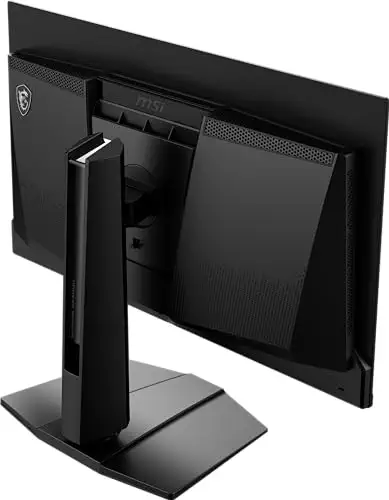

A 27-inch 1440p QD-OLED monitor at 360Hz, best if you want strong color and a burn-in warranty.
Most recommended by reviewers
Check price at AmazonPrices and availability on Amazon change often.
One catchOLED peak brightness is lower than mini-LED screens, so HDR highlights are less punchy.
One editorial review named this monitor its top pick, citing its QD-OLED panel and 99.3% DCI-P3 color coverage. OLED pixels switch almost instantly, so fast-moving objects show no ghosting at this refresh rate.
The 3-year warranty covers burn-in, which matters because OLED can retain static on-screen elements over time.


A premium 1440p QD-OLED with burn-in protection tools and a 3-year warranty.
Prices and availability on Amazon change often.
ASUS's own guide describes its OLED line as offering both QD-OLED and WOLED options, and this model sits in the QD-OLED group. It includes a custom heatsink and OLED Care+ features aimed at reducing burn-in.
The manufacturer notes a fanless design, which avoids the noise of fan-cooled rivals, and a 3-year warranty that covers burn-in.


A 27-inch QD-OLED at 360Hz with a cooling system designed to limit burn-in.
Prices and availability on Amazon change often.
Samsung says this is the first monitor to use a pulsating heat pipe for cooling, which it credits with reducing burn-in risk. Logo and taskbar detection automatically dim static interface elements.
It pairs a 0.03ms response time with 360Hz, and supports AMD FreeSync Premium Pro for tear-free play.
Choose a 360Hz OLED if you play fast competitive titles and can reach high frame rates. If you mostly play slower games or want HDR punch, a mini-LED or a lower refresh rate may suit you better.
The MSI MAG 271QPX is the monitor to choose for a 360Hz OLED, according to one editorial review. ASUS and Samsung also make strong QD-OLED options with burn-in protection tools.
Burn-in is still possible with static on-screen elements, but modern OLEDs add pixel shifting and static image dimming. The ASUS and MSI models on this list include warranties that cover burn-in.
For casual play it is more than most people need, but competitive players who can hold high frame rates benefit from the smoother motion.
Start with your budget and graphics card, then decide between OLED and other panels. Competitive players should also weigh response time, VRR and backlight strobing, not just refresh rate.
Most competitive players prefer around 24 inches, since more of the screen sits in view without moving the eyes. The 27-inch picks here are a common middle ground for OLED gaming.
240Hz is smooth for most players. Move to 360Hz only if you can sustain high frame rates and want the extra motion clarity.
Meet the reviewer
Fact checker and editor
An experienced e-commerce editor and fact-checker specialising in product information, pricing, specifications and online retail content. Focused on ensuring accuracy, credibility and consumer confidence through clear, reliable and informative content.
Why trust CheckedBest
We built this shortlist from three Amazon listings that are in stock right now, weighed against the reviews and manufacturer notes we could find. Each pick is one we could support with specific claims from those sources.
Our expert team tests products when it is needed and researches online and in interviews. Every guide is fact-checked and edited by a real person.
The CheckedBest editorial team · Updated Nov 8, 2026
How we pickEditorial standardsAffiliate disclosureReport a mistake
We earn a commission when you buy through our links, at no extra cost to you. It never decides the winner.
